STEP 2: Attach Monitor
B
B
M-A
M-B
M-C
M
04
M-A
M-B
M-C
M-D
M
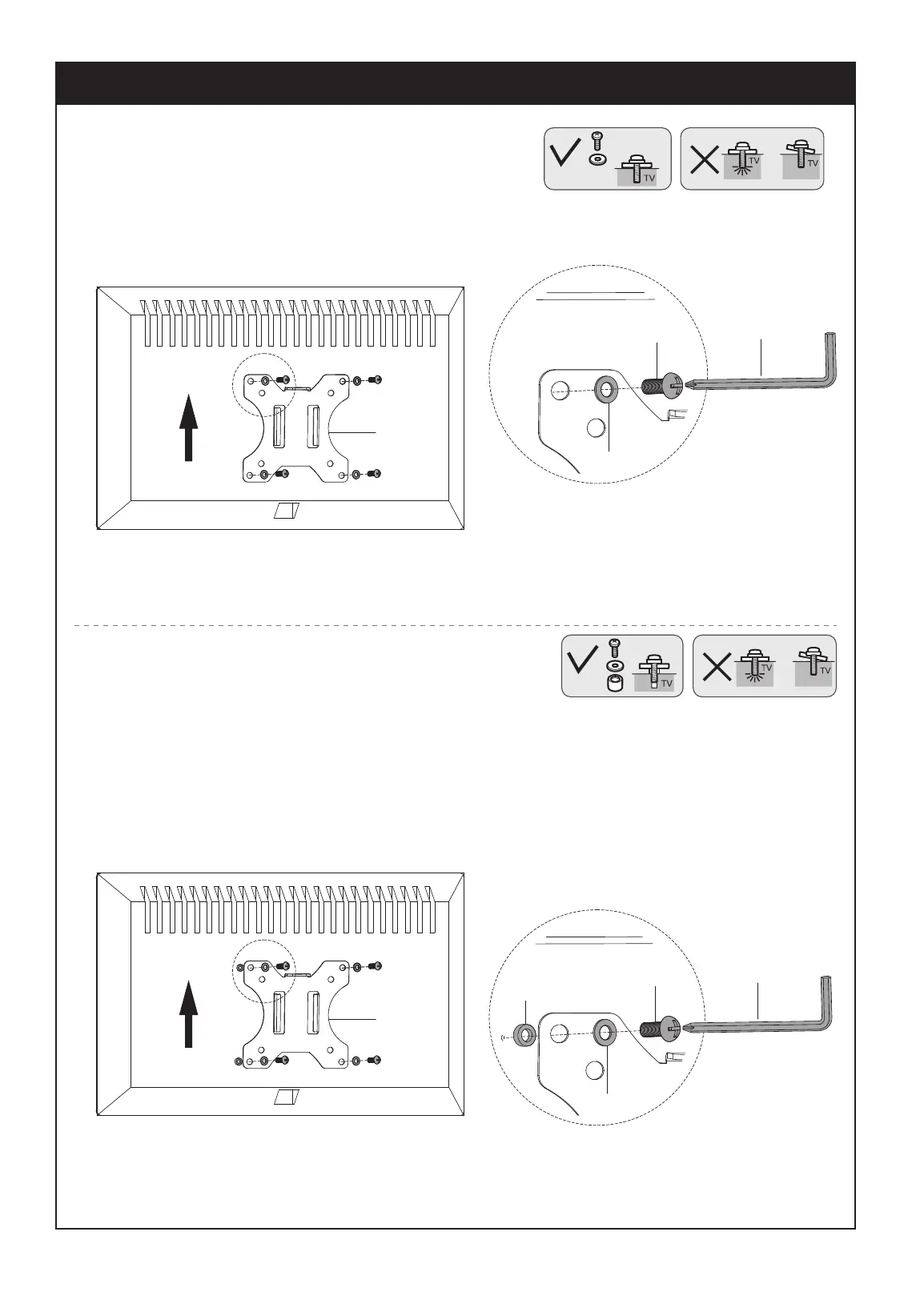
OPTION A: Flat Back Monitor
Attach the VESA plate (B) to back of monitor and
secure with screws(M-A)or(M-B) with washers(M-C)
using 6 mm Allen Key (M). Avoid excessive
tightening screws damage the monitor.
CAUTION:To select the correct screws(M-A or M-B)
for your monitor, you can try to screw it on your
monitor by hand. The one can screw inside is the
correct screw for your monitor.
OPTION B: Curved Back Monitor
Attach the VESA plate (B) to back of monitor and secure
with screws (M-A) or (M-B) with washers (M-C)and
spacers(M-D)using 6 mm Allen Key (M). Avoid excessive
tightening screws damage the monitor.


 To Next Page