EasyManua.ls Logo

Elmo k-100sm - VARIETY OF PROJECTION FEATURES; Reverse Projection; Still Projection; Slow Motion Projection

Elmo k-100sm
36 pages
Print Icon
To Next Page IconTo Next Page
To Previous Page IconTo Previous Page
Loading...
19
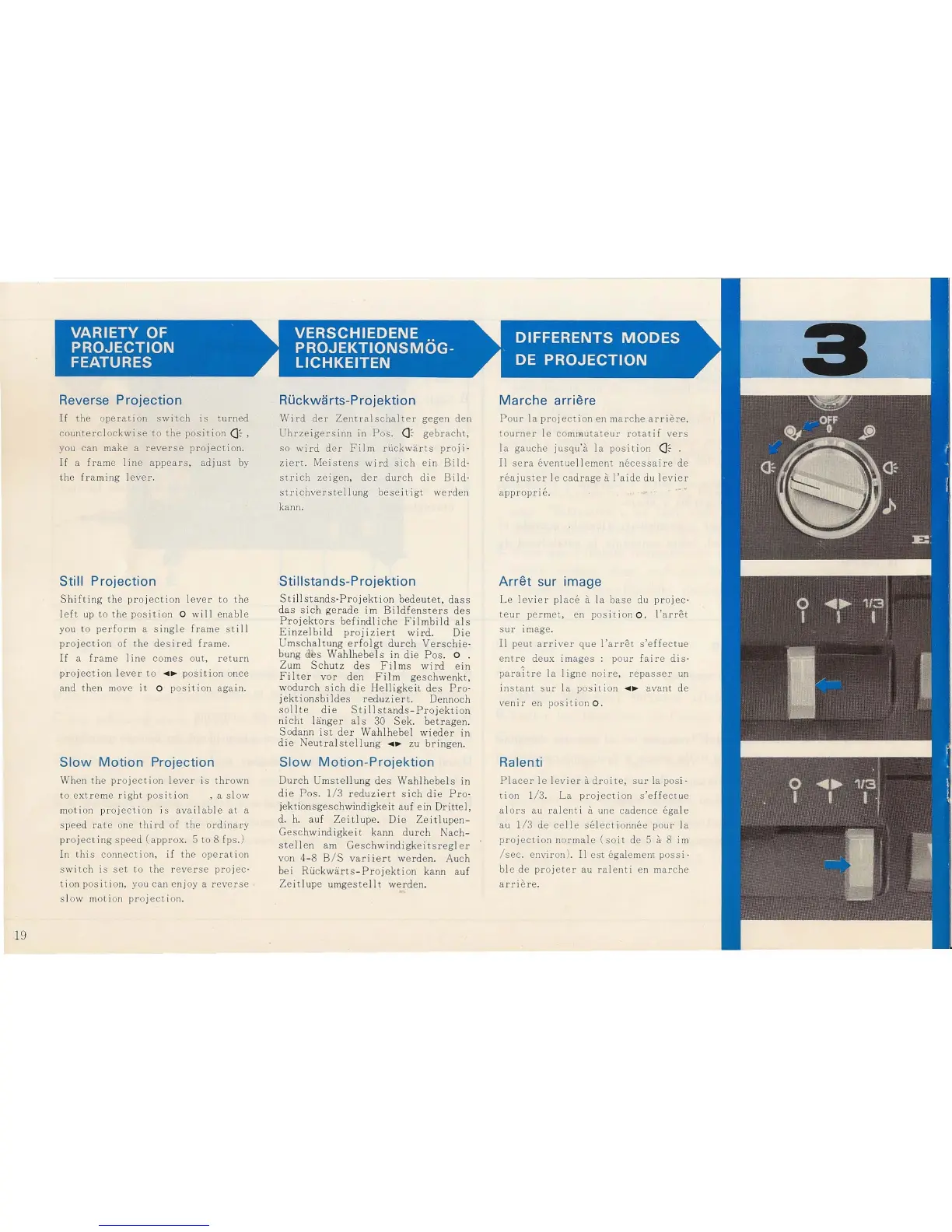
Reverse Projection
If
the
operat
i on
sw
i
tc
h
is
turn
ed
countercl
oc
kwise
to
the
position
(]
::-,
you
can
make a
reverse
pro
j
ecti
o
n.
If
a
fram
e
lin
e
ap
pear
s, adj u
st
by
the
f
ram
ing
l
ever.
Still Projection
Shift
ing
the
projection
lever
to
the
lef
t up
to
the
posit
ion 0
will
enab
le
you to
perf
o
rm
a
single
frame
st
ill
pr
oj
ec
ti
on of t he
desired
fram
e.
If
a
fr
ame I
in
e
comes
out,
return
pr
oj
ect
ion lever
to
....
~
posi
tion
once
and then move
it
0 p
osi
ti
on
aga
in.
Slow
Motion
Projection
When
the
pro
j
ect
i
on
l
ever
is
thrown
to
ext
r
eme
right
posit
ion , a slow
moti
on
projecti
on i s
available
at
a
s peed
rat
e one
th
ird
of the
ord
in
ary
pr
oj
ec
ting
speed
(a
pp
rox
. 5
to
8 fps.)
In
this
connect
io
n,
if
the ope
rati
on
s wi
tc
h i s
set
to
the
r
everse
projec
'
t ion
posi
t ion, you
can
en j
oy
a
reverse
sl ow mo
ti
on
pr
oj
ect
io
n.
RUckwarts-Projektion
Wird
der
Zentralschalter
gegen
den
Uhrze
ig
ersinn
in
P
os
.
(]
::-
gebra
c
ht,
so
wird
der
F
ilm
ruckwarts
proji
·
ziert.
Meistens
wi
rd
sich
ein
Bild
·
s
tri
ch
zeigen,
der
d
ur
ch
die
Bild
·
strichverstel
lung
bese
i
tigt
werden
kann.
Sti Iistands-P rojektion
Stillstands
·
Projekt
ion
bedeutet
,
dass
das
sic
h
gerade
im
Bi
I
dfensters
des
Projektors
befindliche
Filmbild
als
Einzelb
i
ld
proj
izier
t
wird
. Die
Umscha
ltung
erfolgt
durch
Verschie
·
bung
des
Wahlh
ebe
l s
in
die
P
os
. 0 .
Zum
Schutz
des
Fil
ms
wi
rd
e
in
Fi
Iter
vor
den
Film
geschwenkt,
wodurch
sich
die
Helligk
eit
des
Pro-
j
ekt
i
onsbi
Id
es
reduziert.
Dennoch
sollte
die
Stillstands-Pro
j
ekti
on
nicht
liinger
als
30
Se
k.
betragen
.
Sod
ann
is
t
der
Wahlhebel
wieder
in
di
e
Neut
ral
ste
llung
....
~
zu
bring
e
n.
Slow
Motion-Projektion
Dur
ch U
mst
e
llung
des
Wahlhebels
in
die
Po
s.
1/ 3
reduziert
sich
die
Pro-
j
ekt
i
onsgeschw
indigkei
t
auf
ein
Dritt
e
l,
d. h.
auf
Zeitlupe.
Die
Zeitlup
e
n-
Geschwindigkeit
kann
durch
Nach
-
stellen
am
Gesc
hwindigkeit
sreg
l
er
vo
n 4-8 B
/S
va
ri
ier
t
werden.
Auch
bei
Riickwarts
-
Projekti
on kann auf
Zeit
lupe
umgestellt
werden
.
Marche
arriere
Pour
la
projection
en
marche
arr
ier-e,
tourne
r Ie commu
tateur
rotatif
vers
la
gauche
jusq
u'a
la
position
(]
O'
.
II
se
ra
eventuell
ement
necessai
re
de
r
ea
ju
ster
Ie
cad
rage
a
I'a
id
e du l
ev
ie r
appropri
e.
Arret
sur image
Le
lev
i
er
place
it
la
base
du
pro
jec-
te
ur
perme
t, en pos
iti
on
0 ,
l'
arre
t
sur
image
.
II
peUl
arriver
que
I'arret
s'
effectue
entre
de
ux
images
:
pour
faire
dis-
parai
re
la
ligne
noire,
repasser
un
in
sta
nt
sur
la
posi
tion
....
~
avant
de
venir
en pos it i
on
o.
Ralenti
Placer
Ie
levier
it
droite
,
sur
la posi-
tion
1
/3
.
La
projecti
on
s'effectue
al
ors
au
ral
ent i a une
cadence
ega
le
au
1/3
de ce
ll
e
se
l
ec
ti
on
nee
po
ur
la
pro
j
ect
ion
normale
(so
it
de 5 a 8
im
/sec
.
environ
). II
est
ega
lement
possi
-
b
e
de
projeter
au r
ale
nti
en m
arche
arrier-e
.