45
B7 Darning
z
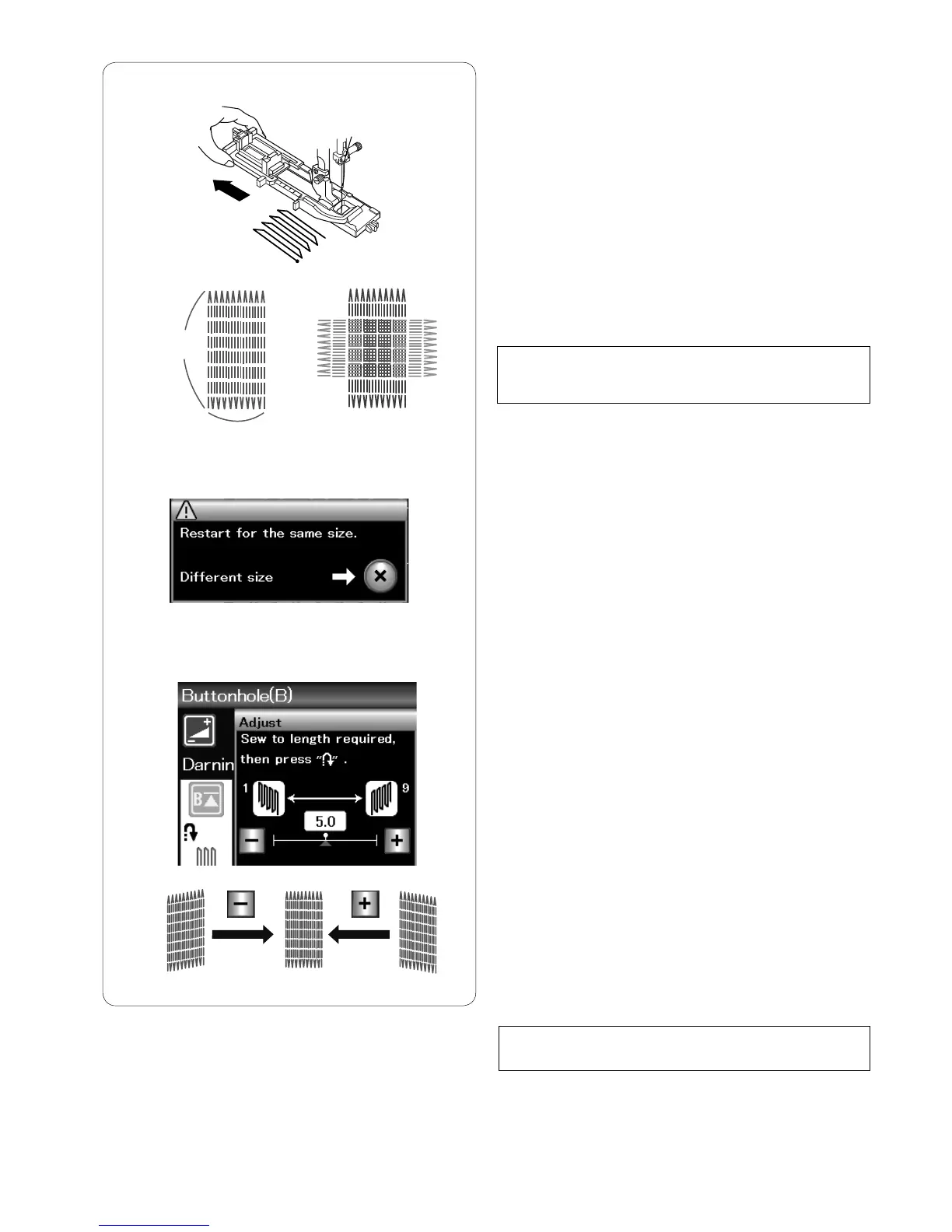
Attach the automatic buttonhole foot R and pull the
button holder all the way out.
x
Start the machine and sew to the required length, then
press the reverse button. This sets the darning length.
Continue sewing until the machine stops automatically.
q
Required length
c
Sew another layer of darning over the first layer, at a
right angle to it.
NOTE:
The maximum darning length is 2 cm (3/4˝) and the
maximum width is 0.9 cm (3/8˝).
To sew the same size darning
When sewing is finished, a confirmation message will
appear.
Simply start the machine to sew another layer of darning
in the same size.
To sew the next layer of darning in a different size, press
the X key.
z
x
c
q
0.9 cm
To adjust the evenness of darning stitches:
You can correct unevenness of darning stitches by
pressing the “–” or “+” key in the adjusting window.
If the left corner is lower than the right side, press the “–”
key to correct it, and vice versa.
NOTE:
See page 70 for sewing instructions of B8 Tacking.



 To Next Page