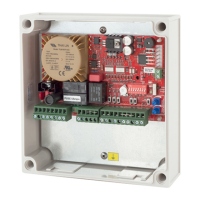
10 Controller Card for 240VAC Motors
3. Setdipswitch1,2,3and4asshowninthetablebelow
Dip switch 1 Dip switch 2 Dip switch 3 Dip switch 4
OpenButton
On=PressandHold
Off=Latching
CloseButton
On=PressandHold
Off=Latching
RemoteButton1
On=PressandHold
(Button1OpenOnly)
Off=Latching
RemoteButton2
On=PressandHold
(Button2CloseOnly)
Off=Latching
4. PresstheEnterbutton.
5. Buzzerwillbeeptoconrmthechangewassuccessful
6. SetalldipswitchesoffandthemodeswitchtoRun.
IftheremotecontrolistobeusedforOpenOnlyandCloseOnlyfunctionthenthedipswitch2should
besetoninnormalrunmode.
Orangetextindicatesfactorydefaultsetting
Stop and Reverse feature for Push Button
and Remote Control on Close Cycle
Thisfeatureisusedtodisableorenablethe
stopandreversefeatureforthepushbuttonand
remotecontrolontheclosingcycle.Factory
defaultisenabled,thereforeonclosingapush
buttonactivationwillstopthegate/doorand
automaticallyopenit.Followthestepsbelowto
disableorenablethisfeature.
1. Setdipswitch5and8to“ON”
2. Setdipswitch1to4and6,7to“OFF”
3. Setthemodeswitchtoprogrammode1.Run
LEDwillturnred
4. Pressbutton“A”todisableStopandReverse
featureorpressbutton“C”toenableStop
andReversefeature.
5. Buzzerwillbeeptoconrmthechangewas
successful
6. Setalldipswitchesto“OFF”andmode
switchtorun
Push Button Open Only
Thisfeaturechangesthefunctionofthepush
buttonto“OpenOnly”.Thepushbuttoninput
willopengate/door,pushbuttoncannotclose
gate/door.Pushbuttoninputwillbethesame
functionasopenonlyinput.Followthesteps
belowtoenableordisablethisfeature.
1. Setdipswitch5and6to“ON”
2. Setdipswitch1to4and7,8“OFF”
3. Setthemodeswitchtoprogrammode1.Run
LEDwillturnred
4. Pressbutton“A”toenablePBopenonlyor
pressbutton“C”todisablePBopenonly.
5. Buzzerwillbeeptoconrmthechangewas
successful
6. Setalldipswitchesto“OFF”andmode
switchtorun


 To Next Page
 Loading...