11www.elsema.com
Relay
1
2
3
4 5
6
Open Limit
Close Limit
Normally Closed
User can change to
Normally Open
Limit switch
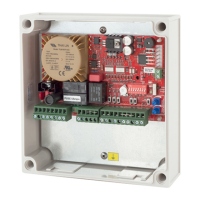
status LED's
Photoelectric Beam Polarity
Tochangethephotoelectricbeampolarityfollowthesesteps:
1. Setdipswitch6and8“ON”
2. Setdipswitch1to5and7“OFF”
3. Setmodeswitchtoprogrammode1,therunLEDwillturnred
4. Pressbutton“A”fornormallyopenorbutton“C”fornormallyclosed
5. Buzzerwillbeeptoconrmthechangewassuccessful
6. SetmodeswitchtoRun
Limit Switch
– Internal Limit Switches
Internalmotorlimitswitchesareusually
connectedinserieswiththemotorwiresandthey
donotrequireanyconnectiontothecontrolcard.
Usetraveltimertosetupmotortraveldistances.
– External Limit Switches Connected to
the Control Card
Ifyouareusingexternallimitswitchesmakesure
theyareconnectedtothecontrolcardasshown
inthediagrambelow.Checkthelimitswitch
statusLED’sareindicatingthecorrectstatusof
thelimitswitches.LED“ON”meanslimitswitch
isactivated.
Tochangethelimitswitchpolarityfromnormally
closedtonormallyopen,followthesesteps:
1. Setdipswitch8“ON”
2. Setdipswitch1to7“OFF”
3. Setmodeswitchtoprogrammode1,therun
LEDwillturnred
4. Pressbutton“A”fornormallyopenlimitsor
button“C”fornormallyclosedlimits
5. Buzzerwillbeeptoconrmthechangewas
successful
6. SetmodeswitchtoRun


 To Next Page
 Loading...