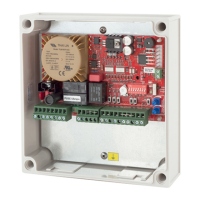
14 Controller Card for 240VAC Motors
Slow Speed
Inordertouseslowspeed,traveltimehastobesetup.Theslowspeedcanbeadjustedanytimeduring
setuporinnormalrunmode.Slowspeedcanbeadjustedindependentlyforopenandclose.Ifslow
speedisnotrequired,turnthebluepotsfullyclockwise.
Setup Pedestrian Access Travel Timer
Pedestrianaccessopensthegate/doorforashorttimetoallowsomeonetowalkthroughthegate/door
butdoesnotallowavehicleaccess.Thefactorydefaultpedestrianaccesstraveltimeris3seconds.To
changethedefaulttime,followthestepsbelow.
1. Closethedoor/gatefullyandpowerupthecontrolboard
2. Setdipswitch6“ON”
3. Setdipswitch1to5and7,8“OFF”
4. Setmodeswitchtoprogrammode1,therunLEDwillturnred
5. PresstheEnterbutton,theopenLEDwillstartashing
6. Pressandholdthepushbuttoninputortheremotecontrol,door/gatewillstartopening
7. Releasethepushbuttonorremotewhenthedoor/gatereachesthepedestrianaccessopenposition
8. PresstheEnterbutton,thecloseLEDwillstartashing
9. Pressandholdthepushbuttonortheremotecontrol,door/gatewillstartclosing
10.Releasethepushbuttonorremotewhenthedoor/gatereachesthefullycloseposition
11.PresstheEnterbutton,thebuzzerwillbeepfor2secondstoindicatelearningissuccessful
12.SetmodeswitchtoRunModeorchangedipswitchtoexitPedestrianAccessLearnmode
Courtesy Light and Lock Time
Dipswitch6allowsyoutosetuptheAUXrelayoutputtoeitheralightorlockoutput.
Dipswitch6“OFF”inRunmode=>AUXRelayoutputiscourtesylight
Dipswitch6“ON”inRunmode=>AUXRelayoutputislock
Courtesy Light
Courtesylighttimeisasfollows:
• Onpoweruplightisonfor60seconds
• Lightstaysonfor60secondsaftertheendofeachruncycle.
Controlling the Courtesy Light with a Remote Control
Button2oftheremotecanbesettooperatethecourtesylightbyselectingdipswitch7on.Thiswill
overridetheclosefunctionofbutton2oftheremoteifselected.


 To Next Page
 Loading...