Setting up the Embertec Emberstrip® 8AV+
1. Connect the supplied Classic Sensor cable to the side of the
Embertec Emberstrip® 8AV+. Ensure the cable clicks into place.
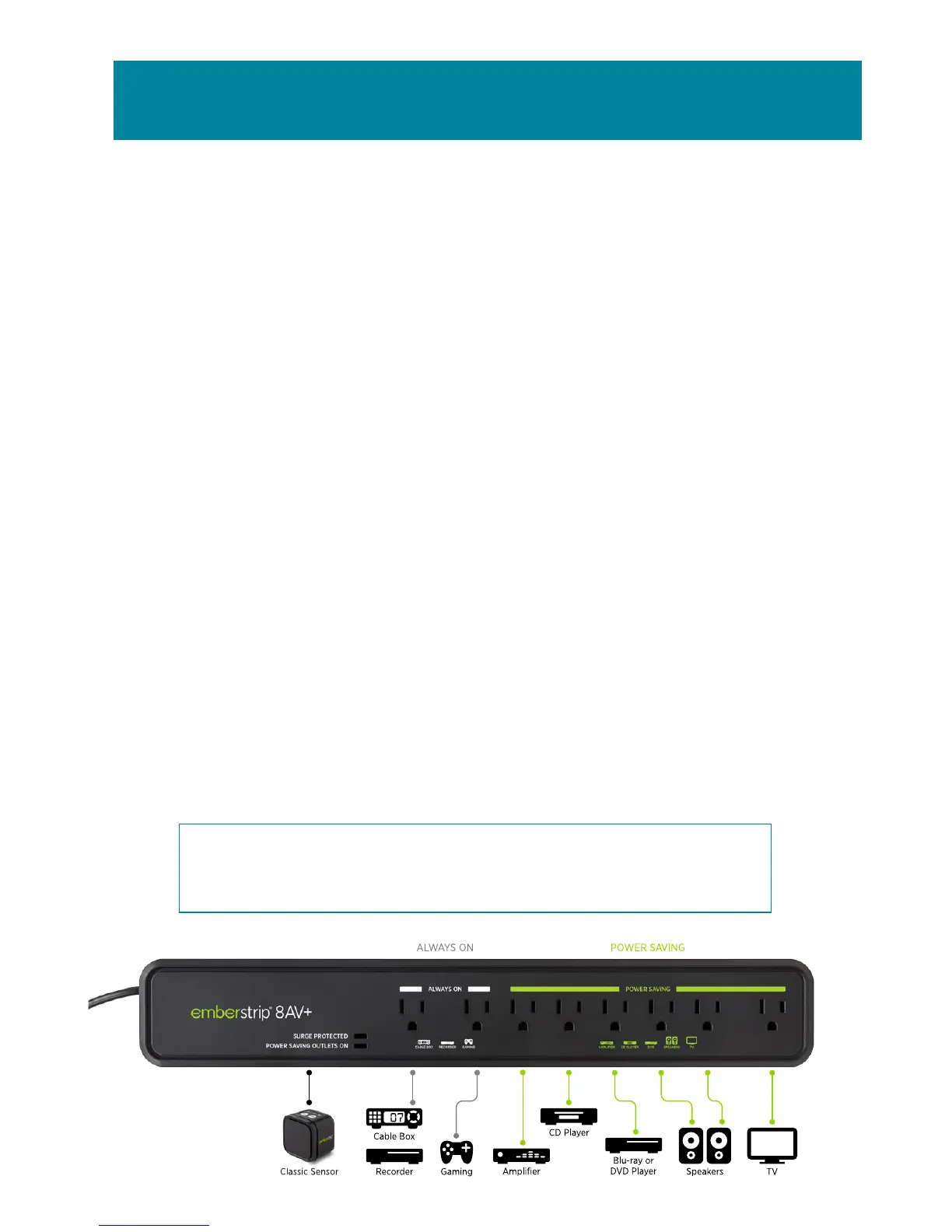
2. Plug AV equipment that can automatically be switched off into
the Power Saving outlets on the strip (TV, Blu-ray, DVD, speakers,
amplifier/stereo receiver).
3. Identify equipment that requires constant power for cool down
period, timers, program guides and recording features and plug
into the outlets marked Always On, or into another wall outlet
(e.g. DVR, cable/hard drives/gaming etc.).
4. Place the Classic Sensor in a convenient location that is in line of
sight. Close to your television is the best position and within normal
operation of your existing remote control(s). The Classic Sensor
detects use of any of your remote controls to know when you are
using your AV equipment.
5. Plug the Embertec Emberstrip® 8AV+ into the wall outlet.
6. Power is now applied to the Power Saving outlets. The LED
monitoring light on the Embertec Emberstrip® 8AV+ will light up for
3 seconds. This also indicates that the Embertec Emberstrip® 8AV+
has performed its initialization process.
NOTE: Other appliances such as lamps, chargers etc., may be
plugged into the Always On outlets if needed, or the Power
Saving outlets if only needed when your AV system is being used.
Quick connection guide
2



 To Next Page