EasyManua.ls Logo

Emerson 1F89EZ-0251 - User Manual

Emerson 1F89EZ-0251
8 pages
Print Icon
To Next Page IconTo Next Page
Loading...
This thermostat is intended for use with a low voltage NEC
Class II system. Do not use this thermostat with a line voltage
system. If in doubt about whether your wiring is millivolt, line,
or low voltage, have it inspected by a qualified heating and air
conditioning contractor or electrician.
Do not exceed the specification ratings.
All wiring must conform to local and national electrical codes
and ordinances.
This control is a precision instrument, and should be handled
carefully. Rough handling or distorting components could
cause the control to malfunction.
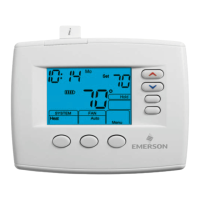
Emerson Blue Easy Set
2H/1C
Non-Programmable Thermostat with 3 Temperature Pre-Sets
Home, Sleep and Away
Installation Instructions and User Guide
Model: 1F89EZ-0251
Heat Pump
www.white-rodgers.com
www.emersonclimate.com
PART NO. 37-7208B
Replaces 37-7208A
1106
Message to Homeowner
Congratulations on choosing the Emerson Blue Easy Set
Thermostat. The Easy Set is designed to be the easiest
thermostat you have ever used. This thermostat features
Home, Sleep, and Away temperature pre-sets. Just press
the button and go. Included with the easy set is the same
temperature accuracy and reliability you expect from all the
Emerson Blue thermostats.
Just Press the Button and Go!
Table of Contents
Get to know your thermostat ....................................... 2
Thermostat buttons and switches ...............................2
Display .........................................................................2
Batteries ......................................................................2
Using your thermostat .................................................3
Home, Sleep and Away temperature pre-sets ............3
Sleep Timer option ......................................................3
Change Filter reminder option ....................................3
Cool Savings option ....................................................3
Installation .....................................................................4
Remove the old thermostat .........................................4
Install the new thermostat ...........................................4
Set switches ................................................................4
Check thermostat operation ........................................4
Selectcongurationoptions ........................................5
Congurationmenu .....................................................5
Troubleshooting Guide ................................................6
Technical Data ...............................................................7
Wiring diagrams ..........................................................7
Thermostat application guide ......................................8

Specications ..............................................................8
3 Simple Pre-Sets

Questions and Answers

Summary

Get to Know Your Thermostat

Thermostat Buttons and Switches

Identifies and describes the physical buttons and switches on the thermostat for user interaction and control.

Display Overview

Explains the various icons, indicators, and numerical readouts on the thermostat display and their meanings.

Battery Status and Replacement

Details the battery indicator, low battery warning, and recommendations for battery replacement for optimal performance.

Important Safety Warnings

Highlights critical safety precautions regarding voltage limits, wiring, and potential hazards during installation and operation.

Using Your Thermostat

Pre-set Temperature Modes

Explains how to use and set the Home, Sleep, and Away temperature pre-sets for convenient comfort control.

Sleep Timer Functionality

Describes the sleep timer feature, its default setting, and how it automatically adjusts temperature from Sleep to Home.

Filter Change Reminder

Details the filter reminder feature, its configuration, and how to reset the notification after filter maintenance.

Cool Savings Feature

Explains the Cool Savings option, how it optimizes cooling by adjusting setpoints during high demand, and its energy-saving benefits.

Thermostat Installation Guide

Removing the Old Thermostat

Provides step-by-step instructions for safely removing an existing thermostat from the wall.

Installing the New Thermostat Base

Guides on mounting the new thermostat base to the wall, including marking, drilling, and securing the unit.

Set Switch Configuration

Explains the function of the FAN (Ele/Gas) and O/B switches and how to set them for different system types.

Verifying Thermostat Operation

Outlines procedures to verify the correct operation of heating, cooling, fan, and emergency heating systems.

Configuration Options Setup

Entering and Navigating the Configuration Menu

Explains how to access and move through the thermostat's configuration settings using the system switch and buttons.

Understanding Configuration Settings

Details the various configurable options, their factory defaults, and their impact on thermostat operation.

Adjusting Cycle Rate and Display

Covers settings for cycle rate, temperature display units (°F/°C), and backlight options.

Troubleshooting Common Issues

Resetting the Thermostat

Provides instructions on how to reset the thermostat in case of display blanking or erratic operation due to power issues.

Diagnosing Heating;Cooling Problems

Lists common symptoms like no heat/cool/fan, constant operation, and temperature swing issues with possible causes and corrective actions.

Technical Specifications and Data

Wiring Diagram Overview

Presents a typical wiring diagram for single transformer systems, illustrating terminal connections.

Important Product Information

Contains critical attention notes regarding mercury content, handling damaged cells, and proper disposal of older units.

Thermostat Specifications

Lists detailed electrical ratings, terminal load, setpoint range, differential, operating ambient conditions, and dimensions.

Overview

The Emerson Blue Easy Set 2H/1C is a non-programmable thermostat designed for heat pump systems, featuring three temperature pre-sets: Home, Sleep, and Away. This thermostat is engineered for ease of use, allowing users to simply press a button to activate their desired pre-set temperature. It maintains the same temperature accuracy and reliability expected from all Emerson Blue thermostats.

Function Description

The primary function of the Emerson Blue Easy Set thermostat is to control heating and cooling systems in a home, specifically heat pump systems with two heating stages and one cooling stage. It operates by allowing users to set and activate pre-defined temperatures for different periods of the day or specific needs. The thermostat is designed for low-voltage NEC Class II systems and is not compatible with line voltage systems.

Usage Features

The thermostat offers several user-friendly features to enhance comfort and energy efficiency:

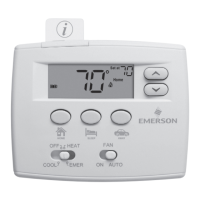
  • Easy Temperature Pre-sets (Home, Sleep, Away): This is the core feature of the thermostat. Users can set their preferred temperatures for "Home," "Sleep," and "Away" modes. Once set, activating these modes is as simple as pressing the corresponding button on the thermostat. The factory default settings are 70°F (Heat) / 75°F (Cool) for Home, 62°F (Heat) / 78°F (Cool) for Sleep, and 62°F (Heat) / 83°F (Cool) for Away. These pre-sets can be customized by the user. To change a pre-set, the user moves the SYSTEM switch to HEAT or COOL, adjusts the temperature using the up or down buttons, and then presses and holds the desired pre-set button (Home, Sleep, or Away) for 3 seconds until the display goes blank and then back on, indicating the new pre-set has been saved.

  • System Switch (COOL, OFF, HEAT, EMER): This switch allows the user to select the operating mode of the HVAC system.

    • COOL: Activates the cooling system.
    • OFF: Turns off the HVAC system.
    • HEAT: Activates the heating system.
    • EMER (Emergency Heat): Bypasses the heat pump and uses the auxiliary heat source (wired to terminal W2) for heating. This is typically used when compressor operation is not desired or when backup heat is preferred.
  • FAN Switch (ON, AUTO): This switch controls the operation of the system's blower fan.

    • ON: The fan runs continuously.
    • AUTO: The fan runs only when the heating or cooling system is actively operating.
  • Temperature Adjustment Buttons (Up/Down Arrows): These buttons allow users to manually increase or decrease the desired temperature setting. When a pre-set is active, manually adjusting the temperature will override the pre-set until another pre-set is selected.

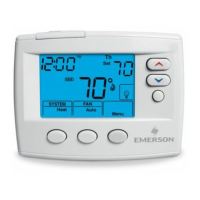
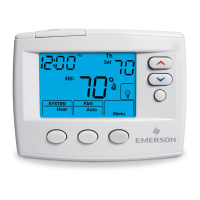
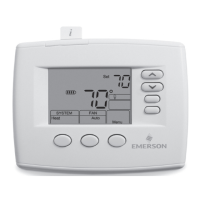
  • Display: The clear digital display shows the desired temperature, current room temperature, system mode (Heat icon or Cool icon), battery status, and various indicators for active features or system diagnostics.

    • "Save" Indicator: This indicator appears when the Cool Savings feature is enabled and flashes when it is actively saving energy. It also flashes for 3 seconds after a temperature change to indicate that a pre-set can be saved.
    • "Change Filter" Indicator: This reminds the user when it's time to change or clean the air filter, based on a programmed time period.
    • "Service" Indicator: This indicates a diagnostic fault in the heating/cooling system, not a fault in the thermostat itself.
    • Battery Level Indicator: Shows the power level of the batteries and indicates when they need to be replaced.
    • "AUX" Indicator: Displays when the auxiliary stage of heating is operating.
    • "EMER" Indicator: Flashes when the system switch is in the EMER position.
  • Sleep Timer Option: This feature allows the thermostat to automatically switch from the "Sleep" temperature to the "Home" temperature after a user-defined number of hours (1 to 12 hours, default 8 hours). This provides convenience by ensuring the home returns to a comfortable temperature after a period of sleep.

  • Cool Savings™ Option: When enabled, this feature makes small adjustments to the desired cooling temperature during periods of high demand to reduce cooling system running time and save energy. After 20 minutes of continuous cooling, the thermostat gradually increases the desired temperature in small increments (less than one degree at a time). This helps the system satisfy the thermostat and turn off, thereby reducing energy consumption. The "Save" indicator flashes when this feature is active. The level of adjustment can be configured from 1 (least) to 6 (most).

  • Compressor Lockout (CL) Option: This feature, when enabled, introduces a 5-minute delay before the compressor turns on again after it has just turned off. This protects the compressor from short cycling, which can extend its lifespan.

  • Display Light (L) Option: Users can choose whether the backlight stays on continuously (if the "C" terminal is connected) or comes on for a short time when any key is pressed.

  • Room Temperature Display Adjustment: Allows for minor calibration of the displayed room temperature, up to 4 degrees higher or lower than the actual temperature.

  • Fahrenheit/Celsius Display: Users can select whether the temperature is displayed in Fahrenheit (°F) or Celsius (°C).

  • Fast Second Stage (FH) Option: Allows the user to enable or disable the fast second stage of heating or cooling.

  • Cycle Rate Adjustment (CR): This feature allows users to adjust the cycle rate (how long the heating or cooling system runs per cycle) to match the temperature response of their home. Options include "Fast" (FA) or "Slow" (SL) for Heat Pump, Heat, and Cool modes, as well as for Aux./Emer Heat.

Maintenance Features

The thermostat includes features to assist with basic maintenance and ensure optimal performance:

  • Battery Replacement Reminder: The battery level indicator will display when the battery power is approximately half. When less than two months of battery life remain, the setpoint temperature will change by 10 degrees (cooler in Heat / warmer in Cool) to alert the user to change the batteries. It is recommended to replace the two "AA" alkaline batteries every 2 years.

  • Change Filter Reminder Option: This feature reminds the user to change or clean the air filter after a programmed number of hours of system operation (configurable from 25 to 1975 hours, with a default of 200 hours). The "Change Filter" message will appear on the display, and pressing the up or down button will clear the display and restart the timer.

  • Reset Operation: In case of a voltage spike, static discharge, or erratic operation, the thermostat can be reset. This involves setting the System Switch to Cool, Heat, or Emer, and then simultaneously holding the up and down buttons for approximately 10 seconds until the display goes blank. This can resolve many common operational issues.

The Emerson Blue Easy Set thermostat is designed for straightforward installation and operation, making it an accessible choice for homeowners seeking a reliable and easy-to-use control for their heat pump systems.

Emerson 1F89EZ-0251 Specifications

General IconGeneral
Temperature Range45°F to 90°F (7°C to 32°C)
Wi-Fi ConnectivityNo
Programmable Schedule7-Day Programmable
Product TypeThermostat
Voltage24V
Battery2 AA batteries
CompatibilitySingle Stage, Multi-Stage, Heat Pump
DisplayBacklit digital display
Power SourceBattery or C-Wire
ProgrammabilityProgrammable

Related product manuals