EasyManua.ls Logo

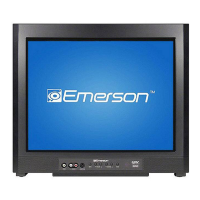
Emerson CR202EM8 - User Manual

Emerson CR202EM8
52 pages
Print Icon
To Next Page IconTo Next Page
Loading...
WATCHING TVINTRODUCTION CONNECTION INITIAL SETTING
OPTIONAL SETTING
INFORMATION
TROUBLESHOOTING
20” Digital / Analog
Television
Owners Manual
CR202EM8
IF YOU NEED ADDITIONAL ASSISTANCE WITH SETUP OR OPERATING AFTER
READING OWNER’S MANUAL, PLEASE CALL TOLL FREE 1-800-256-2487, OR
VISIT OUR WEB SITE AT http://www.EmersonAudioVideo.com
TO RECEIVE DIGITAL/ANALOG SIGNAL,
YOU MUST CONNECT ANTENNA.
TM
EMERSON AND THE G-CLEF LOGO ARE REGISTERED TRADEMARKS
OF EMERSON RADIO CORP., PARSIPPANY, NEW JERSEY, U.S.A.
© 2007 Funai Electric Co., Ltd.

Table of Contents

Other manuals for Emerson CR202EM8

Questions and Answers

  • C
    Cindy RuizAug 20, 2025
    Why is my Emerson CR202EM8 remote control not working?
    • D
      David MedinaAug 20, 2025
      If the remote control for your Emerson CRT TV isn't working, first check the antenna or cable connection to the main unit. Ensure the batteries in the remote are working. Verify there are no obstructions between the remote and the infrared sensor window on the front of the unit. Aim the remote directly at the sensor window, reduce the distance to the unit, and re-insert the batteries with correct polarity.
  • M
    Mrs. Mary Hall MDAug 22, 2025
    What to do if my Emerson CRT TV has no picture or sound?
    • R
      riostimothyAug 22, 2025
      If your Emerson CRT TV shows no picture or sound, first ensure the power is on and the outlet connection is secure. Then, check the antenna or cable connection to the main unit. If using an outside antenna, inspect the wire condition and connection. Try viewing other TV channels to rule out broadcasting station issues. As a last resort, turn the power off, wait a minute, and then turn it back on.
  • T
    Travis ReedAug 25, 2025
    How to fix an Emerson CR202EM8 CRT TV with no power?
    • J
      Jasmin NelsonAug 25, 2025
      If your Emerson CRT TV has no power, make sure the power cord is properly plugged in. If a power failure has occurred, unplug the power cord for 30 minutes to allow the unit to reset.
  • R
    renee60Aug 26, 2025
    How to improve poor reception on some channels on my Emerson CRT TV?
    • C
      Christian ChangAug 26, 2025
      To fix poor reception on some channels with your Emerson CRT TV, start by checking the antenna or cable connection to the main unit. If you're using an outside antenna, check the wire condition and connection. Electrical interference from nearby appliances may affect picture quality. You might also want to view other TV channels, as the problem could be with the broadcasting station.
  • K
    Kristi YoungAug 27, 2025
    How to restore color on my Emerson CR202EM8?
    • R
      Richard HallAug 28, 2025
      If your Emerson CRT TV shows no color, check the antenna or cable connection to the main unit. If you are using an outside antenna, check the wire condition and connection. Try viewing other TV channels, as the issue might be with the broadcasting station. You can also adjust the COLOR setting in the PICTURE menu.
  • J
    jonesstephanieAug 30, 2025
    Why does my Emerson CR202EM8 have sound but a poor picture?
    • T
      tammy62Aug 30, 2025
      If your Emerson CRT TV has sound but a poor picture, check the antenna or cable connection to the main unit. If using an outside antenna, verify the wire condition and connection. Adjust the CONTRAST and BRIGHT settings in the PICTURE menu because electrical interference from nearby appliances may affect picture quality. Also, try viewing other TV channels to see if the problem is limited to the broadcasting station.
  • C
    Claudia KaufmanSep 1, 2025
    What causes a distorted picture on my Emerson CRT TV?
    • M
      Michael HeathSep 1, 2025
      If your Emerson CRT TV picture is distorted, check the wire condition and connection when using an outside antenna. Also, view other TV channels to determine if the problem is limited to the broadcasting station.
  • A
    Amy PerrySep 2, 2025
    How to fix a weak picture on my Emerson CR202EM8 CRT TV?
    • J
      Jasmine JordanSep 2, 2025
      If you're getting a weak picture on your Emerson CRT TV, start by checking the antenna or cable connection to the main unit. If you're using an outside antenna, check its wire condition and connection. You can also adjust the CONTRAST and BRIGHT settings in the PICTURE menu. Try viewing other channels to see if the problem is with the broadcasting station.
  • M
    Michelle CampbellSep 5, 2025
    What causes lines or streaks on my Emerson CR202EM8 screen?
    • F
      Felicia RamseySep 5, 2025
      If you see lines or streaks in the picture on your Emerson CRT TV when using an outside antenna, check the wire condition and connection. Electrical interference from nearby appliances may affect picture quality. Try viewing other TV channels; the problem might be limited to the broadcasting station.
  • S
    slesterSep 6, 2025
    Why is the picture on my Emerson CRT TV blurred?
    • A
      Alison McclainSep 7, 2025
      If the picture on your Emerson CRT TV is blurred, check the wire condition and connection when using an outside antenna. Also, try viewing other TV channels to see if the broadcasting station is the source of the problem.

Summary

Introduction

Important Safeguards

Details critical safety instructions and warnings for operating the television.

Precautions and Warnings

Covers general precautions, FCC warnings, interference, and safety notices.

Location and Electrical Safety

Guidance on proper placement and avoiding electrical hazards.

Supplied Accessories and Symbols

Lists included accessories and explains manual symbols for user reference.

Features Overview

Highlights key features and capabilities of the television.

Remote Control and Battery Installation

Explains the remote control functions and how to install batteries.

Control Panel and Rear Panel Overview

Details the buttons and ports on the TV's control panel and rear.

Connection

Basic Connection Setup

Instructions for connecting the TV to an antenna or cable/satellite box.

External Device Connection

Guide for connecting external devices like DVD players, VCRs, or audio systems.

Initial Setting

Initial Setup Process

Walks through the first-time setup, including language and channel scanning.

Main Menu Navigation

Describes the main menu options and their functions.

Auto Channel Scan

Details how to automatically scan and memorize available channels.

Language Selection

Explains how to choose the on-screen menu language.

Watching TV

Channel Selection Methods

Instructions on how to select channels using remote or number buttons.

Volume Adjustment and Mute

How to adjust the TV volume and use the mute function.

Switching Input Modes

How to switch between TV, DTV, and external device inputs.

Screen Information Display

How to display channel numbers and program information.

TV Screen Display Modes

Options for adjusting aspect ratio (Letterbox, Zoom) for digital broadcasts.

Sleep Timer Function

How to set the TV to automatically turn off after a set time.

Optional Setting

Channel Add;Delete Function

How to add unlisted channels or delete unwanted ones from the channel list.

Picture Adjustment Settings

Adjusting brightness, contrast, color, tint, and sharpness for optimal picture quality.

Closed Caption (CC) Settings

Enabling and configuring closed captioning for programs and text services.

DTV Closed Caption (DTVCC) Options

Customizing DTV closed captioning text, size, and service.

DTVCC Style Customization

Detailed settings for DTVCC font, color, size, and edge effects.

V-Chip Parental Control Setup

Setting up parental controls to block age-inappropriate programs.

TV Rating and MPAA Rating Configuration

Setting TV and MPAA ratings to block specific content elements.

Password Management for V-Chip

How to set, change, or reset the V-chip password.

Troubleshooting

Troubleshooting Guide by Symptom

Lists common problems and their solutions for TV operation.

Closed Caption Issues

Addresses common problems related to closed caption display and timing.

IR Signal Check for Remote

Tests the remote control's infrared signal using AM radio or digital camera.

Information

Glossary of Terms

Definitions of technical terms used in the manual.

Cable Channel Designations

Chart showing common cable TV channel designations.

General and Electrical Specifications

Details TV specifications, terminals, power, and dimensions.

Limited Warranty Information

Provides details on product warranty coverage, limits, and service contact information.

Emerson CR202EM8 Specifications

General IconGeneral
Screen Size20 inches
Display TechnologyCRT
Aspect Ratio4:3
Audio OutputMono
Input PortsRF, Composite
Speakers1

Related product manuals