EasyManua.ls Logo

Emerson LC320EM8 - V-CHIP PARENTAL CONTROL SETUP

Emerson LC320EM8
72 pages
Print Icon
To Next Page IconTo Next Page
To Previous Page IconTo Previous Page
Loading...
28
EN
V-CHIP
You can block certain programming inappropriate for
children. This block can be released by entering a
password.
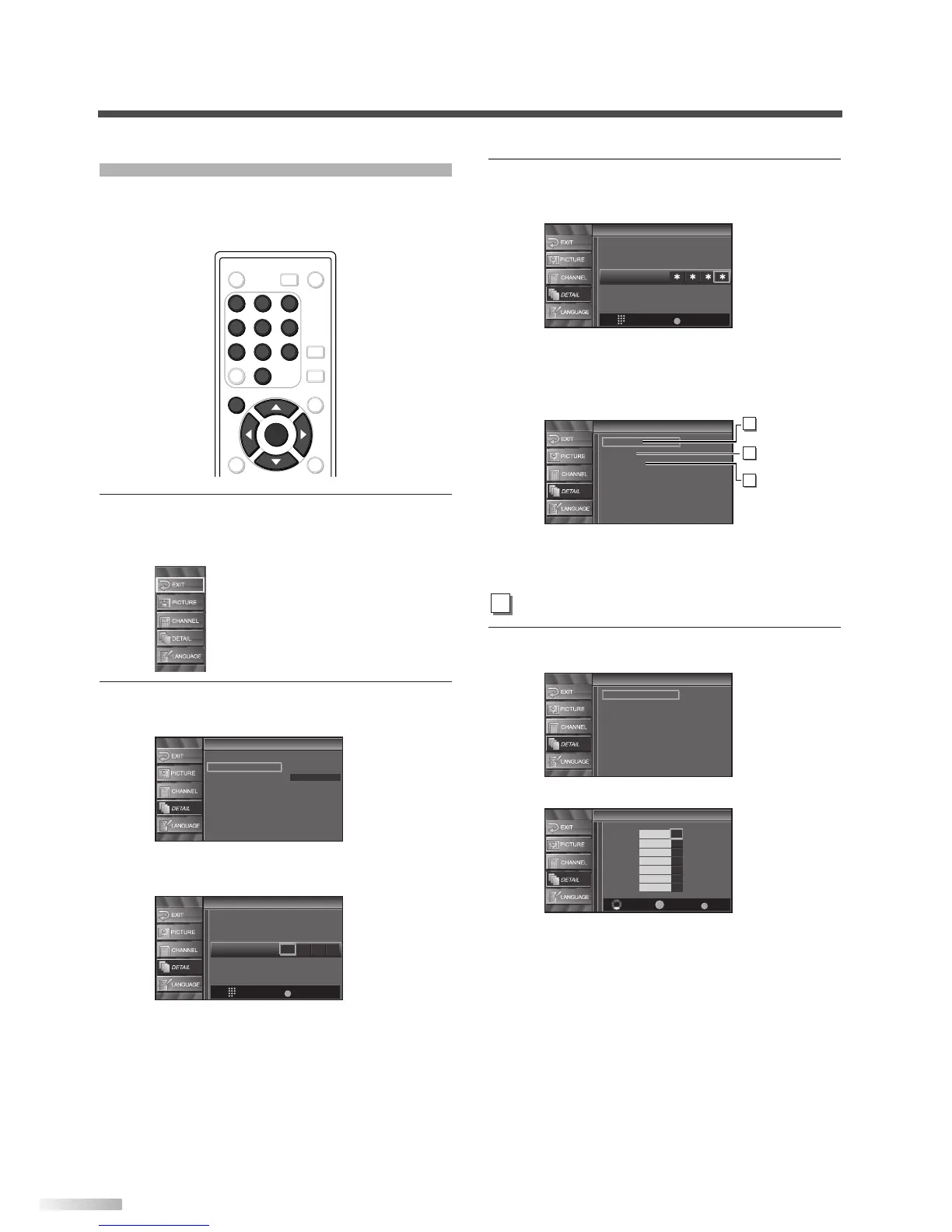
1 Display the setup screen.
• Press
[SETUP].
The following setup screen appears.
2
Select “DETAIL and press [ENTER].
• Using
[
K
/
L
], select “V-chip”.
• Press
[ENTER].
The password entry screen is displayed.
V-Chip
V-Chip
PIN Code
Back
BACK
Enter password.
Detail
Detail
Closed Caption
V–chip
HDMI Audio
Auto
ENTER
POWER SLEEP
AUDIO
STILL
SETUP
BACK
SCREEN
MODE
INFO
1 2 3
4 5 6
7 8 9
-
0
INPUT
SELECT
ENTER
SETUP
1 2 3
4 5 6
7 8 9
0
3 Enter the password.
• Use
[the Number buttons] and enter the
4-digit number.
When you have not set up your password,
enter 0000.
When the password is correct, the following
“V-Chip” screen is displayed.
See the following description for setting each
item.
4
Display the “MPAA Rating” screen.
• Using
[
K
/
L
], select “MPAA Rating”.
• Press
[ENTER].

V-Chip
V-Chip
Select View/Block Back
BACK
ENTER
X
NC-17
R
PG-13
PG
G
NR
V-Chip
V-Chip
MPAA Rating
TV Rating
New Password
A
MPAA Rating
V-Chip
V-Chip
MPAA Rating
TV Rating
New Password
A
MPAA Rating
B
TV Rating
C
New Password
V-Chip
V-Chip
PIN Code
Back
BACK
Enter password.

Table of Contents

Other manuals for Emerson LC320EM8

Related product manuals