8
Control Panel
-3
3
-4
-5 4
5
m7
8
6
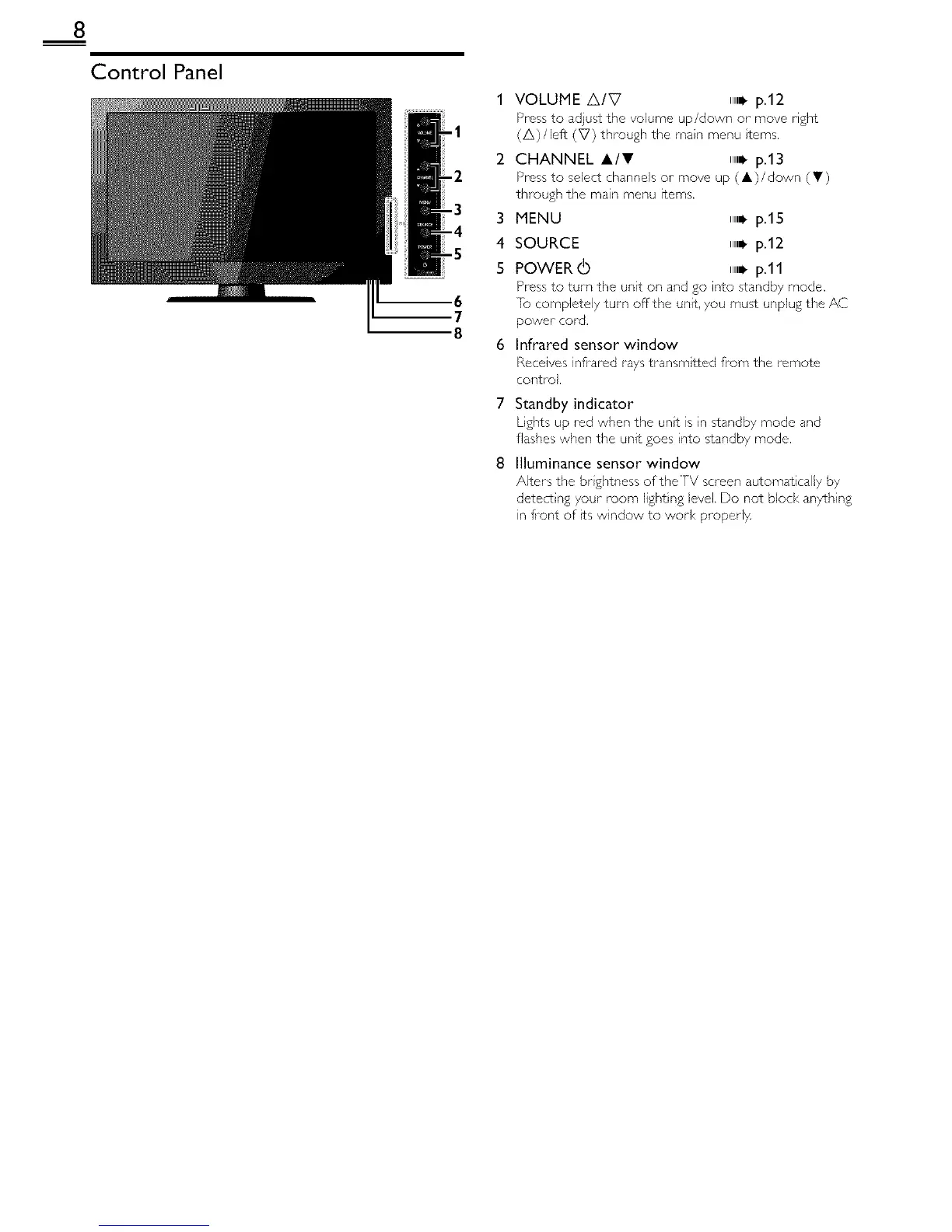
VOLUME A/V ,,,_p.12
Press to adjust the volume up/down or move right
(A)/left (V) through the main menu tems,
CHANNEL A/V ,,,_p.13
Press to select channels or move up ( A)/down (T)
thlough the main menu items.
MENU ,,i. p.lS
SOURCE ,,i. p.12
POWER (b ,,i. p.11
Press to turn the unit on and go into standby mode.
[o completely turn offthe unit, you must unplug the AC
power cord.
Infrared sensor window
Receives inflated rays transmtted from the remote
control.
7 Standby indicator
Lights up red when the unt is n standby mode and
flashes when the unit goes nto standby mode.
8 Illuminance sensor window
Alters the br ghtness of the TV screen automat cal[y by
detect ng your room light ng level Do not block anything
in fiont of ts window to work proper1}4



 To Next Page