EM Service Manual
www.emerymark.com
52
2.2 Use of the machine
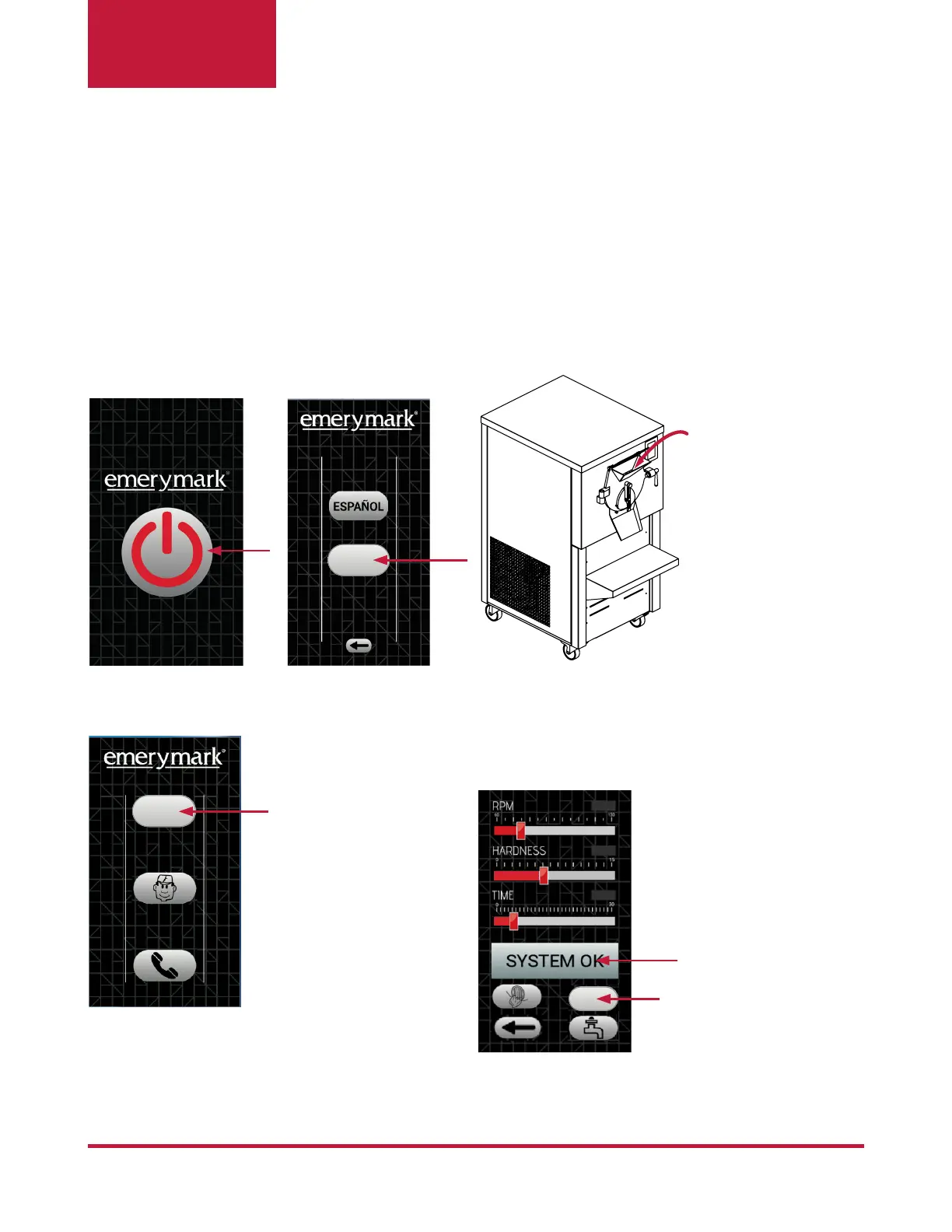
1. Turn On the machine, select the language.
3. Press the button AUTO.
2. Pour the Liquid Mix.
NOTE: By pressing the button this will turn red, it indicates that is ON.
NOTE: After 10 minutes if the machine
is not operating the screen will turn off,
just touch the screen to turn it on.
4. Adjust the desired parameters by sliding the
RPM, HARDNESS and TIME bars. Once you
have selected the values (depending on how
you like your ice cream), press the ON button.
IMPORTANT: Before starting to make ice cream, it is recommended to carry out the disinfec-
tion process described in point 2.3. Once the equipment is clean and disinfected, you can start
making ice cream.
NOTE: The status of
the system and the
alarms of the machine
appear in the window.
AUTO
ON
ENGLISH


 To Next Page
 Loading...