12 13
3
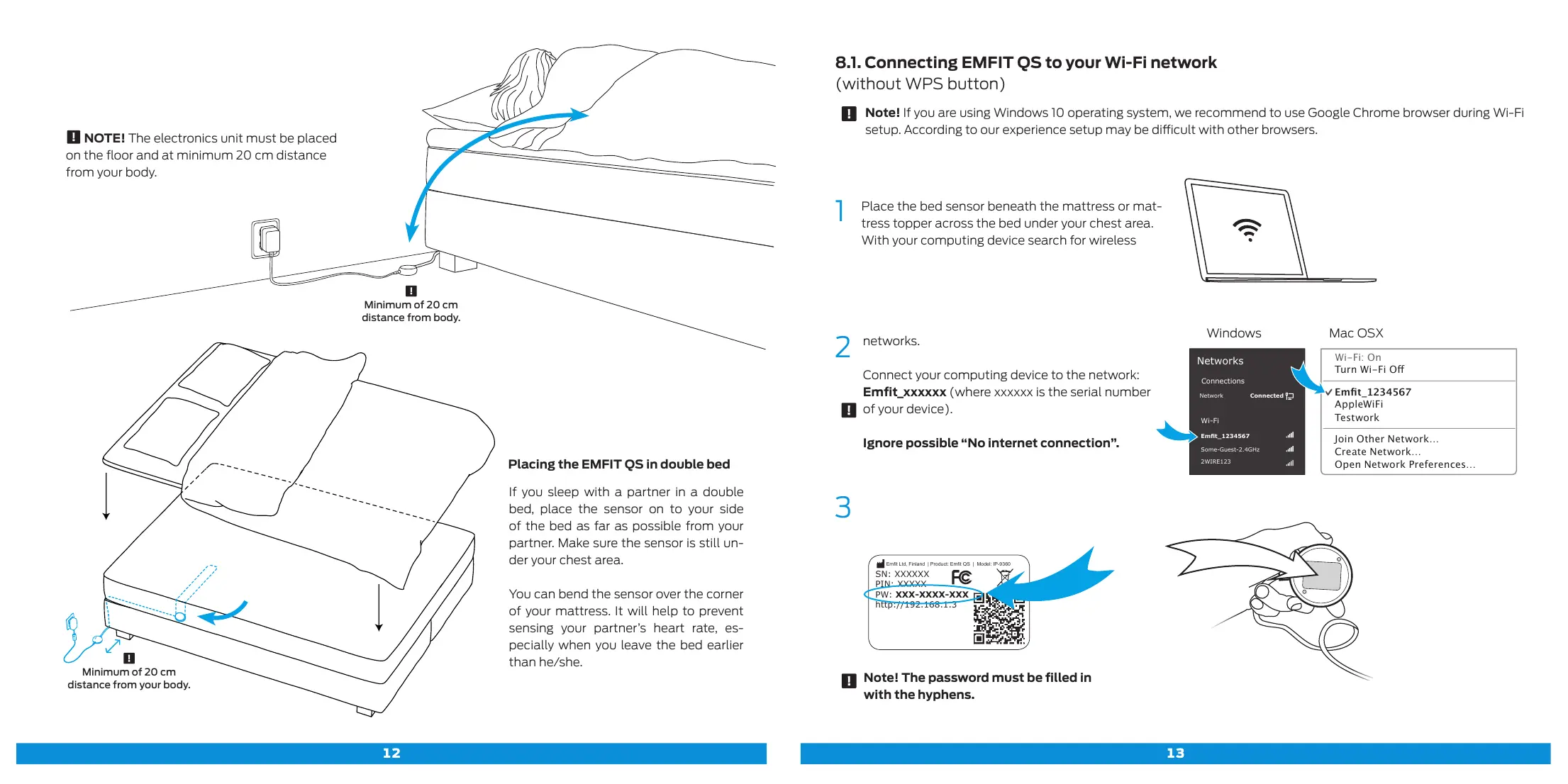
Note! The password must be filled in
with the hyphens.
2
networks.
Connect your computing device to the network:
Emfit_xxxxxx (where xxxxxx is the serial number
of your device).
Ignore possible “No internet connection”.
Emt Ltd, Finland | Product: Emt QS | Model: IP-9360
Contains FCC ID: W70MRF24WG0MAMB
Contains transmitter module IC:
7693A-24WG0MAMB
Designed and manufactured in Finland.
SN: XXXXXX
PIN: XXXXX
PW: XXX-XXXX-XXX
http://192.168.1.3
Windows Mac OSX
Networks
Turn Wi-Fi O
Emt_1234567
AppleWiFi
Testwork
Join Other Network…
Create Network…
Open Network Preferences…
Wi-Fi: On
Connections
Wi-Fi
ConnectedNetwork
Emt_1234567
Some-Guest-2.4GHz
2WIRE123
1
Place the bed sensor beneath the mattress or mat-
tress topper across the bed under your chest area.
With your computing device search for wireless
Placing the EMFIT QS in double bed
If you sleep with a partner in a double
bed, place the sensor on to your side
of the bed as far as possible from your
partner. Make sure the sensor is still un-
der your chest area.
You can bend the sensor over the corner
of your mattress. It will help to prevent
sensing your partner’s heart rate, es-
pecially when you leave the bed earlier
than he/she.
8.1. Connecting EMFIT QS to your Wi-Fi network
(without WPS button)
Note! If you are using Windows 10 operating system, we recommend to use Google Chrome browser during Wi-Fi
setup. According to our experience setup may be dicult with other browsers.
Minimum of 20 cm
distance from your body.
Minimum of 20 cm
distance from body.
NOTE! The electronics unit must be placed
on the floor and at minimum 20 cm distance
from your body.



 To Next Page