16 17
6.3. Connecting EMFIT QS device to your Wi-Fi network
(without WPS button) – Detailed guide with pictures
Getting started (check that you have the following
ready):
• EMFIT QS with power supply
• Computer or tablet/phone with Wi-Fi access
• Wi-Fi network is available and you know the
password to it
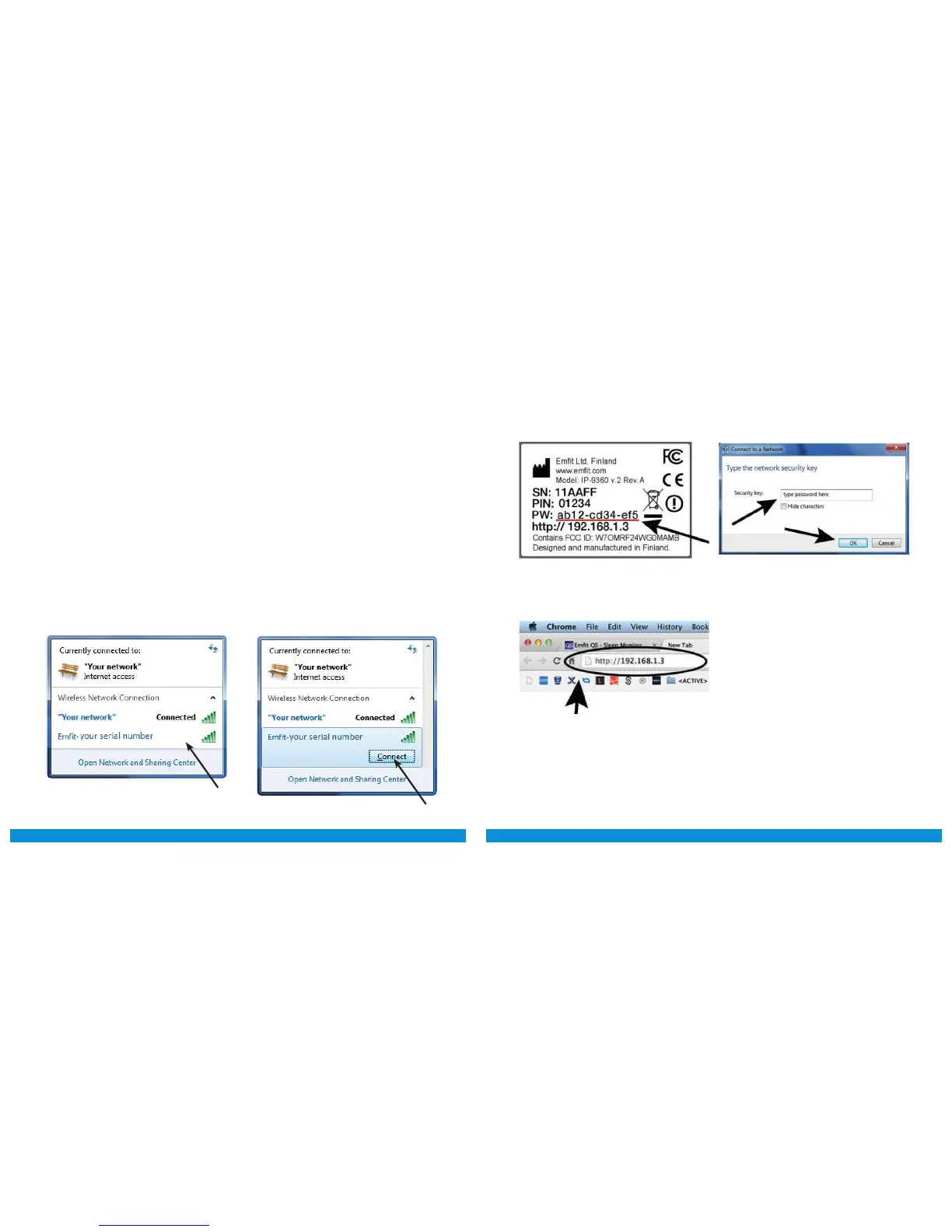
1) Use your computer/tablet to search for wireless
networks. There should be a new wireless network
named Emfit-xxxxxx (where xxxxxx is your QS de-
vice’s serial number).
NOTE: The screenshots in this manual are used for explan-
atory purposes. Your actual screens may differ from the
screenshots in this manual.
2) Network is password protected, you can find the
password on the label of your device.
3) Open your web browser and go to address
http://192.168.1.3.
Use this password for connecting to the network. When
OK is pressed the device will emit a sound indication.



 To Next Page