8 9
5. Quick overview of the set up 6. Connect Emfit QS to Wi-Fi
Please follow detailed instructions on the following pages for getting the device into use
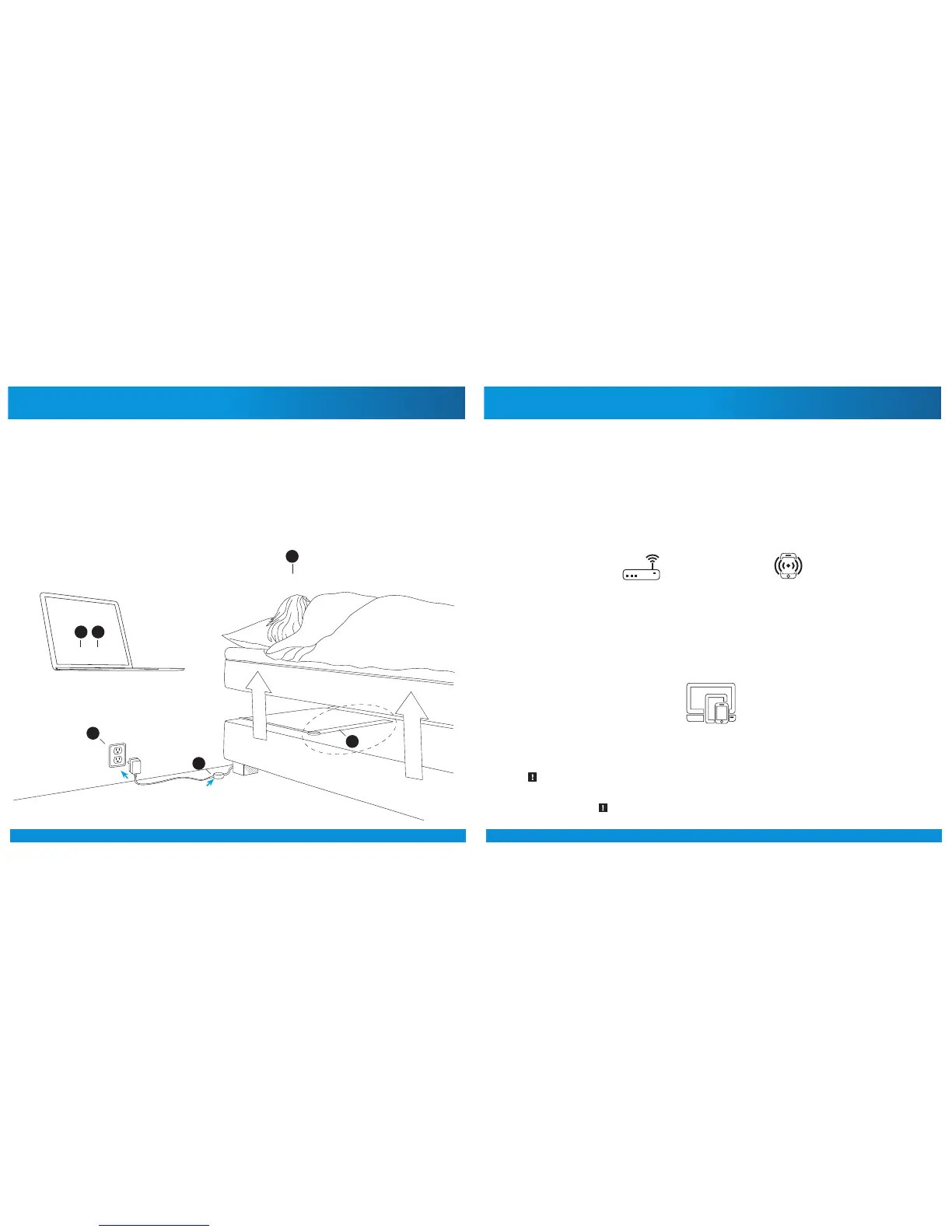
QUICK OVERVIEW
1. PLUG IN THE POWER SUPPLY TO ELECTRICAL OUTLET (110-230V)
2. PLUG IN THE POWER CORD TO THE DEVICE
3. CONNECT THE EMFIT QS TO YOUR HOME WI-FI
4. REGISTER THE DEVICE
5. INSTALL THE EMFIT QS IN YOUR BED
6. GO TO SLEEP
6.
1.
2.
3. 4.
5.
See the minimum requirements on page 3.
6.1. Connecting Emfit QS device to your Wi-Fi network – Quick guide
(without using WPS button; if your router has WPS button, please see next chapter)
Note! As per experience in May 2017, using Windows 10
for Wi-Fi setup process is dicult or impossible.
or
Your Wi-Fi network
password
or
Home Wi-Fi
with Internet access
Mobile device as
Wi-Fi hotspot
Your hotspot Wi-Fi
network password
Computing device
(computer or tablet or smartphone with browser)
For Wi-Fi set up
you need (only once):
To operate, EMFIT QS needs:
Note! To use your phone/tablet as hotspot to provide Wi-Fi for EMFIT QS, you need once some
other computing device to enable this setup.



 To Next Page