Remote Control Operation
_- Note: Wait 3 minutes before restarting the unit.
Selecti_a MODE of OPERATION
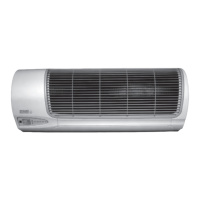
To select operating mode, point the remote control
toward the indoor air conditioning unit:
1) Press the ON/OFF
('D button to START.
2) Press the MODE O button to step through the
operating modes:
AUTO MODE - automatically operates the sys-
tem in DRY, COOL ,or HEAT mode depending on
the indoor temperature and setting.
_COOL MODE - operates the system in COOL
mode depending on the indoor temperature and set
point.
_ DRY MODE - operates the system in DEHUMIDI-
FICATION mode.
gO_ HEAT MODE - operates the system in HEAT
mode depending on the indoor temperature and set
point.
f-
Important:
Heating operation will cease at approximately
15° F outdoor temperature due to a sensor Io=
cated in the outdoor unit= This product does not
contain supplemental electric heat, therefore
other means of heat need to used when this sys-
tem ceases operation at low outdoor ambients.
'_ ,rJ'
_FAN MODE the FAN to circulate the air.
runs
3) Press the ON/OFF button again to STOP.
f ...........



 To Next Page