1
Setup guide
For Emlid RS2 / RS2+ / RS3 with MALÅ
GX and EL WR systems and cable
Introduction
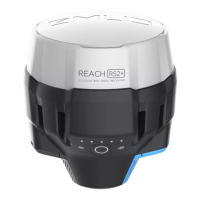
This document provides instructions on configuring the Emlid Reach RS2 / RS2+ / RS3 for use
with MALÅ GX Controller and EL WR Controller, connected by a serial RS232 cable to the Emlid
GNSS antenna.
The following four typical scenarios are defined and described in this guide:
• Single Emlid RS2 / RS2+ / RS3 unit without any RTK correction
• Single Emlid RS2 / RS2+ / RS3 unit using SIM card for RTK correction
• Single Emlid RS2 / RS2+ / RS3 unit using hotspot on mobile device for RTK correction
• Two Emlid RS2 / RS2+ / RS3 units used as base-rover set up
To set up and run the Emlid RS2 / RS2+ / RS3 unit, you will need a mobile phone or a tablet.
Download the Emlid Flow app from Google Play or App Store to your mobile device. More
information on GNSS measurements with Emlid RS2 / RS2+ / RS3 units are available on
https://emlid.com/support/reach-rs2/ and https://emlid.com/reachrs3/
Preparing the Emlid RS2 / RS2+ /RS3
Start your Emlid unit by pressing and holding
the start button. When started, wait until the
battery indicators (nr 1 in the picture to the
right) becomes solid. This takes
approximately 60 seconds.
Make sure that the Wi-Fi indicator (No. 2 in
the picture) is white. This indicates that the
Emlid hotspot is active.
Note: If the Wi-Fi indicator is blue, the Emlid
unit is connected to a Wi-Fi hotspot. Connect
to the same Wi-Fi network with your mobile
device or move the Emlid unit away from the
Wi-Fi network (to disconnect from the
network). Then restart the Emlid unit and
ensure the Wi-Fi indicator is white.

 Need help?

 To Next Page
 General