9
Pedal Assist Mode LCD Screen
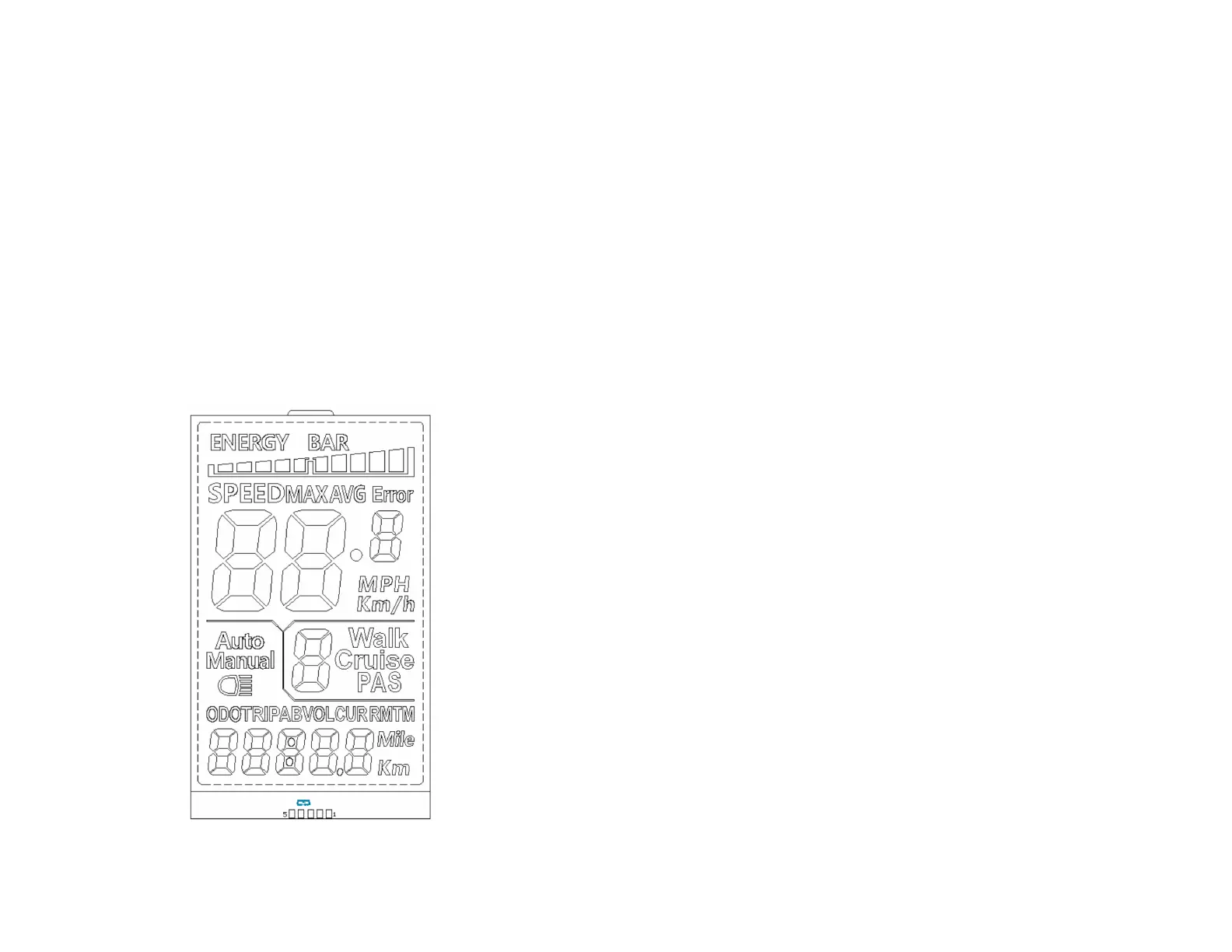
The LCD meter monitors pedal assist, speed, odometer, trip
distance, riding time, and battery energy level. To tum the meter
on, make sure the battery is fully inserted into the bike.
RIDING MODE
Press the power button (M button) on the two button selector
located near the left grip on the handlebars to tum the meter on.
You can adjust the pedal assist power level to have more power
by hitting the [ +] button (first button top to bottom) and can move
to a lower level power by hitting the [-] button (third button top to
bottom).
When not riding the bike, you can tum off the meter by holding
down the power button (M button) for several seconds.
Free Ride
Throttle Only
Display functions
1-Power On/Off
Pr ess the M button to powe r on the display. To power o ff display and power
supply to the bicycle press and hold for 3 seconds
2-Pedal assist (PAS)
The system has
5
PA S assistance modes , use the + -buttons to scroll
between modes
3-Riding Modes
Walk: Walking boost, Cruise: Constant speed cruise, PAS: Pedal assist
levels.
4-
Multi function display
Press the M button once to switch between Total Mileage: ODO, Single
Mileage: TRIP A, dingle Mileage: TRIP B, current Voltage VOL, operating
Current: CUR, Display Booting Time: TM ,
Riding Time
The riding time will be saved up to 100 hours unless you reset it
5-
Battery Level Indicator (Energy bar)
Indicates battery level, there are
5
levels, each segment stands for 20% charge
7-Speed Indicator
Shows the speed either in MPH or KM/h
8-PAS Level
BATTERY LEVEL
SPEED
ERROR CODE
ODOMETER/TRIP
LIGHTS ON/OFF
Indicates the level of motor assistance. Use the+ - buttons to
switch b etween PAS levels
9-Lights: Turn your display ON, then press and hold the UP
arrow for a few seconds to turn on the lights. To turn them
off press and hold again the UP arrow.


 To Next Page