4
Temperature measurement: 0°C to 40°C with 0.1°C resolution; accuracy ±1°C at 20°C
Temperature setting: 7°C to 30°C in 0.2°C increments
Dierential setting: 0.1; 0.2; 0.5; 1°C
Operating temperature: 0°C to 40°C
Storage temperature: -10°C to 60°C
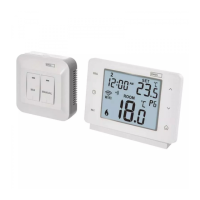
Unit interconnection: via 868 MHz radio signal, max. 25 mW e.r.p.
Transmitter unit range: up to 100 m in an open space
Power supply:
Control unit (transmitter) 2× 1.5 V type AA (LR6) batteries
Switching unit (receiver) 230 V AC/50 Hz
Dimensions and weight:
Control unit: 23 × 97 × 122 mm; 143 g
Switching unit: 37 × 115 × 91 mm; 150 g
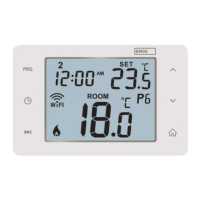
Control (Portable) Unit
(see Fig. 1)
1 – day of the week
2 – clock
3 – comfort mode
4 – economy mode
5 – manual control
6 – programme preset
7 – comfort/economy mode switch
8 – UP button
9 – change clock
10 – change programme
11 – wireless communication icon
12 – set temperature
13 – frost indication
14 – operation status icon
15 – battery status indication
16 – current room temperature
17 – day prole
18 – DOWN button
19 – change temperature
20 – illuminate screen
21 – RESET
Removing the Rear Cover of the Control Unit
(see Fig. 2)
1. Use a screwdriver to press and hold the inner lock.
2. Remove THE front cover.
Switching Unit
(see Fig. 3)
1 – main switch
2 – pairing button
3 – LED indicators
LED Indicators
• Blue LED indicates the switching unit is powered by 230 V AC. If the unit is not con-
nected to power or if the main switch is in the OFF position, the blue LED is not lit.



 To Next Page