6
Time and Date
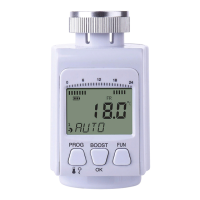
Press the PROG button and by the thumb-wheel set the TIME and then press OK.
Now set the YEAR, MONTH, DAY, HOUR, MIN.
Each value conrm by pressing OK.
Holidays
(DAY--OFF)
To set the constant temperature without the time program (e. g. Holidays).
Press the PROG button and by the thumb-wheel set the icon DAY--OFF, then press OK.
Set number of DAYS, conrm by pressing OK.
It is possible to set 1 – 99 days.
By the thumb-wheel set the temperature (TEMP), conrm by pressing OK.
If you want to cancel this function, press the FUN button.
Travel
Setting the constant temperature without any time program.
Press the PROG button and by the thumb-wheel set the icon
, then press OK.
By the thumb-wheel set the number of DAYS, conrm by pressing OK.
It is possible to set 1 – 99 days.
By the thumb-wheel set the temperature (TEMP), conrm by pressing OK.
If you want to cancel this function, press the FUN button.
Party
Setting the constant temperature without any time program within one day.
Press the PROG button and by the thumb-wheel set PARTY, then press OK.
By the thumb-wheel set the number of HOURS, conrm by pressing OK.
It is possible to set 1 – 23 hours.
By the thumb-wheel set the temperature (TEMP), conrm by pressing OK.
If you want to cancel this function, press the FUN button.
Thermostatic radiator valve’s advanced settings
• Press and hold the PROG button.
• By the thumb-wheel set the following advanced setting:
Open window function
In case the thermostatic valve detects a sudden temperature decrease (e. g. when the window gets opened, the door
is opened), the valve closes and the following icon starts
ashing
After the specied time limit or when you close the window, the valve gets automatically opened.
Time Settings
(TIME
)
• Press and hold the PROG button.
• The icon TIME
, is ashing. Conrm by pressing OK.
• The minutes value starts ashing, the range is 00 – 60 min.
• Set the desired temperature and conrm by pressing OK.
• For this time period the Open Window Function will be active.
• To exit menu press the FUN button.
• The time limit is set to 10 minutes as default.
• If you set 0 minutes, this function will not be active.
Temperature Limits Settings
• The Temperature Limit for Activating the OPEN WINDOW Function
• Press and hold the PROG button.


 To Next Page