ENGLISH-05
1.3 Turning on the phone
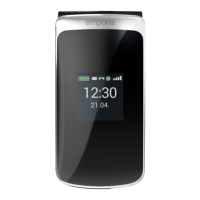
• Press and hold the key for at least two seconds until the
emporia logo appears. It will take a few seconds for the home
screen to be displayed.
1.4 Entering a PIN code
Enter the four-digit PIN code for your SIM card when asked to
do so and conrm the entry.
You have a maximum of three attempts to enter the correct
number. If you enter the wrong number three times in a row, you
will only be able to unblock the SIM card with the PUK code. You
will nd your original PIN code and PUK code in the documents
supplied with your SIM card by your network operator.
1.5 Setting the language, time and date
1. Use to select a Language and then conrm your selection
bypressing OK
.
2. Set the Time and Date and then save these settings.
3. Select a Font size.
1.6 Saving battery power
After a few seconds of inactivity, the screen will go dark to save
battery power. In the event of an incoming call or you pressing
any key, the screen will light up again. If the keypad is set to
lock automatically, the phone will only respond if the green
button or the button (on the side of the phone) is pressed.



 To Next Page