ENGLISH-07
2.3 Dual-function keys
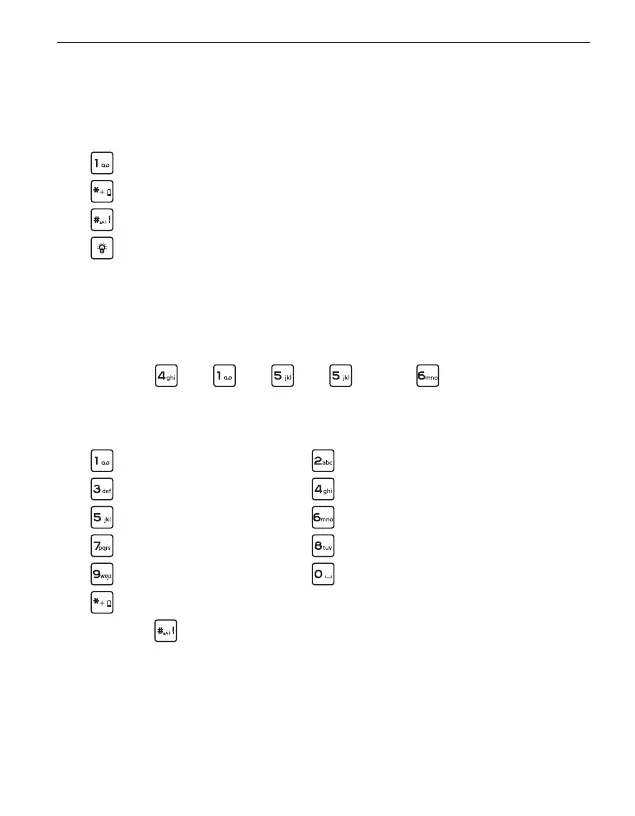
Some keys have additional functions if they are pressed and
held down for a few seconds:
key: Listen to your voicemail
key: + for country codes, e.g. +49 for Germany
key: Show missed calls
Torch button: Torch on continuously when the phone is on
2.4 Writing text
You enter text using the keypad.
• To input text, press a number key multiple times
(e.g. 2 ×
, 1 × , 3 × , 3 × and 3 × for Hallo)
• Special characters and symbols have been assigned to the
various keys, but can dier in some languages:
. , - ? ! 1 ' @ : ; ( ) * abc2äàåāâæçáć
def3đéē€èêë ghi4îïíìğι
j k l 5 £ m n o 6 ö ñ ô œ ó ò
pqrs7ß$ş t u v 8 ü ù û ú
wxyz9ŵýÿ Space 0
.,? ! ' "() @ \/:_ ; +-*= % &<>£ $ ¥§€¤ [ ]{}~ #
• Use the
key to switch between the abc, ABC, Abc and 123
input methods.



 To Next Page