EasyManua.ls Logo

Enel X JuiceRouter - User Manual

Enel X JuiceRouter
13 pages
Print Icon
To Next Page IconTo Next Page
Loading...
User Manual
JuiceRouter
ENGLISH
Question and Answer IconNeed help?

Do you have a question about the Enel X JuiceRouter and is the answer not in the manual?

Overview

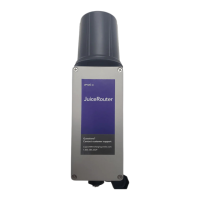
The JuiceRouter is a cellular hotspot designed to create a WiFi network, enabling JuiceNet devices to connect online. It serves as a central point for managing and connecting JuiceBox charging stations.

Technical Specifications:

  • Temperature Range: Operates in extreme conditions, from -40°C (-40°F) to +85°C (185°F).
  • Weather Protection: Rated IP67, indicating high resistance to dust and water ingress, making it suitable for outdoor installation.
  • WiFi Connection: Supports IEEE 802.11b/g/n WiFi standards, ensuring compatibility with a wide range of devices.
  • Power Supply: Utilizes a 24V passive Power over Ethernet (PoE) via a PoE injector. This simplifies installation by delivering both power and data over a single Ethernet cable.
  • Carrier Wireless: Features a CAT-4 LTE modem, certified for use on the Verizon Wireless network, providing reliable cellular connectivity.
  • Ethernet: Equipped with a 10/100BASE-TX PoE Ethernet port with auto MDI/MDI-X, allowing for flexible network connections.
  • Power Input Connector: Uses a 10/100BASE-TX RJ-45 Passive PoE connector.
  • Dimensions: Approximately 290.33 mm (11.430 inches) in height, 91.02 mm (3.583 inches) in width, and 80 mm (3.150 inches) in depth.
  • PoE Cable Length: The maximum recommended Ethernet cable length for power and data is 100 meters (328 feet).
  • JuiceBox Distance: The maximum recommended distance between a JuiceBox and a JuiceRouter is 75 feet (23 meters).

Usage Features:

  • WiFi Hotspot: Creates a local WiFi network for JuiceNet devices.
  • Cellular Connectivity: Leverages a CAT-4 LTE modem for internet access, making it ideal for locations without existing wired internet.
  • Web Dashboard Access: The JuiceRouter's web management interface can be accessed via WiFi or a hardwired Ethernet connection.
    • WiFi Connection: Connect to the "ENELX" network with the default password "Enelx12345".
    • Hardwired Connection: Connect a computer to the open Ethernet port on the PoE injector.
    • Dashboard URL: Navigate to 192.168.168.1 in a web browser.
    • Default Credentials: The default username is "admin" and the default password is "admin123".
  • JuiceBox Integration: Once the JuiceRouter broadcasts a WiFi signal, JuiceBox charging stations (JuiceBox 1.0 and JuiceBox 2.01) can connect to it.

Installation Features:

  • Mounting Options: Can be installed onto a wall or a pole.
    • Wall Installation: Requires user-supplied fasteners.
    • Pole Installation: Includes two U-bolts for easy mounting.
  • RJ-45 Gland: The device includes an RJ-45 gland for protecting the Ethernet connection.
    • Assembly: The gland disassembles into a gland base, split washer, rubber seal, spacer, and cap. These components have a "clamshell" design for easy installation onto the Ethernet cable.
    • Connection: The Ethernet cable is routed through the gland components and connected to the RJ-45 port on the base of the JuiceRouter. The gland is then tightened to ensure a secure and weather-resistant seal.
  • PoE Injector: The JuiceRouter is powered via a passive Power over Ethernet (PoE) injector.
    • Indoor/Sealed Enclosure Requirement: The PoE injector and AC adapter are not outdoor-rated and must be installed indoors or within a sealed outdoor enclosure to prevent corrosion and damage.
    • Connection Sequence: The Ethernet cable connects from the JuiceRouter to the PoE injector, and the PoE injector is then connected to power.

Maintenance Features (via Web Dashboard):

  • Password Management: Users can change the default dashboard password for enhanced security. This requires navigating to "Admin > Users" and entering a new password. After changing the password, the user is automatically logged out.
  • WiFi SSID and Password Configuration: The WiFi network name (SSID) and password can be customized. This is done by accessing "Wireless > Radio1" in the top menu, entering the desired SSID and password, and submitting the changes.
  • Timezone Settings: The JuiceRouter's timezone can be adjusted to ensure accurate timekeeping. This feature is available under "System > Settings" in the "Time Settings" section. Users can select a new timezone from a dropdown menu and submit the change.
  • No On/Off Switch: The JuiceRouter does not have a physical on/off switch; it remains powered on as long as it is plugged in.

The JuiceRouter is a robust and versatile device designed for reliable cellular and WiFi connectivity in various environments, particularly for managing Enel X JuiceNet devices. Its IP67 rating and wide operating temperature range make it suitable for challenging outdoor installations, while its web dashboard provides comprehensive control over network settings and security.

Enel X JuiceRouter Specifications

General IconGeneral
BrandEnel X
ModelJuiceRouter
CategoryWireless Router
LanguageEnglish