S K U : SH A5328
E A N : 50 60774553053
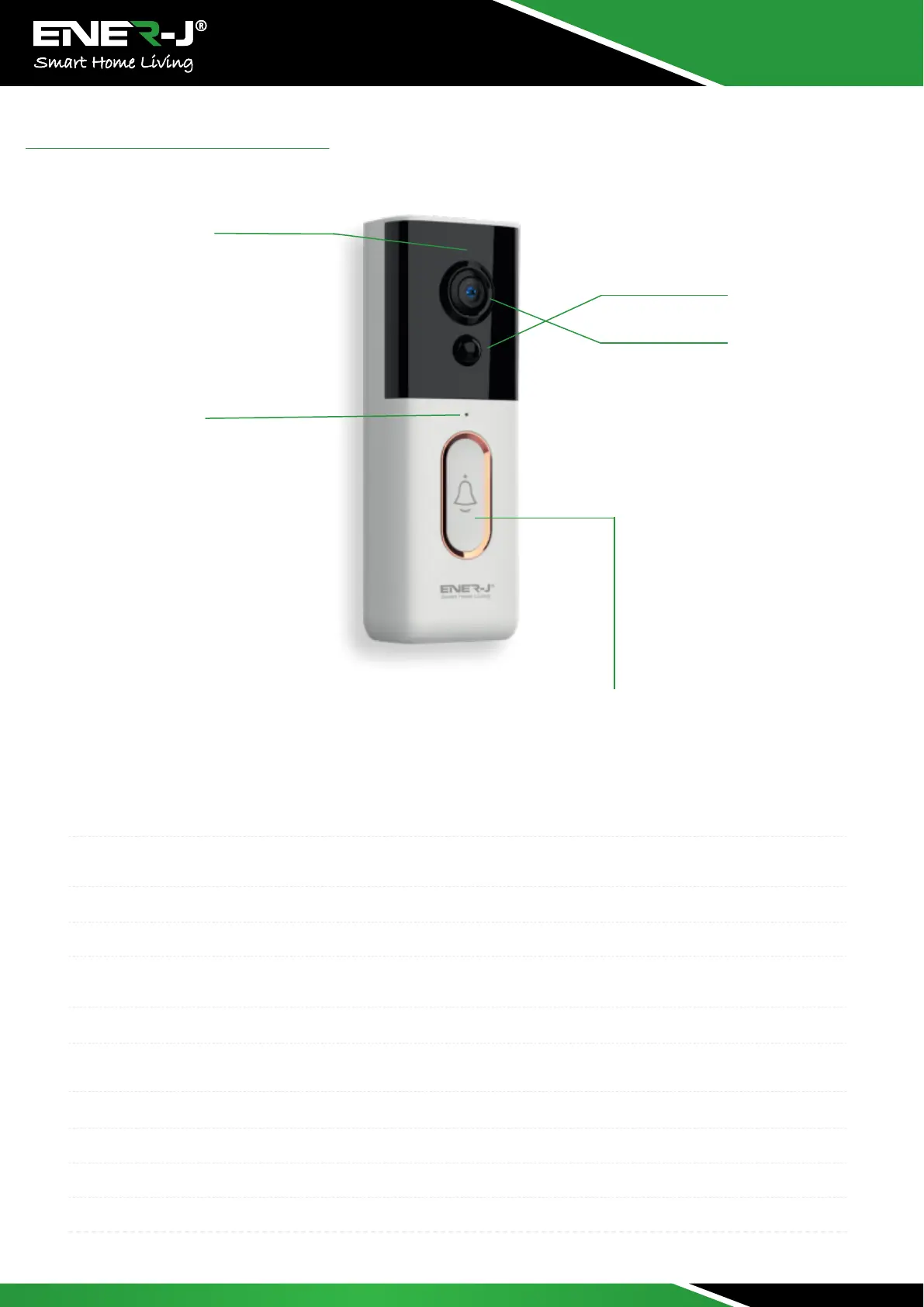
PIR
LENS
IR LED
Light Sensor
MIC
Button
Appearance Introduction
IR LED
Light Sensor
MIC
Button
PIR
Lens
Indicator Light
Reset Button
Battery Slot
USB Interface
Mounting Port
The ambient light is not enough, this can increase picture brightness.
Used to collect environmental light status, when ambient light drops down to 2 Lux, the IR LED
will turn on automatically.
Audio Capture
Doorbell button
When object movement detected in front of the device, the device will send notification to your
phone automatically.
Video image capture.
Blink BLUE light: Configuration status; Light RED light ON: Failed to connect to Wi-Fi; BLUE light
ON: Connect to phone automatically; RED and BLUE flash: Connect to Wi-Fi automatically.
To reset the device, long press this button for 5 seconds.
Support 4800 mAh x 2 batteries
Micro USB port charging
Use this port to mount the camera to bracket
:
:
:
:
:
:
:
:
:
:
:


 To Next Page