S K U : SH A5328
E A N : 50 60774553053
Setup the Device
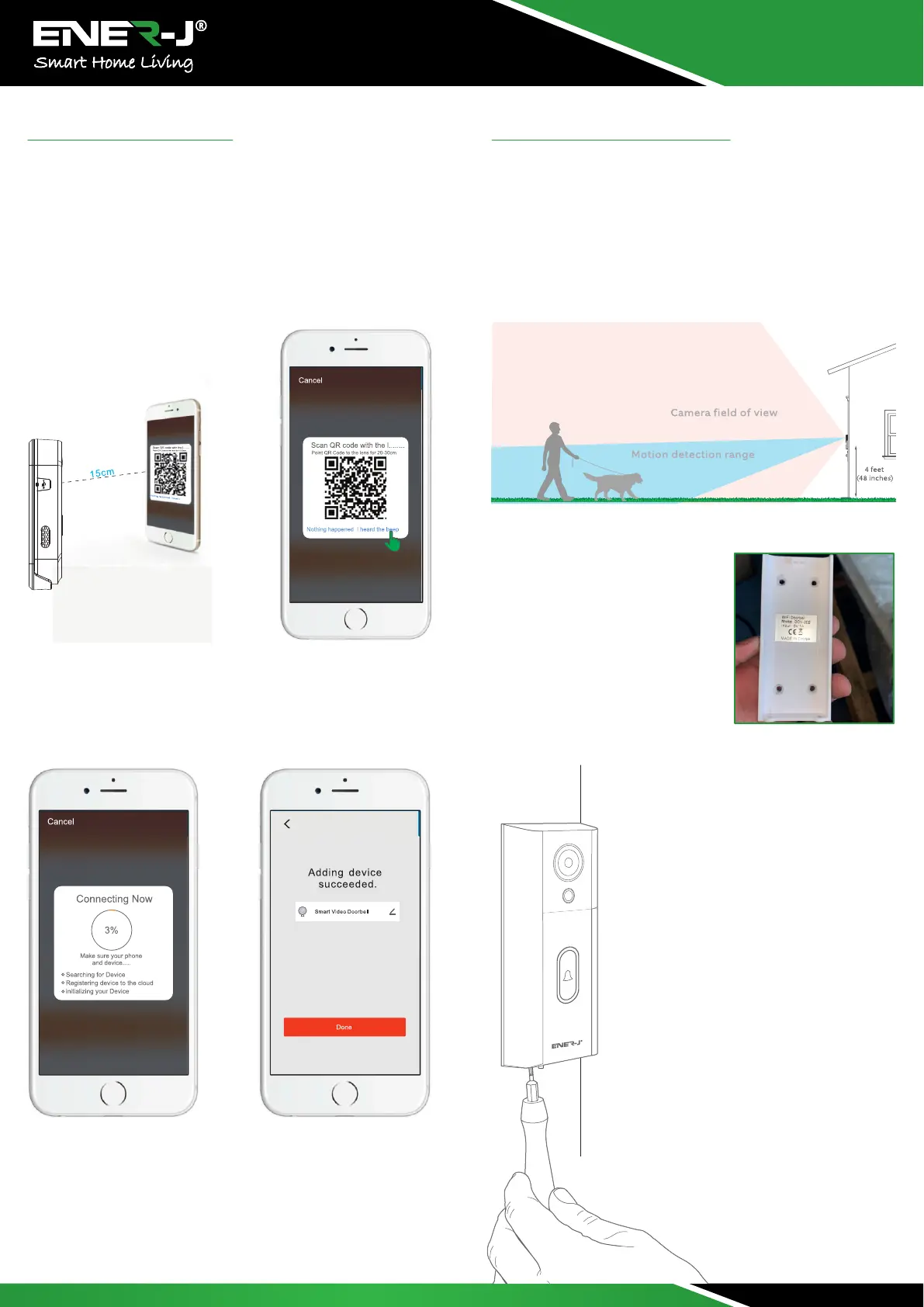
Choose "Continue" and use Doorbell's camera to scan QR Code by
showing it to your phone. Make sure to keep 15-20cm distance
between the mobile device to the doorbell. When you hear the
prompt, tap·1 heard a Prompt" and wait for device connection to
be successful.
If your camera fails to connect, please try to RESET the camera
and repeat all steps again.
When the app show Device added successfully, Congratulations!
The device is ready for use now!
Physical Installation
Install your Enerj Doorbell four feet off the ground for optimal
performance.
If you’re connecting to existing doorbell wiring that’s higher than
four feet, thus limiting where you can install Enerj Doorbell, use
the provided wedge mount to angle your Enerj Doorbell down.
Select an install height
Install anchors (optional)
If installing on stucco, brick, or
concrete, Mark 4 drill holes. Use the
provided anchors
Install the doorbell
Slotting it in at the top and clicking it
into place.
Lastly, use one of the provided securities
Screws and the star- shaped end of the
screwdriver bit to
secure the doorbell.
Secure with a security screw


 To Next Page