4
HEAT PUMP CONTROLLER FUNCTIONS
Your Enerflow heat pump makes use of an intelligent LCD controller. This controller
can be used to inform the user of certain parameters and change settings on the heat
pump unit. The changes that can be made with this controller include the following:
• Changing the desired water temperature;
• Setting up the timers and
• Activating the electrical element for fast heating mode.
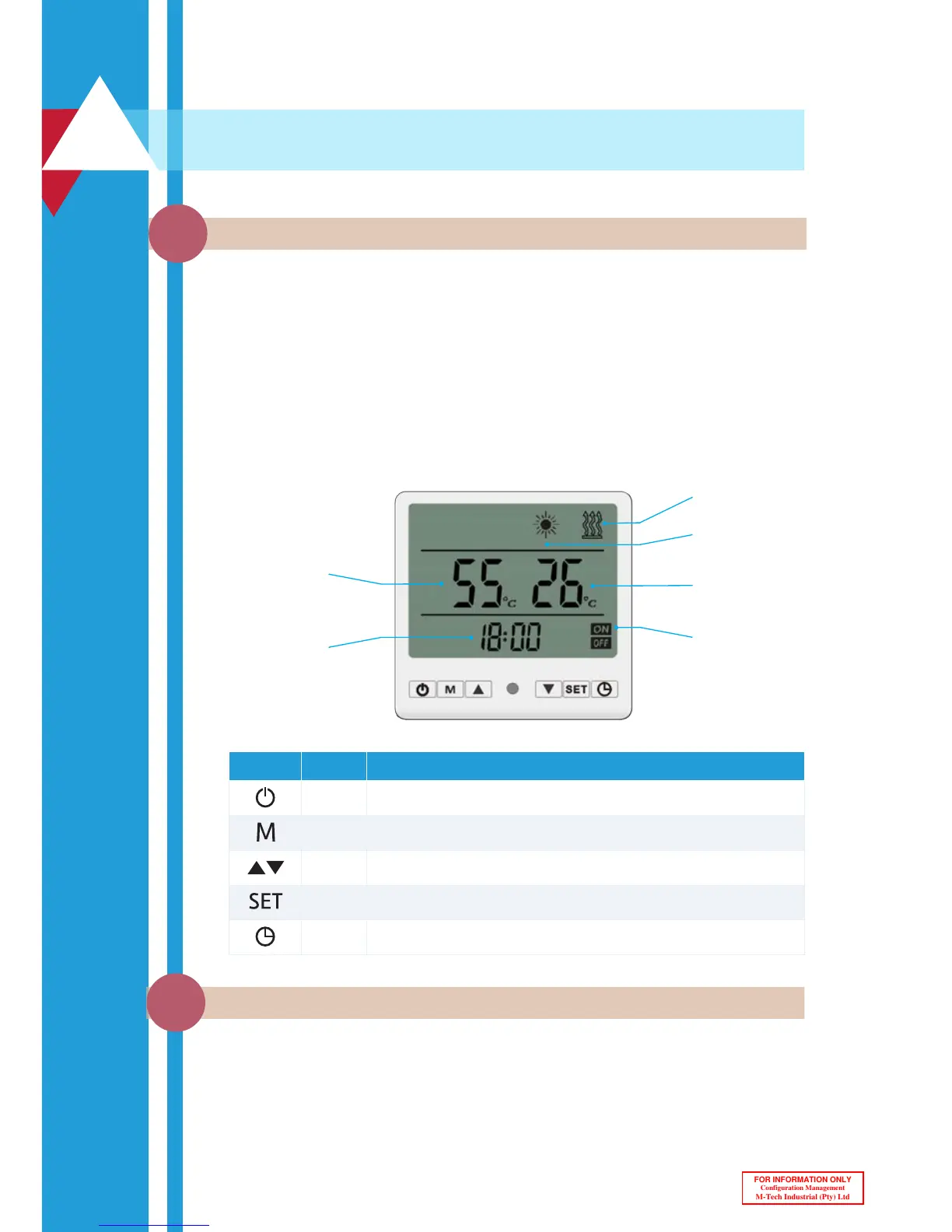
Below is a depiction of the controller interface and buttons:
Controller and Button Functions
2.1
Once the system is switched on at the main power distribution board (DB), the
intelligent controller will start up and display the initialization phase for a few seconds
after which the time will be displayed as 00:00. The unit is now in standby mode and
ready for operation.
Desired water
temperature
Time
Heating with
electric element
Heating with
heat pump
Timer active
Current water
temperature
2
Display Name Function
Power Switches the heat pump between heating mode and standby mode.
Mode Activates the fast heating mode by also engaging the geyser element.
Arrows Used for changing the current setting up or down.
Settings Used to change the time, day or parameter settings of the unit.
Clock Used for activating and setting up timers.
Heat Pump Modes
2.2



 To Next Page