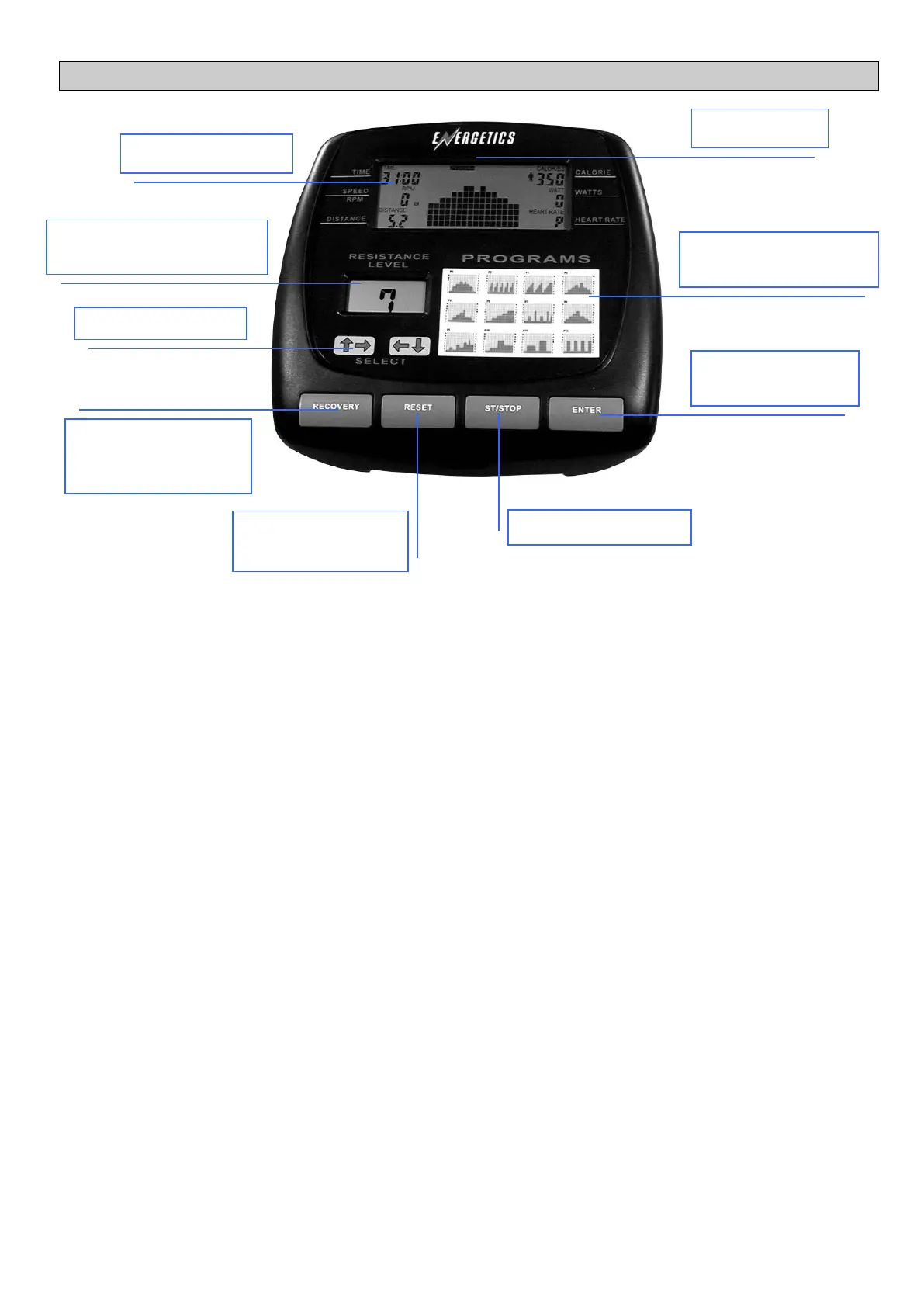
Batteries Open the battery compartment at the rear of the computer and install 4 x C Alkaline batteries. If the LCD is not
clear and only partial segments are displayed then remove the batteries, wait 15 seconds, and reinstall them. If the
problem persists then install new batteries. If new batteries do not fix the problem then consult your retailer. Under normal
use the batteries will last 6 months. AC adaptor socket for 6 volt @ 100mA AC adaptor, fitted on back of case, optional.
Power On The power will automatically turn on when the batteries are installed or any key is pressed or the computer
receives a speed signal.
Auto Power Off/On. As long as you are working out the computer will operate. If there is not input for 1 minute then the
computer will automatically turn off. All existing values will be held until the computer is powered up again.
COMPUTER KEY FUNCTIONS
Start Stop Key. By pressing this key the computer will START and STOP. When the computer is in the stop mode STOP
will be displayed. If no sensor input is detected for 4 seconds the computer will stop and STOP will be displayed. All
functions will resume when the sensor input is reactivated or the START key is pressed.
Reset Key. Press this key once to revert back to the previous display. Pressing and holding the RESET key for 2 seconds
will reset all functions and return you to the personal data entry section.
Recovery Key. Pressing this key at the end of your workout will activate the recovery function and test your fitness level.
Select Keys. These keys are used for selecting a variety of data as well as increasing or reducing the resistance level
PROGRAMMING FUNCTIONS
Personal Data Storage. There are 9 separate user personal data storage files listed from U1 to U9. When the computer
is powered-up it will first display the wheel size for 2 seconds then automatically enter the user data storage section where
you will be asked to enter your sex, age, height and weight. The first user number displayed will be the last user number
selected. Press the SELECT keys to select the required user number, U1 to U9, press ENTER. The computer will now
enter the personal data entry section and the male symbol will flash (along with the STOP indicator). If there is no change
to your personal data from the last workout press ENTER quickly 4 times. Press the SELECT key to change to female.
Once the correct sex symbol is flashing press ENTER. The computer will now prompt you to enter your correct age. Press
the SELECT KEYS until your correct age is flashing then press ENTER. Enter your height in cm. Select your correct height
and press enter. NOTE By pressing and holding either of the SELECT keys the display will cycle rapidly. Now select and
enter your weight in Kg. Press ENTER. You will now enter the programming mode.



 To Next Page