5
USER MANUAL
MPD-1007E
Discharge
Menu Description Setting range Default setting
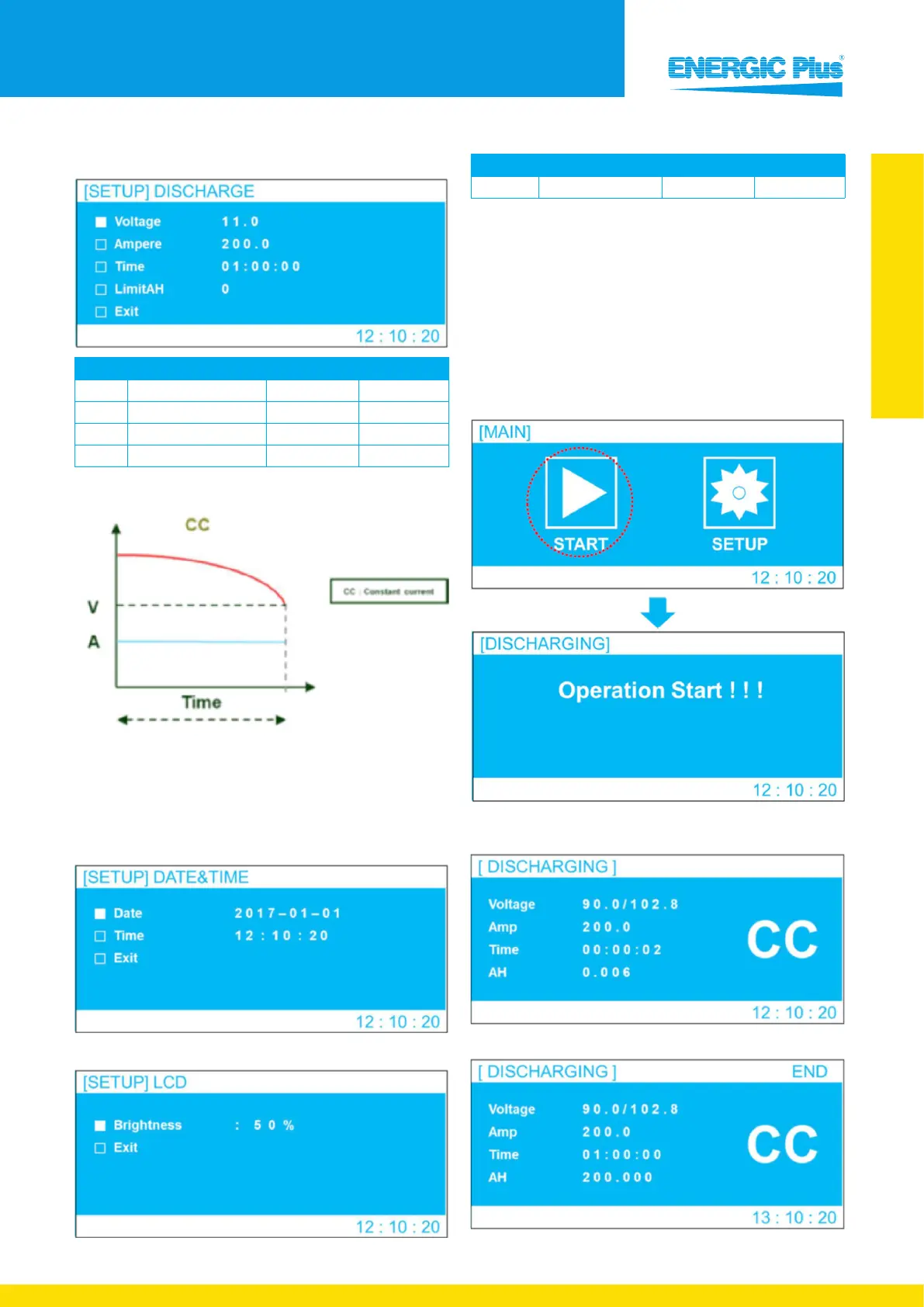
Voltage Discharge voltage setting 10.0 V ~ 96.0 V 43.2 V
Ampere
Discharge current setting 0 A ~ 200.0 A 50.0 A
Time Discharge time setting 0 H ~ 10 H 5 H
Limit AH
Discharge capacity 0 Ah ~ 2,000 Ah 0 Ah
Discharge step graph
End condition of discharge
• When battery voltage has reached the set voltage
• When set time has been reached
• The set Limit AH value has been reached
Date & Time
Backlight
Menu Description Setting range Default setting
Brightness LCD brightness setting 0 % - 100 % 50 %
4.1.2 Discharge operation
The discharge process commences as soon as the “START”
option is selected.
The MPD-1007E will discharge according to the voltage,
current and time set in the setup menu.
If you need to force shutdown while discharging, press
the Push switch for five (5) seconds.
1) If you select “START” in the Main menu as shown below,
discharging will start
2) Display of ongoing charging mode
• Constant current discharging display
• End of discharge


 To Next Page