7
USER MANUAL
MPD-1007E
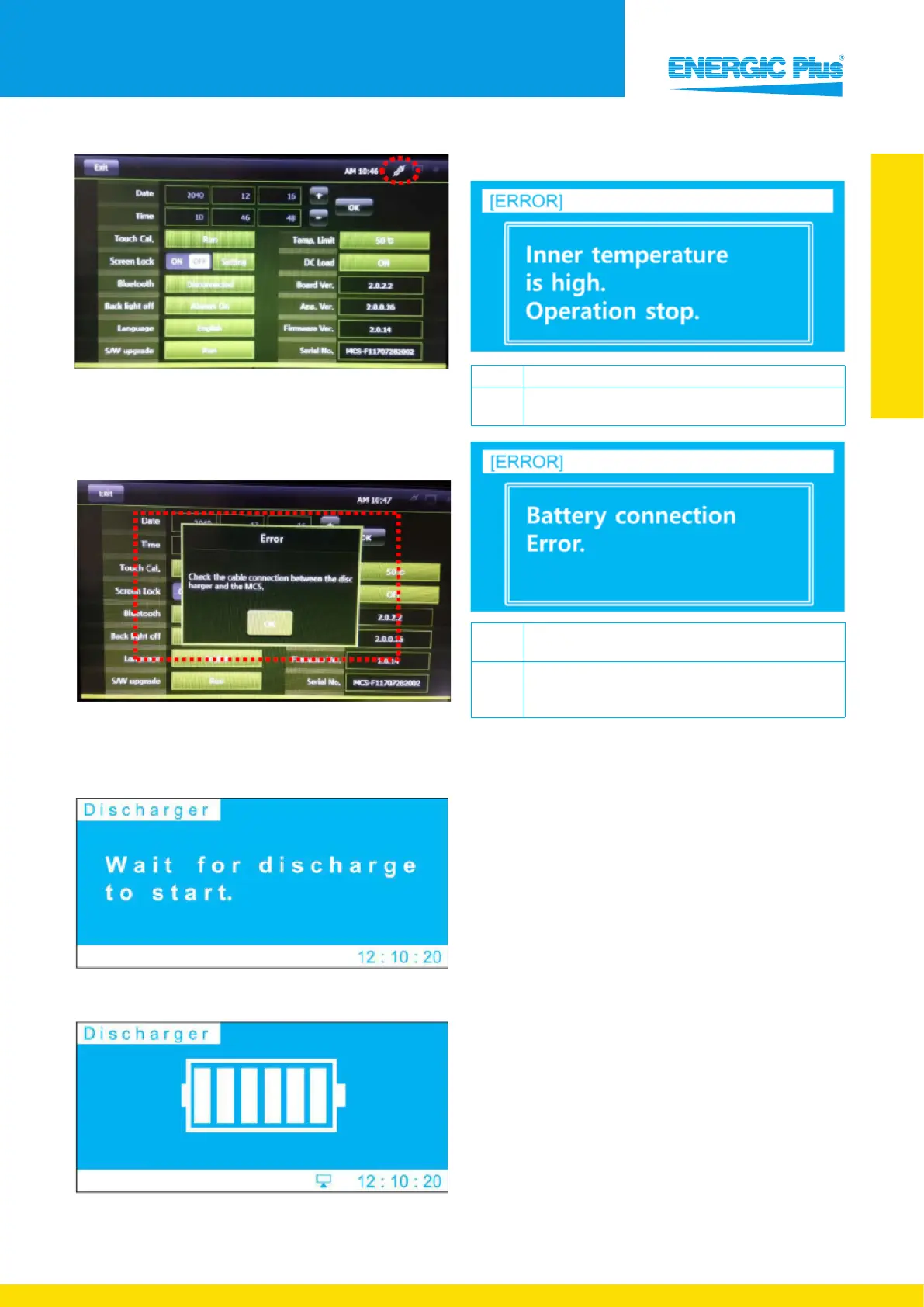
An icon will appear in the top right corner when the DC
Load is switched on. From now on, the regenerator will only
use your external discharger during the discharging process.
Display message
If the connection wasn’t successful, this message will
appear. What should you do?
1. Check the RS-232 cable connection
2. Make sure the MPD-1007E is switched on
When the connection is successful, this screen will appear
on your MPD-1007E machine.
Discharging...
After starting the discharge, this screen will appear to
indicate the process has started.
4.4. Error & alarm messages
Cause Internal operating temperature of the MPD-1007E is high.
Check
Make sure the ambient temperature is below 50 °C.
Please check if the cooling fan functions normally.
Cause
The connection between the MPD-1007E and the battery is
faulty.
Check
Please check if the connection between the MPD-1007E and
battery is correct. Make sure the (+) and (-) terminals are
correctly connected.


 To Next Page