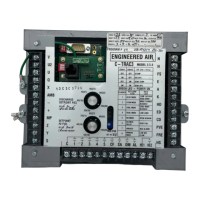
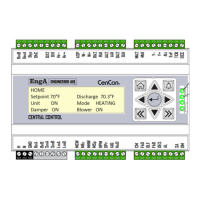
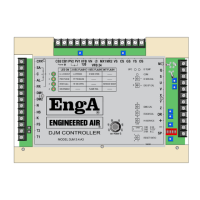
A DJM3
IOM-17 23 of 27 Mar 99 R3
INDUCEDVOLTAGEONREMOTECONTROLWIRING
TheDJM3controliscalibratedatthefactoryandthiscalibrationwillsatisfymostapplications.
Occasionallyimpedancefromlongwiringrunsorinducedvoltageontheremotewiringcauseittobe
outofcalibration.Torecalibraterefertothefollowingsection.Tocheckforinducedvoltages,
disconnectallofthefieldwiringinquestionfromtheDJM3.2whiletheunitisleftoperating,andcheck
forACvoltsacrosseachquestionablewireandground.
CALIBRATION
DischargeSensor
1. Accuratelymeasurethedischargeairtemperatureatthetemperaturesensorin°C.
2. ReadtheDJM3dischargetemperaturebyreadingthevoltageatmultimetertestpointDTEMP.
UsingaDCvoltmeter
3. IfadifferenceisfoundadjusttheDSENCALPottomatchtothetwovalues
DischargeSetpointCalibration
1. RecordthesettingsofDIPswitches1,2,and3.TurnoffDIPswitches1,2,and3.Ifthe“OR”
terminalisused,thewiretoterminal“OR”mustberemoved.
2. Dependingonwhichsetpointcontrolmethodisused:
a) JohnsonControlsTE6100
i) SetJohnsonControlsTE6100setpointto21°C
ii) ReadtheDJM3DischargesetpointatmultimetertestpointSPCusingaDCvoltmeter.
iii) AdjusttheDISSPCALPOTtomatchthereading.
b) DJM3BuiltinDial
i) Turnsetpointdialto21°C.
ii) ReadtheDJM3DischargesetpointatmultimetertestpointSPCusingaDCvoltmeter.
iii) Loosentheset‐screwonthesetpointknobandmovetheknobmarkertomatchwiththe
measuredvalue.
iv) Tightenset‐screw.
Foreitheroftheabove:
3. ReturntheDIPswitchestotheirnormalposition.
RoomSensorCalibration
1. Accuratelymeasuretheroomorreturnairin°Candsettheroomsetpointdialtothemeasured
value.
2. RecordthesettingsofDIPswitches1,2,and3.TurnoffDIPswitches1,2,and3.
3. ReadtheDJM3DischargesetpointatmultimetertestpointSPCusingaDCvoltmeter.
4. TurnDIPswitch3on
5. ReadtheDJM3DischargesetpointagainandadjusttheROOMCALPottomatchthesamevoltage
measuredinstep3.
6. ReturntheDIPswitchestotheirnormalposition.


 To Next Page