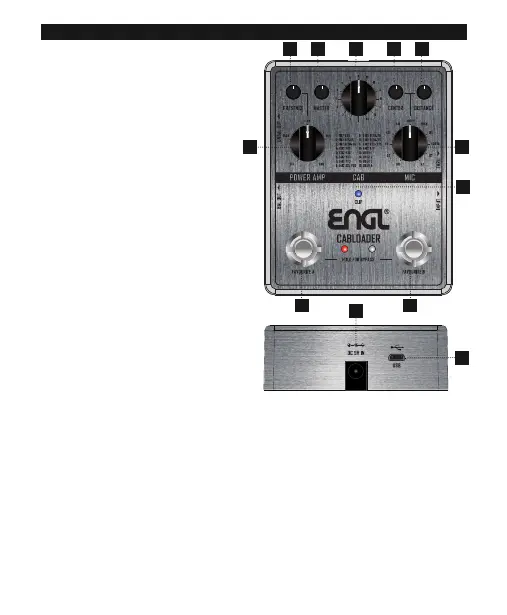
PEDAL LAYOUT
1. CAB
Select speaker cabinet model
2. POWER AMP
Select power amp tube type
OFF – Deactivate POWER AMP modelling
3. PRESENCE
Adjust the brightness of the POWER AMP
model
4. MASTER
Adjust the output volume level of
CABLOADER
5. MIC
Select microphone, model and positions
13 – 16 are for 3rd party IR models
6. CENTER
Adjust microphone offset
7. DISTANCE
Adjust distance between MIC and CAB
8. FAVOURITE A
Save and recall your settings as a preset.
Press and hold the footswitch for three
seconds to save your current settings.
Press to toggle your saved preset on/off.
9. FAVOURITE B
Save and recall your settings as a preset. Press and hold the footswitch for three seconds to save
your current settings. Press to toggle your saved preset on/off. Simultaneously press and hold
FAVOURITE A + FAVOURITE B for three seconds to bypass CABLOADER
10. CLIP LED
CLIP LED indicates power on/off, input clipping and bypass mode.
BLUE = Power connected and pedal on RED = Input signal clipping
OFF = Pedal in bypass mode
11. DC IN
Connect a 9V DC power supply
12. USB
Connect to your computer using a Micro USB cable to load 3rd party IR models using the
proprietary software
13
2
8 9
4 6 7
5
10
12
11


 To Next Page