Copyright 2007 – Enseo, Inc.
19
Default Limits
This section allow for various default values to be set for the tuner.
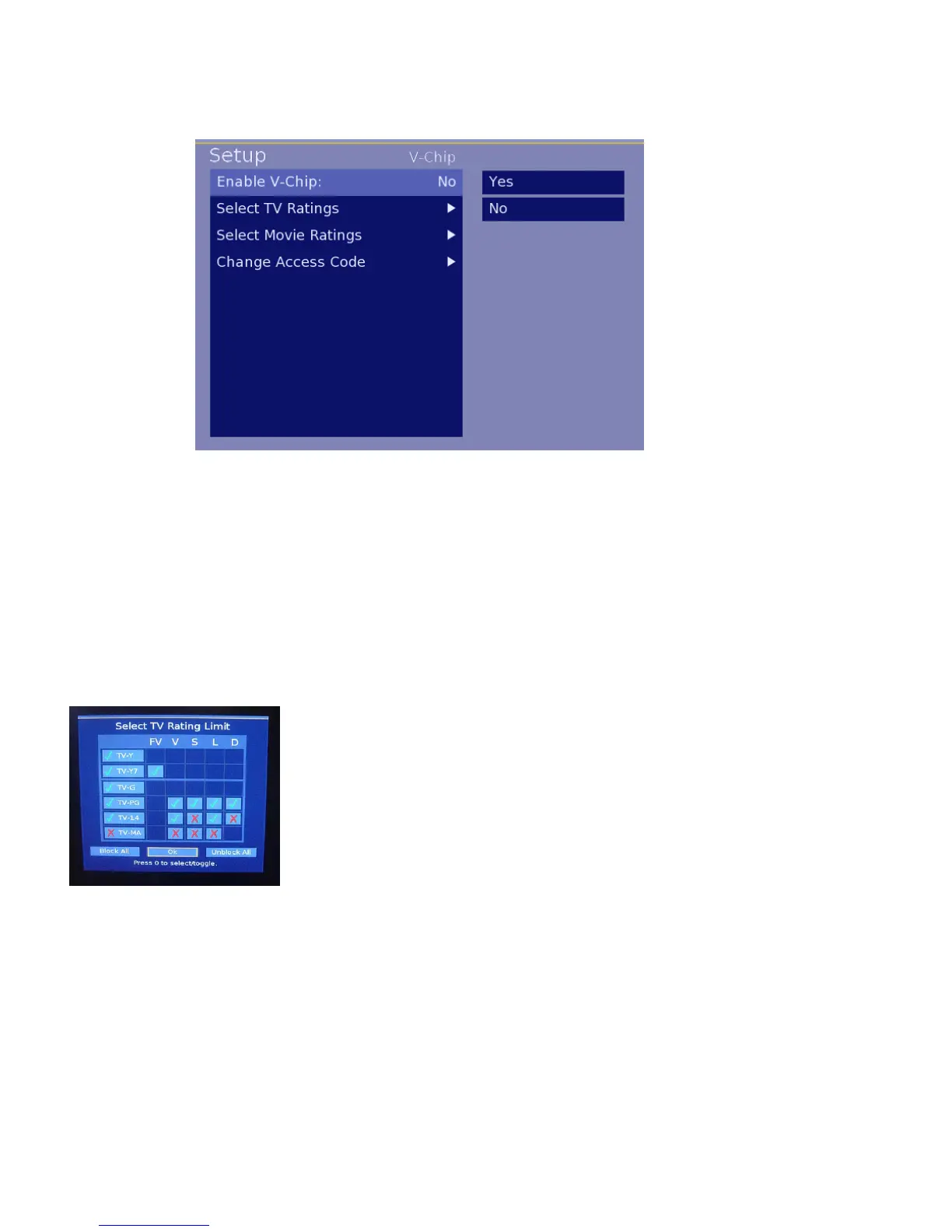
Enable V-Chip
This setting is a YES/NO selection. By setting YES, the default V-Chip settings
will be active when the ICS-SP30 starts up. Selecting NO disables the V-Chip
settings.
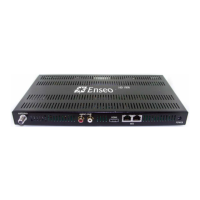
Select TV Ratings
This matrix allows for allowing or restricting various settings, including the TV
industry Parental Guide ratings, and new specific ratings:
TV-Y = All Children TV-Y7 = Directed to Older Children
TV-G = General Audience TV-PG = Parental Guidance Suggested
TV-14 = Parents Strongly Cautioned TV-MA = Mutual Audience Only
FV = Fantasy Violence (cartoons)
V = Violence
S = Sexual Situations
L = Language
D = Suggestive Dialog
Use the arrow keys to highlight a box in the matrix and then use the 0
button on the remote is used to toggle between selections. When
finished, move to the OK box and press 0 to save settings and exit.
Image 18 – V-Chip Default Limit Submenu
Image 19 – V-Chip TV Ratings



 To Next Page