page 7
• –EncryptedmediathathasbeengeneratedbytheNMPSMediaEncryptionStationwillhave
theabilitytoskipthroughcontentin30-secondincrements.Onepushofthisradialbuttonskipsthecurrent
progressinthemediaforwardby30seconds.Multiplesequentialpresseswillallowquickforwardtraversalof
themediainplay.Aprogressbarwillappearwithatimeindicatortodenotethecurrentpositioninthemedia.
Notethatwarningmessagesthatmaybeincludedonadisccannotbeskipped.
• –Duringoperation,theusermaywishtostopplaybackofthemedia.Whenthisradialbuttonispressed,
currentplaybackwillbestoppedandastatusindicatorwillappearonthetopleftofthescreendenotingthis.If
aplaycommandissentafterthestopcommand,themediawillbeginatthestartoftheinserteddisc(including
warningfilesifpresent).IfthestopbuttonispressedwhiletheEnseoNavyDVDplayerisinthestoppedstate,
theplayerwillejectthedisc.
• –Thereareanumberofconditionsthatmayoccurthatwillcompromisethesecurityofthe
EnseoNavyDVDplayer(pleaseseetheWarningssectionofthemanualbelowformoredetails).Whensucha
conditionoccurs,theEnseoNavyDVDplayerwillreportthisvialightingtheSecurityLEDred,displayingsecurity
onthefrontdisplay,andindicatingthetypeofwarningonthemainscreenoutput.
Note that resolving some conditions on the user’s end will clear some security statuses, while other statuses may
require contact with Enseo. Almost all security statuses will require resolution before the Enseo Navy DVD player
can resume normal playback.
• –CompatibleremotesshouldbepointedtowardtheIRReceiverinordertoreceivereliableIR
commands.
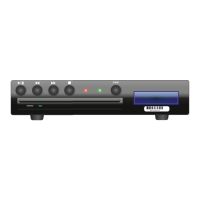
• –TheStatusLEDisresponsibleforindicatingthecurrentstatusoftheEnseoNavyDVDplayer.
WhentheLEDisorangeitisnotavailableforuse.Thisistypicalwhenpowerhasjustbeensuppliedtothe
playeranditisbooting,oriftheplayerhasbeensenttothestandbystate.IftheEnseoNavyDVDplayerhas
justreceivedpowerorhasbeenrestarted,itwillgointothebootingphaseofoperation,whichwillintroduce
theorangeStatusLEDforaboutaminutewhileitboots.Oncetheplayerfinishesbootingorapoweroncom-
mandissentfromthestandbystate,theStatusLEDwillchangetogreentoindicatetheEnseoNavyDVDplayer
isnowoperational.
• –ThePowerbuttonwilltogglethepowerstateoftheEnseoNavyDVDplayerwhenpressed.Ifthe
playerisintheONstate(greenStatusLED)whenthebuttonispressed,theplayerwillgotostandby(orange
StatusLED),andviceversa.
• –TheDVDdriveisbelowthebuttonsandLED.DVDstobeinsertedintotheEnseoNavyDVD
playerwillbeinsertedhere.Furthermore,anejectbuttonislocatedbelowthediscinsertionpointthatwillat-
tempttoejectanycurrentlyinserteddisc,ifpressed.
• –Thedisplaywindowthattheplayerwillusetoindicatecertaininformationtotheuserislocatedon
therightsideoftheEnseoNavyDVDplayer.Thedisplayshowstwolinesofstatus.Thefirstlinewillindicate
thestatustheEnseoNavyDVDplayerisin,suchasplaying,paused,stopped,security,andblank(whenin
standby).Thesecondlineindicatesthecurrentdate.
• –AsmalllabelindicatingtheserialnumberoftheEnseoNavyDVDplayerislocatedbelowthe
frontpaneldisplay.


 To Next Page