page 6
Enseo’sEncryptedDVDplayer(NavyDVD)isoneoftwoproductsthatiscapableofplayingsecurecontentgenerated
byEnseo’sNavyMotionPictureServiceMediaEncryptionStation.TheEnseoNavyDVDplayersupportsseveralmodes
ofvideoandaudiooutputthroughplaybackofDVDmediawhileensuringaveryspecificsetofcriteria.Thecriteria
include,butarenotlimitedto,measuresofsecurityacrosscontentencryption,encodingtomedia,tampering,andtheft.
TheEnseoNavyDVDplayerisaDVDplayerwithtwomainareasoffocus:thefirstisdisplayandcontrol,andthe
secondisconnections.Thedisplayandcontrolmodules,locatedonthepanelthatfacestheuser,aremodulesthat
theuserwillinteractwithduringnormaloperation.Theconnections,locatedonthepanelfacingawayfromtheuser,
interfacewithothersystems,andshouldnotbechangedfrequently.
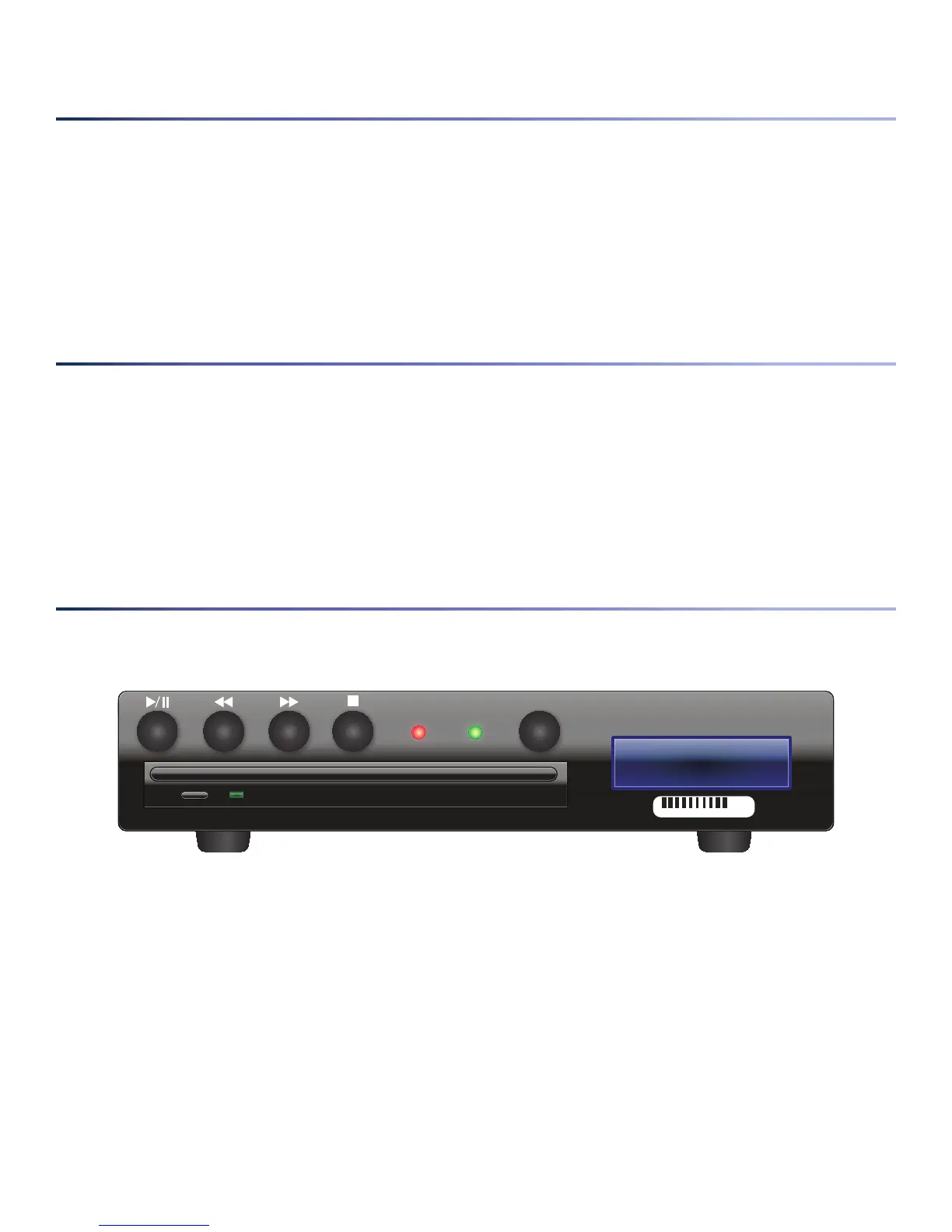
BelowisadiagramofthefrontpaneloftheEnseoNavyDVDplayer.
• –Duringoperation,theusermaywishtopauseandresumeplaybackofthemedia.Insertedmedia
isautomaticallysettoplay.PressingtheradialPlay/Pausebuttonwillsendplaybacktothepausedstate,and
resumeplaybackifthemediaiscurrentlypaused.Indicatorswillappearonthetopleftofthescreentodenote
thecurrentplay/pausedstate.
• –EncryptedmediathathasbeengeneratedbytheNMPSMediaEncryptionStationwillhave
theabilitytoskipthroughcontentin30-secondincrements.Onepushofthisradialbuttonskipsthecurrent
progressinthemediabackwardsby30seconds.Multiplesequentialpresseswillallowquickbackwardtraversal
ofthemediainplay.Aprogressbarwillappearwithatimeindicatortodenotethecurrentpositioninthe
media.
Note that warning messages that may be included on a disc cannot be skipped. Also note that if the media track
were skipped to before the beginning of the media, it will cycle around to several minutes before the end of the
track. This can be used for easy navigation to the credits.
201 0 4 4 1 8
PW R


 To Next Page