page 8
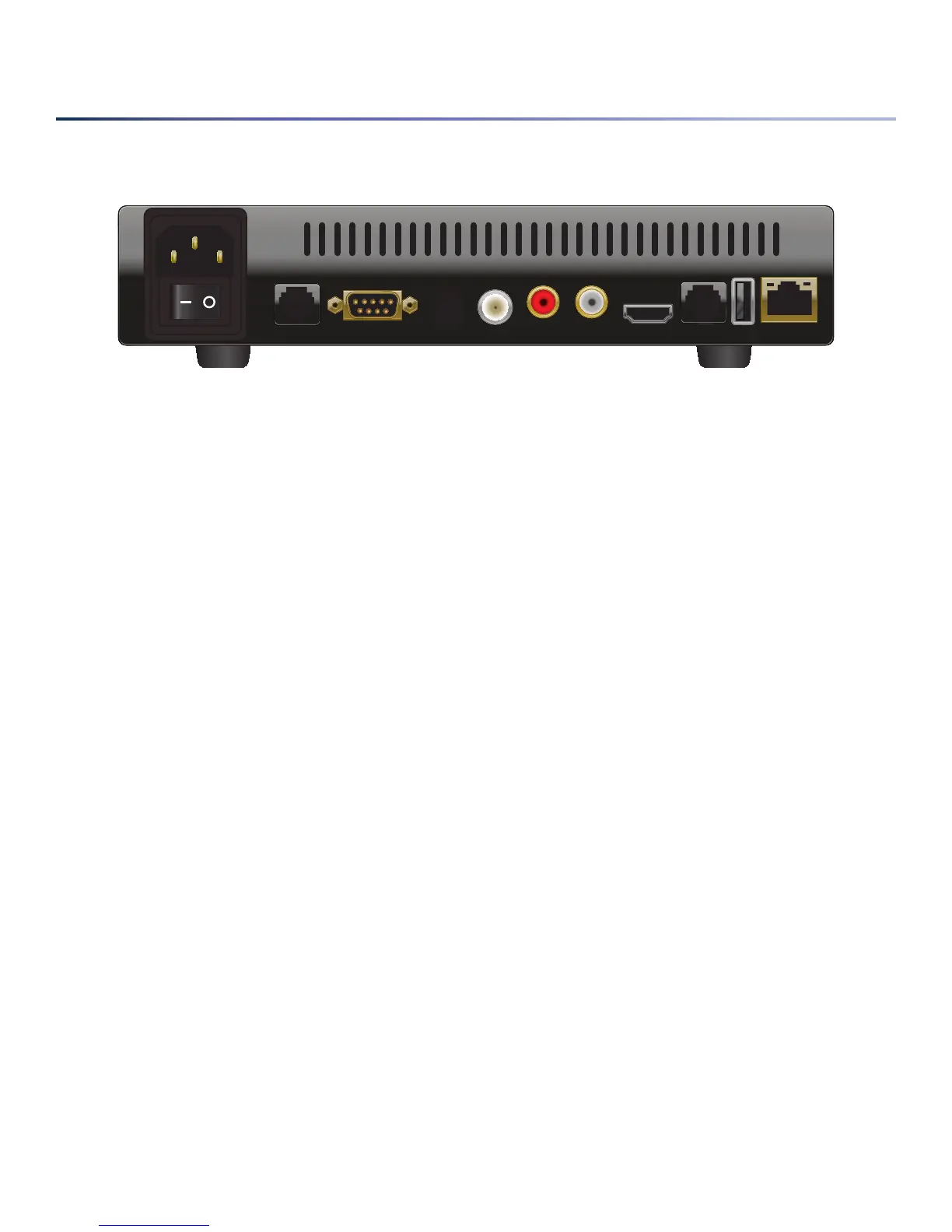
ThebackpaneloftheEnseoNavyDVDplayerisdisplayedinthediagrambelow.Thesearetheconnectionsthatthe
EnseoNavyDVDplayerhas;however,onlyafewareusedundertypicaloperation.
• –Thepowerinputiswhereapowersourceisconnectedtotheplayerviathepowercablesent
withtheEnseoNavyDVDplayer.
• –Whenfirstreceived,thepowerswitchwillbesettoOFF.Thismustbeturnedonbeforethe
EnseoNavyDVDplayerwillreacttoapowersource.
• –AuxisanauxiliaryportlocatedtotherightofthepowerinputontheEnseoNavyDVDplayer.Itisnot
usedundernormaloperation.
• –TheMaintPortisthemaintenanceportusedtohandleoperationsthatrequireRS-232feedback
fromtheEnseoNavyDVDplayer.Thisisnotusedundernormaloperations,andisprimarilyfortroubleshooting
issues.
• –DigitalAudioOutisasourceforopticalaudiooutoftheEnseoNavyDVDplayer.This
isalwaysactive,butnotrequiredtobeconnectedforthesystemtowork.Connectingthisporttoasoundsys-
temthatcanhandleopticalaudiowillsendaudiothattheEnseoNavyDVDplayerisproducingtothatsystem
forplayback.
• –VideoOutisaBNCconnectionthatsendscompositevideofromtheEnseoNavyDVDplayer.
Thisisalwaysactive,butisnotrequiredforthesystemtowork.Whenthisisconnectedtoanothersystemthat
receivescompositevideo,itwillplaybackthevideobeingproducedbytheEnseoNavyDVDplayer(whenitis
tunedtoit).
• –AudioOutistwoRCAconnectionsforleftandrightcompositeaudioout.Thisisalwaysactive,
butisnotrequiredforthesystemtowork.Connectingthesesourcesofaudiotoasoundsystemcapableof
compositeaudiowillsendaudiothattheEnseoNavyDVDplayerisproducingtothatsystemforplayback.
• –TheHDMIconnectionisanHDMIvideosourcegeneratedfromtheEnseoNavyDVDplayer.Thisis
alwaysactive,butisnotrequiredforthesystemtowork.ConnectadevicecapableofreceivinganHDMIsource
forhighdefinitionvideoandaudio(asprovidedbytheencodedmaterial).AnHDMItoDVIadaptormaybe
usedtopushvideosignaltoaDVIsourceonasystem.
Note that another source from the Enseo Navy DVD player may then be used to get audio from content playback.
• –DisplayControlhandlescontrolpropertiesoftheTVwhenavailablethroughtheEnseo
NavyDVDplayer.Currentlythisfeatureisnotactive,andisnotintendednorrequiredforoperationaluseofthe
NavyDVDplayer.
AU X
MA I NT
PO R T
DI G ITAL A UDI O
OU T
VI D EO
OU T
AU D IO OUT
HD M I
DI S PLAY
CO N TRO L
US B
NE T WOR K


 To Next Page