The AXK4 Series is a range of automatic entrance keypads manufactured by Entrematic, with AE Systems BVBA providing local support in Belgium. This manual covers two models: AXK4 and AXK4P/PS, which differ primarily in their operating frequency and transmission protocol.
Function Description
The AXK4 Series keypads are designed for automatic entrance control, allowing users to activate specific channels (CH1, CH2, CH3, CH4) by entering numerical codes. The device supports both standard code activation and a "zero length" code (free channel) for simplified access. It also includes features for repeating the last command, activating backlight, canceling typed sequences, and identifying the model. Configuration settings, such as changing codes and resetting to factory defaults, are accessible through a dedicated configuration mode.
Important Technical Specifications
Models: AXK4 and AXK4P/PS
Operating Frequency:
- AXK4: 433.92 MHz
- AXK4P/PS: 868.35 MHz
Radiated Power: < 1 mW for both models.
Transmission Protocol:
- AXK4: Rolling code data frame (can be changed to AES-128).
- AXK4P/PS: AES-128 encrypted data frame (can be changed to rolling code).
Available Channels: Four (CH1, CH2, CH3, CH4), each activated with a different numerical code.
Range: 50 m - 150 m (outdoors, line of sight).
Power Supply:
- Internal: 9 volt alkaline battery, 6LR61 (Lithium-ion battery for AXK4P/PS).
- External: 12-24 volt DC (Note: Internal battery must be disconnected when using external power supply).
Protection Degree: IP55.
Operating Temperature Range: -20°C to +50°C.
Weight: 165 g.
Dimensions:
- Front: 75.5 mm (width) x 91 mm (height).
- Side: 33 mm (depth).
- Back: 46 mm (width) x 60 mm (height).
Usage Features
General Operation:
- Activating a Channel (CHn): Enter the numerical code for the desired channel (CH1-CH4). The device will indicate activation with a green light for 2 seconds.
- Activating a Free Channel: If configured, a free channel can be activated without a code.
- Repeat Last Command: Within 10 seconds of the last command, pressing the repeat button will re-execute it.
- Activate Backlight: Pressing the backlight button illuminates the keypad for 2 seconds.
- Cancel Typed Sequence/Exit Mode: Pressing the cancel button will clear the current input or exit the "repeat last command" mode.
- Model Identification: The device can indicate its model (AXK4 or AXK4P/PS) with a red light for 1 second.
- Incorrect Code Entry: If an incorrect code is entered, a red light will flash for 2 seconds. Multiple incorrect entries (x10) will lock the device for 2 minutes.
- Incomplete Key Sequence: Any incomplete code sequence is aborted after 10 seconds of inactivity, returning the device to standby. The pause between key presses must be shorter than 5 seconds.
Code Management:
- User Codes: User codes must be between 0 (free channel) and 8 digits long.
- Changing Codes:
- Replacing an Old Code with a New One: Enter the old code, press the cancel button, enter the new code, and press the cancel button again. A red light for 3 seconds indicates success.
- Setting a "Zero Length" Code (Free Channel): Enter the old code, press the cancel button, then press the cancel button again. A red light for 3 seconds, followed by a green light flashing twice for 3 seconds, indicates success. Only one channel can be configured as a "free channel."
- Factory Default Codes: These can only be used for their predefined channels (e.g., code 3333 cannot be used for CH4).
Maintenance Features
Battery Replacement:
- The keypad is powered by a 9-volt alkaline battery (6LR61). For the AXK4P/PS model, a Lithium-ion battery is used.
- To replace the battery, open the keypad housing, disconnect the old battery, and connect the new one.
- Important: If using an external power supply, the internal battery must be disconnected.
- Disposal: Exhausted batteries must be disposed of in dedicated WEEE containers or collection centers, not in domestic refuse bins.
Configuration State (CONFIG state):
- Accessing CONFIG State: Enter the CONFIG access code (factory default: 676158). The CONFIG access code must be between 4 and 8 digits long.
- Changing CONFIG Code: Follow the same procedure as changing a user code.
- Restoring Free Channel to Default: In CONFIG state, press the "()" button, then the cancel button. A red light for 3 seconds indicates success.
- Toggle ROLL/ENC on CH1-CH2 and CH3-CH4: In CONFIG state, press the "3" button (for CH1-CH2) or "4" button (for CH3-CH4), then the cancel button. A red light for 3 seconds indicates success.
- Code Change Function ENABLE/DISABLE: In CONFIG state, press the "5" button (ENABLE) or "6" button (DISABLE), then the cancel button. A red light for 3 seconds indicates success.
- RESET to Factory Default Condition: In CONFIG state, press "7" and "9" simultaneously for 10 seconds. A red light for 10 seconds indicates success.
- Total Configuration LOCK: In CONFIG state, press "2" and "8" simultaneously for 10 seconds. A red light for 10 seconds indicates success. Once locked, configuration changes and factory resets are no longer possible.
- Time Limit: Configuration actions must be completed within 30 seconds. If the time limit is exceeded, the keypad returns to standby without saving changes.
Environmental Considerations:
- The product should not be installed in explosive areas or atmospheres with inflammable gas or fumes.
- Packaging materials (plastic, polystyrene) should be disposed of carefully according to environmental requirements and kept out of reach of children.
- The product itself, when it reaches its end of life, should be disposed of at special recycling centers as per local environmental regulations for electronic waste.

 Need help?
 General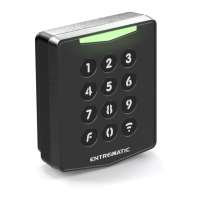

 To Next Page