4 (4)
9
07
08
09
10
11
16
27
28
29
30
40
44
45
A0
b1
LB = 2 s
UP
10
11
00
01
02
03
04
13
15
20
68
69
94
95
96
97
b1
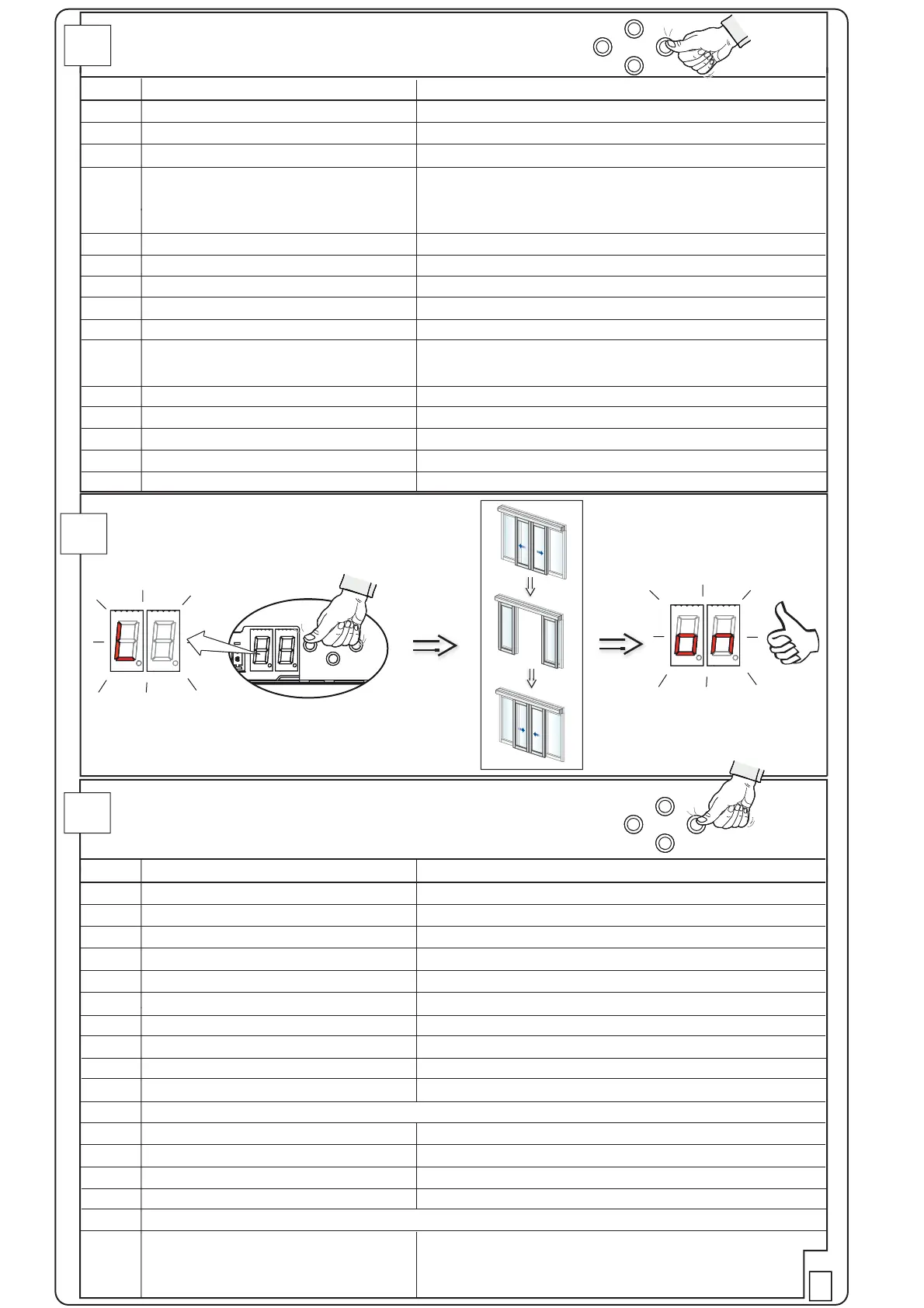
Common parameters
HP = High Performance
EP = Exceptional Performance
No. Parameter Name Value
50
70
20-22
01
07
Max. 60 N
01-05, as low as possible to get a smooth running
01
01-40 kg x 10
Make mechanical adj. if the value is higher than. HP<50N, EP<70N
00 (01 if anything is connected to IOU-TB:18 and TB:19)
00 (01 if anything is connected to IOU-TB:1 and TB:5)
00 = NO, 01 = NC
00 if PS-6
00 no access code
01 press arrow 2 sec.
02 four pushes
High Speed Opening
Low Speed
High Speed Closing
Hold Open Time
Key Hold Open Time
Hold Force
Run Program
Partial Hold Open Time
Door weight
Friction
Control following parameters if I/O-board is used:
Fire Impulse function
Emergency opening
Emergency opening configuration
OMS function on IOU
OMS Parameter:
OMS-1 Key Lock
SELECT
SELECT
LEARN/
EXIT
Parameter settings for escape route
No. Parameter Name Value
00 = NO 01 = NC
00 = NO 01 = NC
02 (01 if only one sensor)
02 when escape route (MCU-ER+24V battery)
(01 no escape route (MCU+12V battery))
(00 no monitoring (no battery))
Set to 80% of certified COW
01 (00 if no inner impulse monitoring)
00 = NO 01 = NC
00 = NO 01 = NC
02 (01 if only one sensor)
Set to, max, 20% of certified COW and add remaining part of
COW for one door leaf
23 hours
00 = OFF
00 = OFF
02 = 2-motors, (01 = 1-motor)
02 = escape route (four pushes)
Presence Impulse 1 Conf
Presence Impulse 2 Conf
Presence Impulse Monitoring
Emergency Unit Monitoring
Partial Open Position
Inner Impulse Monitoring
Side Presence Input 1 Conf
Side Presence Input 2 Conf
Side Presence Impulse Monitoring
Side Presence Activation Distance
Emergency Unit Test Interval
Exit Lock
Stop function
Escape Route Motor Configuration
OMS-1 Key Lock
Make a LEARN
NOTE! If the display is flashing after LEARN, see
chapter Start-Up in the Installation and Service Manual


 To Previous Page