ENTTEC website:
http://www.enttec.com/dmx_usb/vcom_setup.exe
4-If item 1 & 2 have a yellow exclamation mark after installing the
driver, you will need to force a driver install. Install the driver files
by downloading the driver ZIP
http://www.enttec.com/dmx_usb/CDM_2.00.00. zip then unpack
its contents into the directory c:\VCOM.
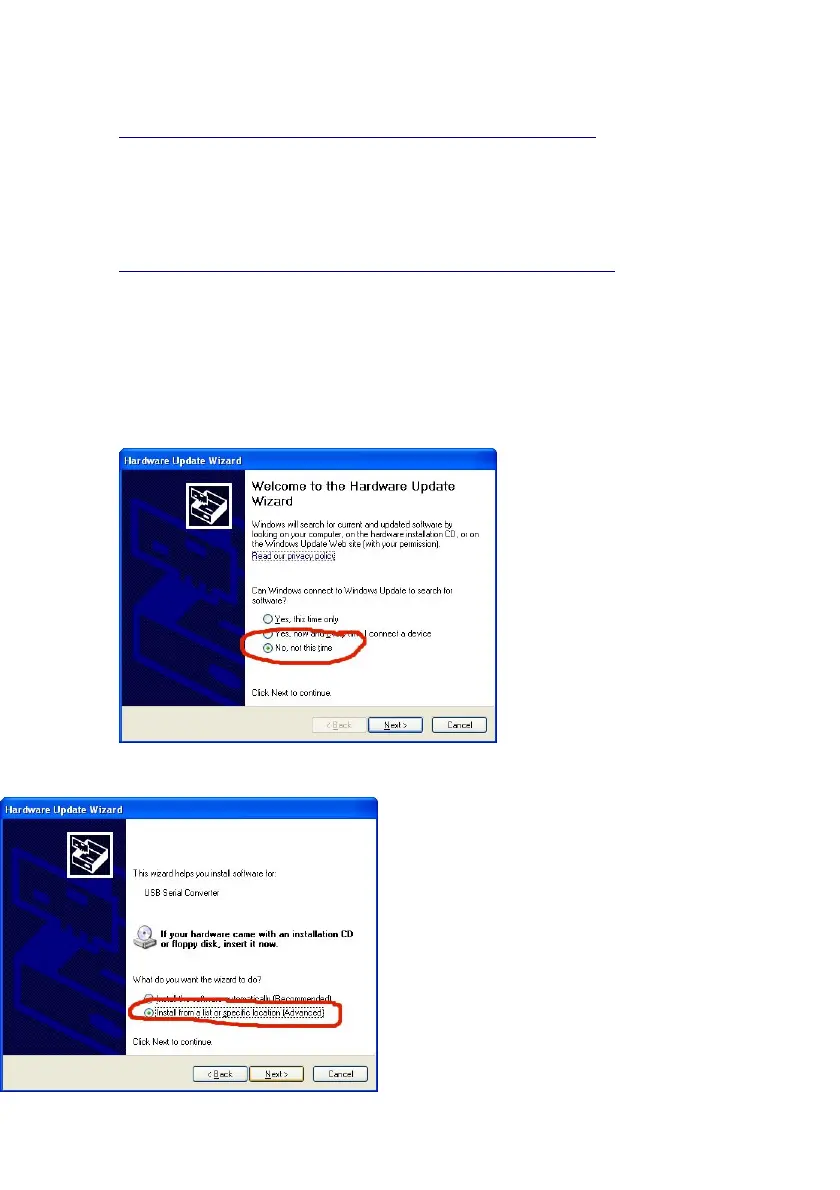
Left-click item 1 and select "Update Driver" and follow the
screen shots below, the important settings have been circled in
RED.
5-If your device
manager now looks like
the one above for
section 1 & 2, the DMX
USB Pro is now
connected and
configured correctly. If
you still have problems,
please check the
software you are using.
6-If you still have the yellow exclamation marks or the items 1 & 2
do not appear in your device
manager,
please change/swap the USB cable
and/or the USB Port. You can also
try installing your DMX USB PRO
on another computer, to eliminate all
possible causes of the problem.
18


 To Next Page