EasyManua.ls Logo

Enttec ODE MK3 - User Manual

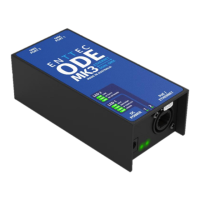
Enttec ODE MK3
12 pages
Print Icon
To Next Page IconTo Next Page
Loading...
ODE MK3 (70407)
Visit the ENTTEC website for the latest version.
..
USER MANUAL
1 |
ID: 5946689
ODE MK3 - User Manual
Two-Universe bi-directional eDMX DMX/RDM controller supporting Power over Ethernet (PoE).
.
The ODE MK3 is a solid-state RDM compatible DMX
node designed for the highest level of portability,
simplicity, and practicality. A perfect solution for
converting from a multitude of Ethernet-based
lighting protocols to physical DMX and vice versa
without the need for adaptors.
With 2 Universes of bi-directional eDMX <–>
DMX/RDM support female XLR5s and a PoE (Power
over Ethernet) RJ45, ODE MK3 is simple and easy to
connect physical DMX devices to your network
infrastructure.
Connectors with EtherCon lockable feature in
addition make the wiring secured with a peace of
mind.
The configuration as well as the firmware updates of
the ODE MK3 are managed through the localhost web
interface to simplify commissioning from any
computer on your network.
Features
Two-Universe bi-directional DMX / E1.20 RDM
female XLR5s.
One PoE (Power over Ethernet) RJ45 port
supporting IEEE 802.3af (10/100 Mbps) and one
optional DC 12-24v power input.
Secured ‘EtherCon’ connectors.
Support RDM over Art-Net & RDM (E1.20).
Support for DMX -> Art-Net (Broadcast or
Unicast) / DMX -> ESP (Broadcast or Unicast) /
DMX -> sACN (Multicast or Unicast).
HTP/LTP Merging support for up-to 2 DMX
sources.
Configurable DMX output refresh rate.
Intuitive device configuration and updates
through the inbuilt web interface.
‘Current Port Buffer’ allows live DMX values to be
viewed.
Question and Answer IconNeed help?

Do you have a question about the Enttec ODE MK3 and is the answer not in the manual?

Summary

Features Overview

Safety Information

Electrical Safety

Guidelines for safe electrical installation and preventing hazards.

System Planning and Specification

Recommendations for planning installations and specifying system components.

Installation and Wiring Safety

Protection from Injury During Installation

Crucial safety steps for personnel during product installation.

Installation Safety Guidelines

General guidelines to ensure safe installation and prevent damage.

Wiring Diagrams

Visual representation of electrical and network connections for the ODE MK3.

Hardware Features

DMX Connectors

Description of the 5-pin XLR DMX ports and their pinout.

LED Status Indicator

Explanation of the status and activity LEDs on the device.

Functional Features

PoE (Power over Ethernet)

How the device supports power delivery via Ethernet cable.

Bi-directional eDMX Protocols

Details on converting between eDMX protocols and DMX.

Operational Modes and Networking

Merging

How to merge multiple DMX sources using HTP or LTP.

Out of the Box Configuration

Default IP address and DMX input settings upon first use.

Networking

Configuration options for DHCP and static IP addressing.

Web Interface

Home Tab Overview

Description of the read-only device overview provided on the Home tab.

Settings Configuration

Network Settings

Configuration of DHCP, IP address, NetMask, and Gateway.

Port Settings

Configuration of Type, Protocol, Universe, Refresh Rate, and Options for each port.

Control4 Support

Functionality for integrating with Control4 systems.

Network Statistics

Firmware Update

Servicing and Maintenance

Cleaning Procedures

Recommended methods for cleaning the device to ensure longevity.

Package Contents

Ordering Information

Overview

The ENTTEC ODE MK3 (Part No. 70407) is a solid-state, RDM-compatible DMX node designed for portability, simplicity, and practicality in converting between Ethernet-based lighting protocols and physical DMX, and vice versa. It is an Australian-designed and manufactured device.

Function Description

The ODE MK3's primary function is to convert between Ethernet-DMX protocols and USITT DMX512-A (DMX). It supports bi-directional eDMX, allowing for both DMX input and output. The device can receive eDMX protocols such as Art-Net, sACN, and ESP, converting them to DMX with HTP or LTP merging options. Conversely, it can convert DMX to eDMX protocols with options for Unicast or Broadcast/Multicast. Each of its two ports can be configured individually, meaning they can use different universes and protocols, or even the same universe and protocol. For example, one port can be set to Universe 10 and the other to input Universe 3, or both outputs can be set to output Universe 1.

Important Technical Specifications

  • DMX Ports: Two 5-Pin Female XLR connectors for bi-directional DMX/RDM (E1.20) support.
  • Ethernet Connection: One RJ45 EtherCon connection, supporting IEEE 802.3af (10/100 Mbps).
  • Power Input:
    • One PoE (Power over Ethernet) RJ45 port (IEEE 802.3af active PoE).
    • One optional DC 12-24V power input. DC power input has higher priority over PoE.
  • Housing: Electrically insulated ABS plastic.
  • LED Indicators: Two LEDs for Status and Link/Activity.
    • LED 1 (Status):
      • On: IDLE
      • 1Hz blink: DMX / RDM
      • 5Hz blink: IP CONFLICT
      • Off: ERROR
    • LED 2 (Link/Activity):
      • On: Link
      • 5Hz blink: ACTIVITY
      • Off: NO NETWORK
    • Both LEDs blink at 1Hz: Indicates the ODE MK3 requires a firmware update or a reboot.
  • IP Rating: IP20, not designed for exposure to moisture or condensing humidity.
  • DMX Pinout (5-pin XLR):
    • Pin 1: 0V (GND)
    • Pin 2: Data -
    • Pin 3: Data +
    • Pin 4: NC
    • Pin 5: NC
  • DMX Cable Specifications: Any twisted pair, 120ohm, shielded EIA-485 cable suitable for EIA-485 (RS-485) with low capacitance twisted pairs, overall braid and foil shielding. Conductors should be 24 AWG (7/0.2) or larger.
  • DMX Line Limitations: Maximum 32 devices per DMX line before regeneration. DMX chains should be terminated with a 120Ohm resistor. Maximum recommended DMX cable run is 300m (984ft).
  • eDMX Protocol Support:
    • Art-Net: Art-Net 1, 2, 3 & 4 (Universes 0-32767). RDM (ANSI E1.20) supported when Type is Output (DMX Out) and Protocol is Art-Net.
    • sACN: Universes 0-63999. sACN priority configurable (default 100). Supports a maximum of 1 multicast universe with sACN sync.
    • ESP: Universes 0-255.

Usage Features

  • Configuration: Managed through an intuitive inbuilt web interface accessible via any modern web browser (Chromium-based browser recommended). The web interface allows for device configuration and firmware updates.
  • Device Discovery:
    • Direct IP address entry in browser URL field (if known).
    • IP scanning software (e.g., Angry IP Scanner).
    • Art Poll (e.g., DMX Workshop for Art-Net).
    • ENTTEC EMU software (Windows and MacOS) for discovering devices on the Local Area Network.
  • Networking:
    • DHCP (Default): Automatically requests an IP address from a DHCP server.
    • Static IP: Default static IP is 192.168.0.10. Fallback to static IP if DHCP server is slow or unavailable.
    • IP Conflict Avoidance: For static networks with multiple ODE MK3s, ENTTEC recommends connecting one device at a time to configure its IP.
    • Recommended Protocols for DHCP: sACN protocol or Art-Net Broadcast for continuous data reception if DHCP server changes IP address. Unicasting data to a device with its IP address set through a DHCP server is not recommended for long-term installations.
  • Merging: Available when the 'Type' is set to Output (DMX Out). Supports merging values from two different Ethernet-DMX sources (from different IP addresses) if they use the same protocol and universe.
    • Disabled: No merging, only one source.
    • HTP Merge (Highest Takes Precedence - Default): Channels are compared one-to-one, and the highest value is set.
    • LTP Merge (Latest Takes Precedence): The latest source received is used.
    • Merge Buffer: If a source stops being received, it is held in the merge buffer for 4 seconds.
  • DMX Output Refresh Rate: Configurable. Default is 40 Frames per second (fps).
  • Current Port Buffer: Allows live DMX values to be viewed on the web interface.
  • EtherCon Connectors: Lockable feature for secure wiring.
  • Out of the Box Configuration:
    • Default to DHCP IP address.
    • Default to DMX Input, listening to DMX512-A and converting to Art-Net-4 packets sent on Universe 0 to IP address 192.168.0.11.
  • sACN CID: Unique Component Identifier displayed in web interface for sACN communication.
  • Control4 Support: Sends SDDP (Simple Device Discovery Protocol) packets for faster configuration in Control4's Composer software.

Maintenance Features

  • Firmware Updates: Managed through the web interface. Latest firmware files (.bin extension) can be downloaded from www.enttec.com.
  • Servicing: The device has no user-serviceable parts. Damaged parts should be replaced.
  • Inspection:
    • Ensure all connectors are securely mated and free from damage or corrosion.
    • Check for physical damage or crushing of cabling.
    • Inspect for dust or dirt buildup.
  • Cleaning:
    • Power Down: Always power down the system before cleaning.
    • Method: Use low-pressure compressed air to remove dust and loose particles. If necessary, wipe with a damp microfiber cloth.
    • Prohibited: Do not use abrasive, corrosive, or solvent-based cleaning products. Do not spray the device or accessories.
    • Environmental Factors: Frequent cleaning may be required in environments with stage fog, smoke, high airflow, high pollution, cigarette smoke, or airborne dust (from construction, natural environment, pyrotechnics).
  • Factory Default Reset: Resets device name, enables DHCP, sets static IP to 192.168.0.10 / Netmask 255.255.255.0, sets output protocol to Art-Net, merging Unicast address to 192.168.0.11, sets Port 1 and Port 2 Universe to 0, and disables RDM.
  • Restart Now: Allows for device reboot through the web interface.

Enttec ODE MK3 Specifications

General IconGeneral
BrandEnttec
ModelODE MK3
CategoryController
LanguageEnglish

Related product manuals