EasyManua.ls Logo

Enttec Din Pixie - User Manual

Enttec Din Pixie
16 pages
Print Icon
To Next Page IconTo Next Page
Loading...
DIN PIXIE
73539
User Manual
SPI Pixel Strip/Dot controller: controls up to 4 universes of LED pixels over two outputs featuring
standalone mode.
Question and Answer IconNeed help?

Do you have a question about the Enttec Din Pixie and is the answer not in the manual?

Summary

Safety

Electrical Safety

Safety guidelines for electrical operation and protection against excess voltage and faults.

System Planning and Specification

Optimal operating temperature, IP rating, and environmental conditions for device performance.

Protection from Injury During Installation

Use of PPE and ensuring secure installation to prevent personal injury during setup.

Installation Safety Guidelines

Precautions for device installation, including airflow, temperature, environment, and handling.

Hardware Feature

Physical Dimensions

Detailed measurements and diagrams of the DIN PIXIE unit's physical size and form factor.

Mounting Methods

Instructions and illustrations for DIN rail mounting and surface mounting the DIN PIXIE.

RJ45 Pin Out to DMX Input

LED Status Indicator

Explanation of the LED colors and their corresponding status indicators on the DIN PIXIE.

Application Diagram

Visual overview of the DIN PIXIE's operation modes: DMX, USB, and Standalone.

Wiring Diagrams

USB Mode Wiring

Diagram illustrating the connections and wiring for operating the DIN PIXIE in USB mode.

DMX Mode Wiring

Diagram showing the wiring and connections for the DIN PIXIE when operating in DMX mode.

Standalone Mode Wiring

Diagram illustrating the wiring setup for the DIN PIXIE when used in standalone mode.

Functional Feature

USB Mode Operation

Details on using the DIN PIXIE via USB, including configuration, management, and API.

DMX Mode Operation

Explanation of DMX mode, input, personalities, and pixel control capabilities.

Application Example

Standalone Mode Operation

How the DIN PIXIE operates in standalone mode for playback without external controllers.

Out of the Box - Factory Default

Configuration Software - ENTTEC EMU

Introduction to the ENTTEC EMU software for device configuration, testing, and updates.

Discover the Device

Steps to find and connect to the DIN PIXIE using the EMU software's device discovery feature.

Device Configuration

Information on configuring the DIN PIXIE's state, serial number, DMX personality, and pixel management.

Send

Data Source Selection

Choosing input data sources like test patterns or live Art-Net for testing DMX output.

Output Destination

Specifying output ports and pixel capacity for data transmission during testing.

Firmware

Firmware Update Procedure

Step-by-step guide to update the DIN PIXIE firmware using the EMU software.

Boot

Accessing Boot Mode

Instructions to enter boot mode for firmware updates or factory resets via USB and EMU.

Standalone

Recording Shows

Configuring input/output for recording sequences/shows, including show name and playback settings.

Playback

Export Show to File

Downloading recorded sequences/shows from DIN PIXIE to a computer as a binary file.

Export to.pshow File

Exporting the sequence/show from DIN PIXIE to a .pshow file for duplication.

Import from.pshow File

Importing a .pshow file onto the DIN PIXIE from a computer for duplication.

Delete Show

Removing current sequences/shows from the DIN PIXIE to prepare for new recordings.

Servicing, Inspection & Maintenance

Cleaning Procedures

Guidelines for cleaning the DIN PIXIE, including safety measures and recommended cleaning methods.

Revision History

Package Contents

List of items included in the DIN PIXIE product package.

Ordering Information

Details on how to order the DIN PIXIE, including part number and support contact.

Overview

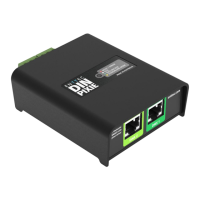
The ENTTEC DIN PIXIE (73539) is a versatile SPI Pixel Strip/Dot controller designed for managing LED pixels across various applications. It offers control over up to four universes of LED pixels using two outputs and features a standalone mode for independent operation. This device is Australian designed and made, emphasizing robust construction and reliable performance.

Function Description:

The DIN PIXIE acts as a bridge between DMX512 or USB data and SPI-controlled LED pixels. In DMX Mode, it efficiently converts two DMX Universes (512 channels each) into two universes of SPI pixel output. When operating in USB Mode, it unlocks its full potential, offering control over four universes of pixels. The device supports a wide range of over 20 SPI protocols for pixel strips and dots and allows for the creation of custom pixel protocols, providing flexibility for diverse lighting setups. Its standalone mode enables playback of pre-recorded shows without the need for an external computer or controller, making it suitable for installations requiring consistent, independent operation.

Important Technical Specifications:

  • Operating Voltage: Wide (5-48VDC), allowing it to be powered from the same source as the pixels.
  • Connectors: Pluggable screw terminal output connectors for easy wiring, and a robust USB type-B connector for configuration and control.
  • DMX Input: Two RJ45 ports for DMX input, compliant with ANSI E1.27-2.
  • Protection: All ports feature ESD surge protection and resettable fuses to prevent external faults and electrical noise propagation.
  • IP Rating: IP20, indicating it is not designed to be exposed to moisture or condensing humidity.
  • Mounting: Supports both surface mount and TS35 DIN mount (using the provided DIN Clip accessory). Physical dimensions are approximately 92.98mm [3.66in] x 40mm [1.57in] x 31mm [1.22in] for the main unit, with mounting tabs extending the width to 77.9mm [3.07in].
  • Pixel Control Capacity:
    • USB Mode: Controls up to 4 universes of LED pixels.
    • DMX Mode: Controls up to 2 universes of LED pixels (1U DMX512 per port).
    • Personalities: Offers four DMX personalities (Basic Combined, Basic Straight Through, DMX1 Only, DMX2 Only) to distribute data across its two output ports, supporting up to 340 RGB/128 RGBW pixels per output in some configurations.
  • Standalone Memory: Inbuilt flash memory capable of storing up to 4000 frames (approximately 100 seconds) for standalone show playback.

Usage Features:

  • Modes of Operation: Can operate in USB Mode, DMX Mode, or Standalone Mode, with a priority hierarchy where USB data overrides DMX data, and DMX data overrides playback data.
  • Configuration Software (ENTTEC EMU): The DIN PIXIE is configured and managed using ENTTEC's EMU software, compatible with Windows and Mac operating systems. This software allows users to:
    • Discover Devices: Scan for connected DIN PIXIE devices.
    • Configure Settings: Adjust DMX personality, DMX start address, LED strip protocol (including custom protocols with adjustable voltage timing), pixel ordering (RGB, RGBW combinations), and DMX pixel count.
    • Test Outputs: Send test output sequences to eliminate the need for external data sources during installation and design.
    • Firmware Updates: Easily update the device firmware.
  • Standalone Mode:
    • Recording: Record sequences from Art-Net or import/export show files from other DIN PIXIEs via EMU software.
    • Playback Options: Configure play count (e.g., forever), loop delay, and whether to play the show on power-up or DMX loss.
    • Show Management: Export recorded shows to a .pshow file for duplication across multiple DIN PIXIE devices, import shows, and delete existing shows.
  • DMX Features:
    • Start Address: Offset the DMX start address based on pixel type (RGB-8bit, RGBW-8bit, RGB-16bit, RGBW-16bit increments).
    • DMX Pixel Count: Configure how pixels are distributed across outputs.
    • Run Show on DMX Loss: Option to automatically play a standalone show if no DMX signal is received for 3 seconds.
    • Blackout Output: Option to set channels to 0 if no DMX or USB signal is received for 30 seconds.
  • LED Status Indicator: A forward-facing RGB LED provides visual feedback on the device's status: Red (Boot/Error), White (Idle), Green (Data Receive), and Yellow (Standalone).
  • API Support: ENTTEC provides an API for the DIN PIXIE, enabling users with programming expertise to integrate its controls into their custom software applications.

Maintenance Features:

  • Servicing & Inspection: The device has no user-serviceable parts; damaged components should be replaced. Regular inspection is recommended, focusing on:
    • Connectors and Cabling: Ensure secure connections, absence of damage, corrosion, or physical strain.
    • Dust and Dirt Buildup: Check for accumulation that can limit heat dissipation and schedule cleaning as needed.
  • Cleaning:
    • Safety First: Always power down the system and ensure it cannot be re-energized before cleaning.
    • Cleaning Agents: Do not use abrasive, corrosive, or solvent-based cleaning products. Do not spray the device directly.
    • Method: Use low-pressure compressed air to remove dust and loose particles. If necessary, wipe the device with a damp microfiber cloth.
    • Schedule: Cleaning schedules vary based on the operating environment (e.g., presence of stage fog, high airflow, pollution, cigarette smoke, airborne dust). Frequent inspection after installation helps determine a reliable cleaning schedule.
  • Firmware Updates: Firmware can be easily updated via the EMU software, ensuring the device benefits from the latest features and bug fixes. In cases of unstable firmware, a boot mode is available for factory resets and firmware recovery.

Enttec Din Pixie Specifications

General IconGeneral
BrandEnttec
ModelDin Pixie
CategoryController
LanguageEnglish

Related product manuals