
 Need help?
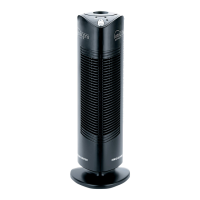
Do you have a question about the Envion Ionic Pro Compact CA200 and is the answer not in the manual?
Identifies and describes the key components of the Ionic Pro® Compact air purifier.
Instructions on how to properly position and plug in the air purifier before operation.
Explanation of the unit's buttons, indicator lights, and their functions.
Details on how to activate the air purifier and cycle through output settings (LO, HI).
Step-by-step guide to safely remove, clean, and re-insert the collection blades.
Instructions for cleaning the internal ionizing wires using the wire cleaning mechanism.
Guidance on performing a comprehensive clean of the unit's blades and wires.
Instructions for cleaning the exterior housing of the air purifier.
Information about ozone emissions and health considerations related to the air purifier.
 General
| Product Type | Air Cleaner |
|---|---|
| Model | CA200 |
| Technology | Ionic |
| Power Source | Electric |
| Voltage | 120V |
| Filter Type | None (Ionic technology) |
| Additional Features | No replacement filters needed, Silent operation |


 To Next Page