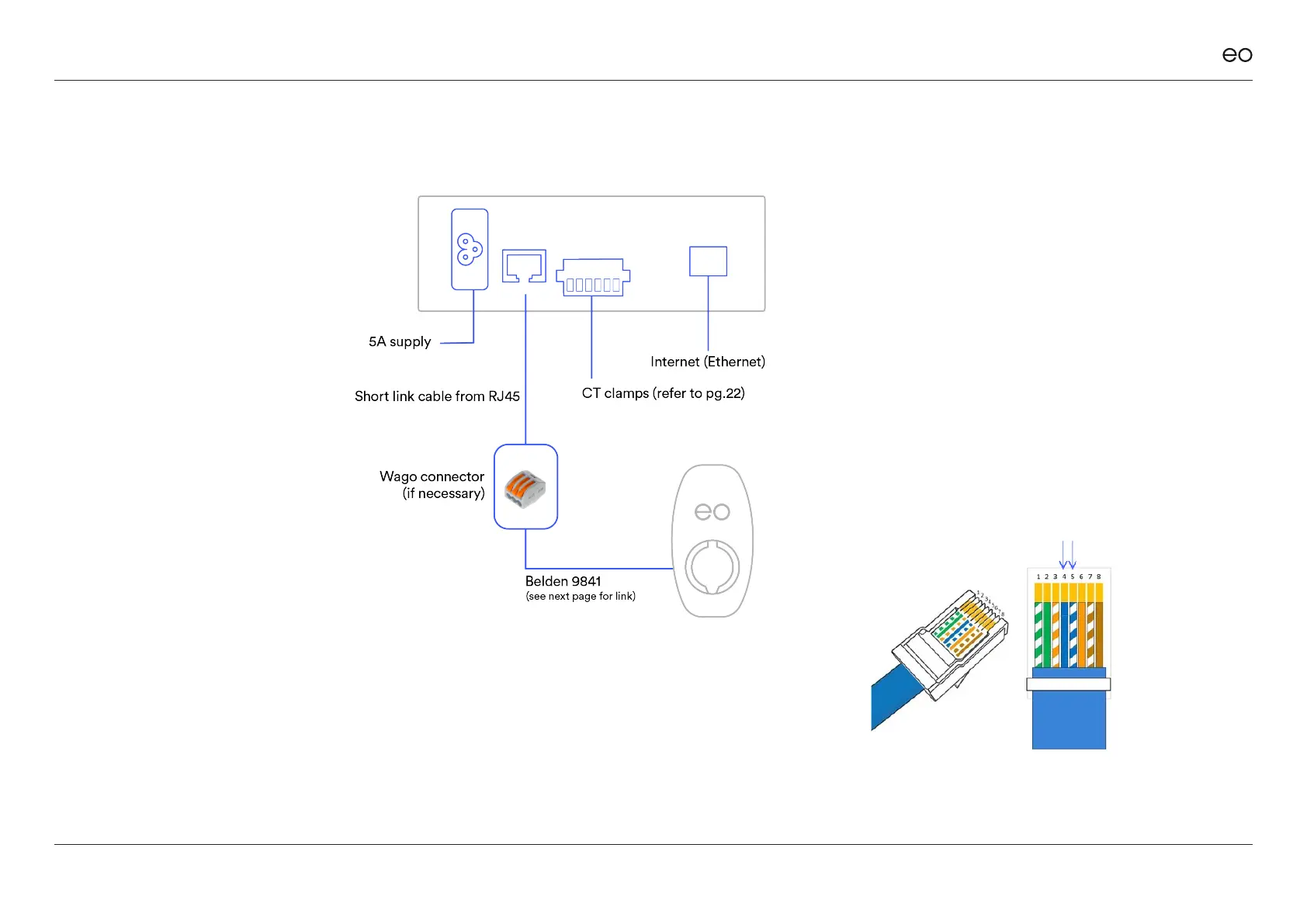
RJ45 Pinout [T-568A]
The wiring of the EO Hub RJ45 connector for
serial comms is as follows:
Pin 1 – Unused
Pin 2 – Unused but connected to GND
Pin 3 – Unused but connected to GND
Pin 4 – Comms A – Blue
Pin 5 – Comms B – White with blue stripe
Pin 6 – Unused but connected to GND
Pin 7 – Unused but connected to GND
Pin 8 – Unused but connected to GND
RJ45 plug and wiring –
Pins 4 & 5 to be selected only
(snip o other wires)
Figure 3
Use the short link, provided, to
make the initial connection from
the EO Hub to serial line RS485.
If not using the link provided we
recommend the use of a Wago
style connector for this purpose.
We recommend you us ethe
Belden 9841 as the serial line.
DO NOT use CAT 5 or 6 cable
as serial line type or you will nd
issues with data transfer.
DO t ferrules to ends of serial
wires if when using Wago
connectors.
Connecting the
Serial cable to the
RJ45 connector on
the hub.
EO Genius & EO Hub Installation Guide
© EO Charging 2021 12
3.0
3.02
Figure 2



 To Next Page