EO Mini Pro 2 User Manual
© EO Charging 2020 8
When a vehicle is connected
to the EO Mini Pro 2 then it is
possible to pause and resume
the charging session by pressing
the pause and play buttons. The
pause action or play action shall
operate until the next schedule
boundary. For example if a
scheduled charging window is
set from 16:00 to 17:00 and the
play button is pressed at 15:45
then the vehicle will charge
from 15:45 to 17:00. If the pause/
play button is pressed inside
a charging window, then the
vehicle will stop charging and
then resume charging at the
previous rate (e.g. full rate or at
solar rate).
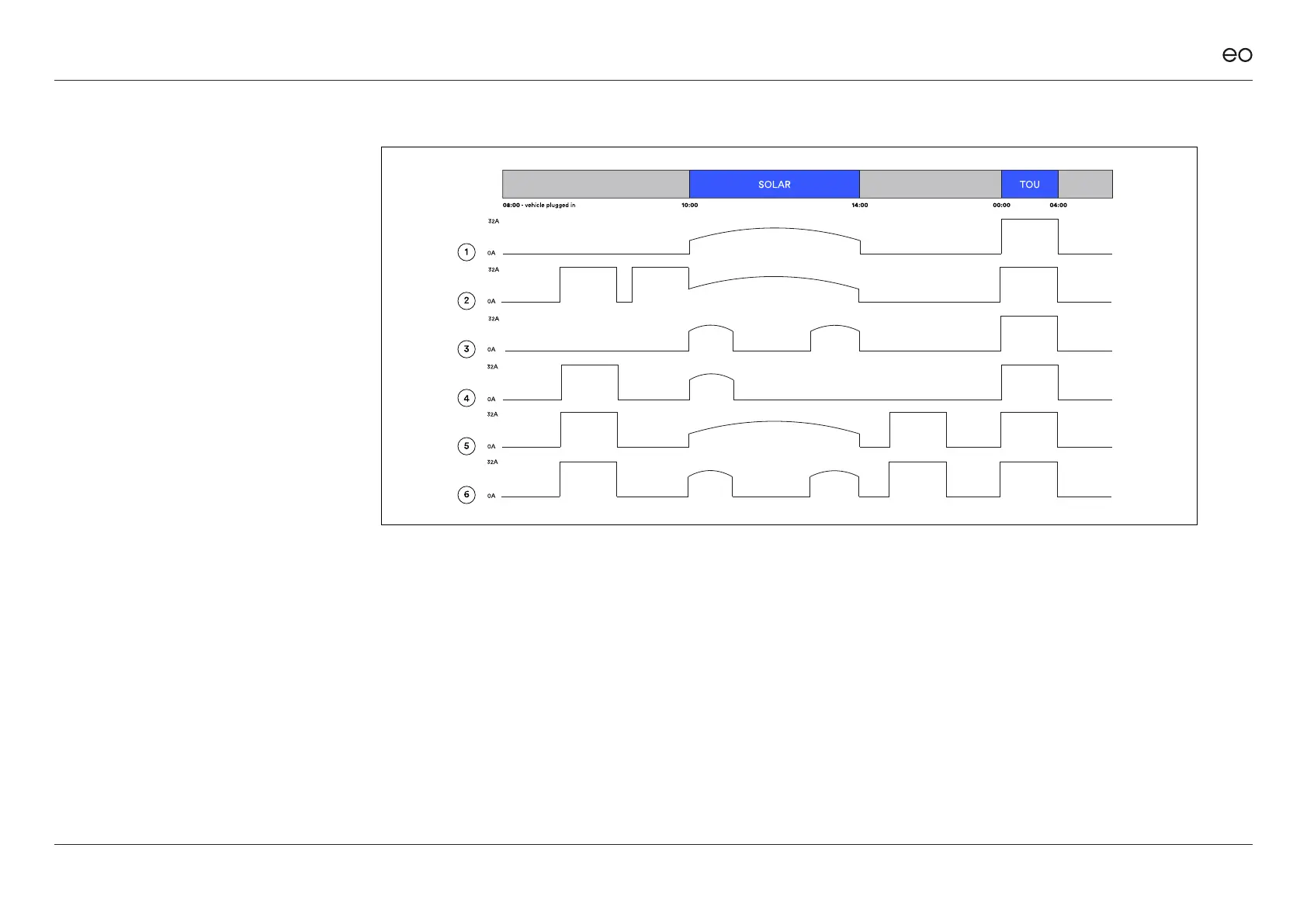
The pause & play functionality is
detailed opposite.
3.5
Pause/Play.
Solar Charging Window set to 10:00 – 14:00 and TOU from 00:00 to 04:00
1. Vehicle charges during Solar Charging Window (10:00 – 14:00) and TOU window (00:00 to 04:00)
2. Play” and “Pause” pressed before solar window. “Play” pressed before Solar Charging Window – vehicle charges at 32A until solar window,
then drops to solar rate. Stops at end of Solar. Charges during TOU.
3. “Pause” & then “Play” pressed inside the Solar Charging Window –vehicle charges at solar rate until end of solar session. Then charges at TOU.
4. “Play” and “Pause” pressed before solar window. “Pause” pressed inside solar window. Vehicle starts to charge again in TOU window“Play” and
“Pause” pressed before solar window. Car charges during solar window on solar rate. “Pause” and “Play” pressed inside solar window. “Play”
and ”Pause” pressed after solar window. Vehicle charges during TOU.
5. “Play” and “Pause” pressed before solar window. Car charges during solar window on solar rate. “Play” and “Pause” pressed after solar window.
Vehicle charges during TOU.
6. “Play” and “Pause” pressed before solar window. Car charges during solar window on solar rate. “Pause” and “Play” pressed inside solar window.
“Play” and “Pause” pressed after solar window. Vehicle charges during TOU.



 To Next Page