P
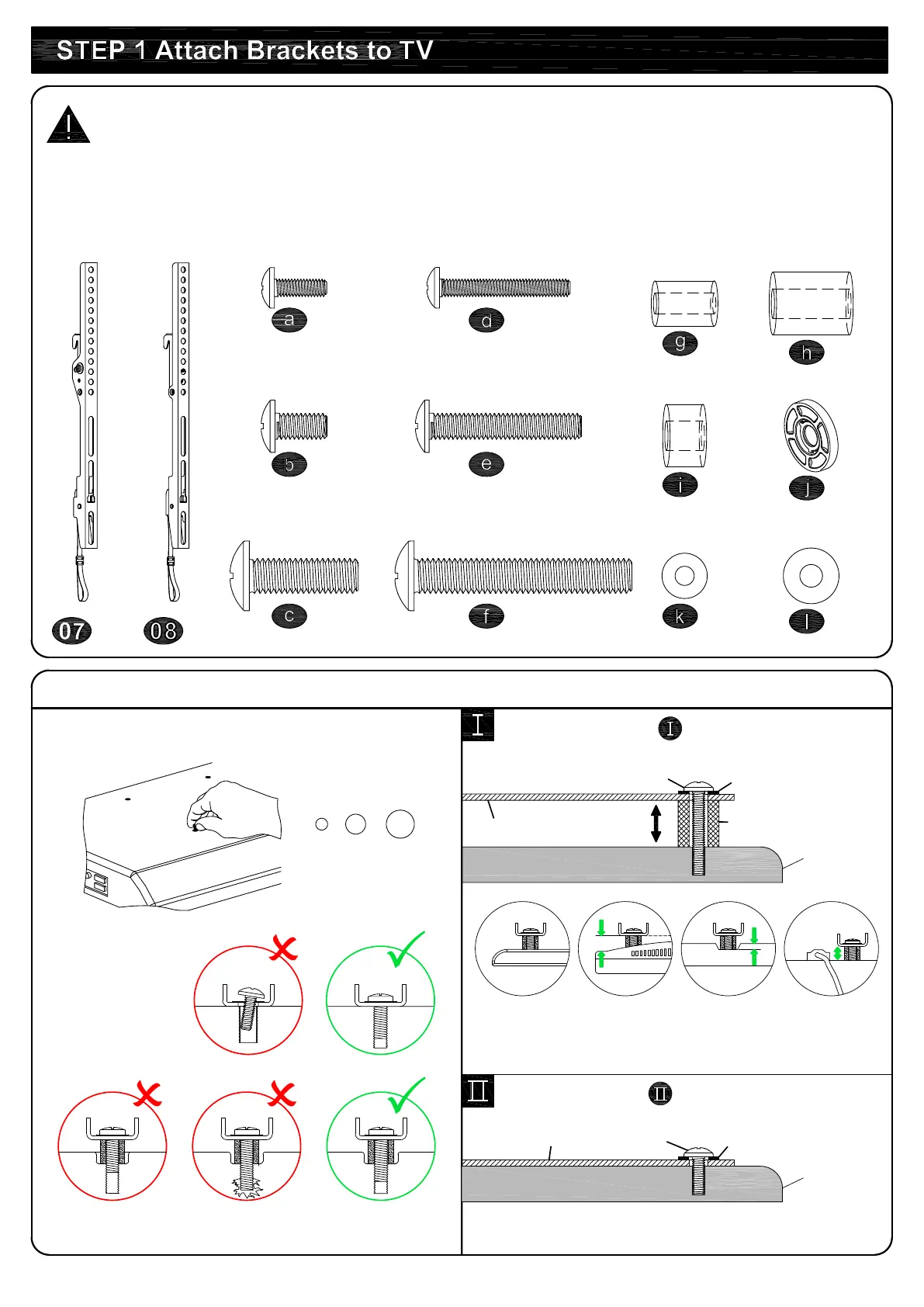
arts and Hardware
WARNING:
This product contains small items that could be a choking hazard if
swallowed. Before starting assembly, verify all parts are included and undamaged. For parts
shortage or damage, please contact customer service.
NOTE: Not all hardware included will be used.
TV Br
ackets
x1
M
8
M6
M4
1-1 Sele
ct TV Screws
TV bac
k
Bracket
Long
Screw
Spacer
Y
es, go to PAGE 3 for detailed combination.
1-2 Need
Spacer?
Washe
r
x1
H
ighly recommended to add spacers for more
spacing between wall mount and wall.
M
4x12mm
M
6x12mm
M
8x25mm
M
4x30mm
M6x35mm
M8x45mm
M
6x17mm
M8x22mm
M
4
M6
10mm
2.
5mm
W
ashers
Spacers
TV Screws
x4 x4
x4 x4
x4 x4
x
4
x4
x4
x4
x
8
x4
Bracket
Washer
N
o, go to PAGE 3 for detailed combination.
TV bac
k
Short Scre
w


 To Next Page