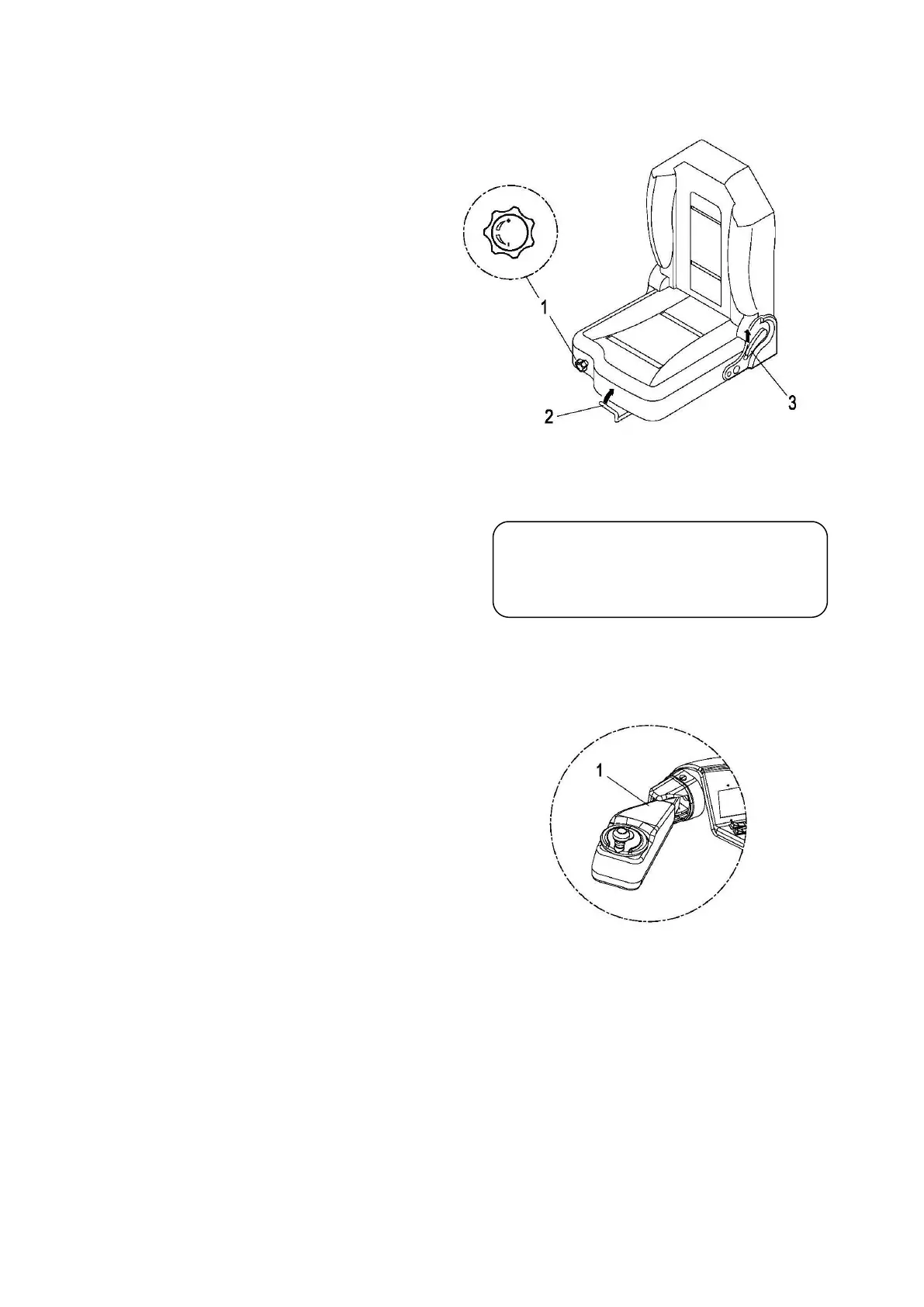
1. Adjusting the driver's weight
Rotary switch (1) as far as it will go in
• Clockwise rotation for setting the seat
• Counterclockwise rotation for setting
the seat to a lower weight.
2. Adjusting the seat position
• Pull up the locking lever (2) of the
driver’s seat lock in the direction of the
arrow and push the seat forwards or
backwards to the desired position.
• Engage locking lever 2) in position again.
3. Adjusting the backrest
• Lift up the locking lever (3) and adjust the
• Release locking lever (3) to lock the
3.3.3 Adjusting the steering wheel
• Adjust the control pane (1) vertically and
horizontally to the required position.
3.3.4 To prepare the truck for operation
• Insert the key in the key switch and turn it to the “ON” position .
• Pull up the emergency brake switch .
• Test horn.
• Check the operation of the brake.
Warning!
The seat setting must not be changed
during travel.


 To Next Page