epoc Host
2
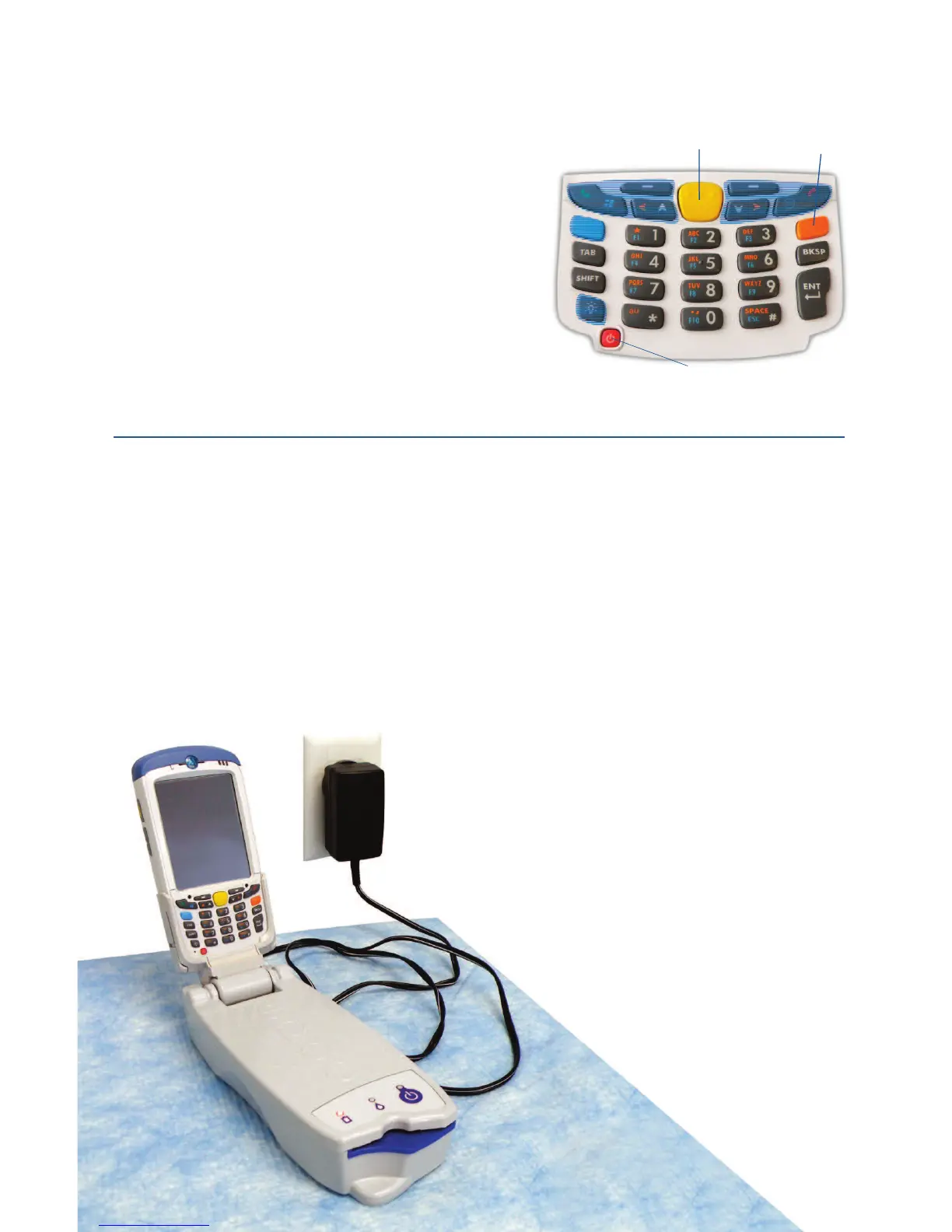
Numeric Keypad
Power
Scan
Toggle Key
•
Power button turns device on and off. Holding the
Power button for 5 seconds will reset the device.
• Scan key (and Scan Buttons on sides of Host)
activates the barcode scanner.
•
Alphanumeric keys default to numeric values.
Pressing the Toggle Key
allows entry of alpha
characters.
(Key is illuminated and orange symbol
appears on display when active).
Pressing the Toggle
Key again returns key functions to numeric values.
•
Tab & Enter keys navigate to the next editable eld.
•
Backspace key (BKSP) deletes entered characters.
Prior to use . . .
Step 1: Charge the
epoc Host
2
Before using the
epoc Host
2
, charge its battery as follows:
1.
Connect the
epoc
Reader power supply to the power jack on the back of the Reader.
2. Insert the
epoc Host
2
into the
epoc
Reader’s pivot slot as shown. The initial charge
will take approximately eight hours.
Note: Shaded keys are not active
• A blinking Amber battery LED shows
that the
epoc Host
2
is charging.
• A solid Amber battery LED shows that
the
epoc Host
2
is fully charged.
2


 To Next Page