
 Need help?
Do you have a question about the EPOS H3 Hybrid and is the answer not in the manual?
Lists all items included in the headset box for initial setup.
Instructions on how to power the headset on and off for use.
Steps to connect the headset to a computer using a USB cable for charging.
Overview of various connection methods, including Bluetooth and cable options.
Guide for connecting the headset to gaming consoles using wired or wireless methods.
Instructions on how to properly adjust and wear the headset for comfort and optimal performance.
Information on using software to improve audio quality and tailor sound settings.
How to manage audio from two connected devices simultaneously for mixed sound.
Instructions for controlling the audio volume for single or multiple device connections.
Guide to utilizing the Smart button for various functions like call management and sound modes.
Steps to quickly mute or unmute the microphone during calls or gaming.
Procedures for cleaning the headset and replacing ear pads to ensure longevity.
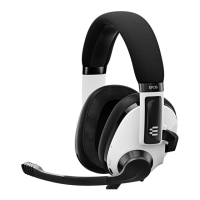
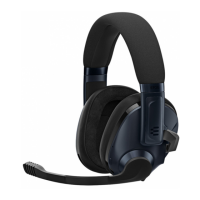
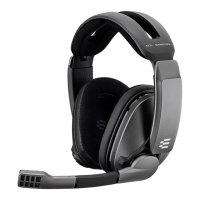
The EPOS H3 Hybrid is a Bluetooth® gaming headset designed for versatile audio experiences across multiple platforms. This quick guide provides essential information on its setup, usage, and maintenance.
The H3 Hybrid is a multi-purpose headset that offers both wired and wireless connectivity, making it suitable for a wide range of gaming and communication needs. It supports Bluetooth® for wireless connection to mobile devices and PCs, and also includes a console cable for wired connection to gaming consoles. The headset features a built-in microphone for clear communication, which can be muted by simply flipping it up. It also includes a smart button that can be customized via the EPOS Gaming Suite to control various functions like surround sound or preset switching. The headset's hybrid nature allows for mixing audio from two connected devices simultaneously, providing flexibility for gamers who want to listen to game audio and communicate on a separate device.
The package includes the EPOS H3 Hybrid headset, a USB cable for PC connection and charging, and a console cable for wired connections.
To switch the headset on, press and hold the power button for 2 seconds. The LED indicator will flash 3 times to confirm it's on. To switch it off, press and hold the power button for 3 seconds, and the LED will flash 3 times before turning off.
The headset can be connected to a PC using the provided USB cable. This connection allows for both audio transmission and charging of the internal battery. When charging, the LED indicator will show the charging status. A solid red light indicates low battery, orange indicates medium battery, and green indicates high battery. A flashing green light indicates a full charge.
The H3 Hybrid offers three main connection types:
The headset features an adjustable headband and earcups to ensure a comfortable fit. Extend or retract the headband until the earcups sit comfortably over your ears. The earcups can also pivot to conform to the shape of your head.
The volume can be adjusted using the volume wheel located on the earcup. Turn the wheel up to increase volume and down to decrease it. The volume control works for both single and dual device connections.
The H3 Hybrid allows you to mix audio from two devices simultaneously. For example, you can have game audio from a console (primary) and communication audio from a smartphone via Bluetooth® (secondary). This feature is ideal for multi-tasking gamers.
The headset is designed to be portable. When not in use, the microphone can be detached or flipped up to mute, making it more compact for travel.
The smart button on the headset can be customized via the EPOS Gaming Suite. By default, it may control functions like answering calls or switching audio presets. For example, a single press might answer a call, while a double press might reject it. A long press can activate voice assistant or switch between different sound modes (e.g., surround sound).
To mute the microphone, simply flip it up. An audible "click" confirms that the microphone has been muted. To unmute, flip it back down.
For a more personalized audio experience, download the EPOS Gaming Suite from www.eposaudio.com/gaming/downloads. The suite allows you to:
To maintain the headset's condition, regularly clean it with a soft, dry cloth. Avoid using harsh chemicals or abrasive materials.
The ear pads are replaceable, ensuring hygiene and extending the life of the headset. To replace them, gently pull off the old ear pads. Align the new ear pads with the grooves on the earcups and press them firmly into place until they click.
For further assistance, FAQs, and support, visit www.eposaudio.com/gaming/support. The quick guide also provides contact information for DSEA A/S in Denmark and publication details.
 General
| Impedance | 28 Ohms |
|---|---|
| Battery Life | Up to 37 hours |
| Wearing Style | Over-ear |
| Ear Coupling | Around-ear |
| Cable Length | 1.5 m USB cable, 1.5 m console cable |
| Noise Cancellation | Passive noise cancellation |
| Connection Type | Wired, Bluetooth |
| Frequency Response (Headphones) | 20 Hz - 20, 000 Hz |
| Frequency Response (Microphone) | 100 Hz - 10 kHz |
| THD | < 0.5% |
| Microphone Sensitivity | -20 dBFS/Pa |




 To Next Page
