5
Emptying Dust Bin
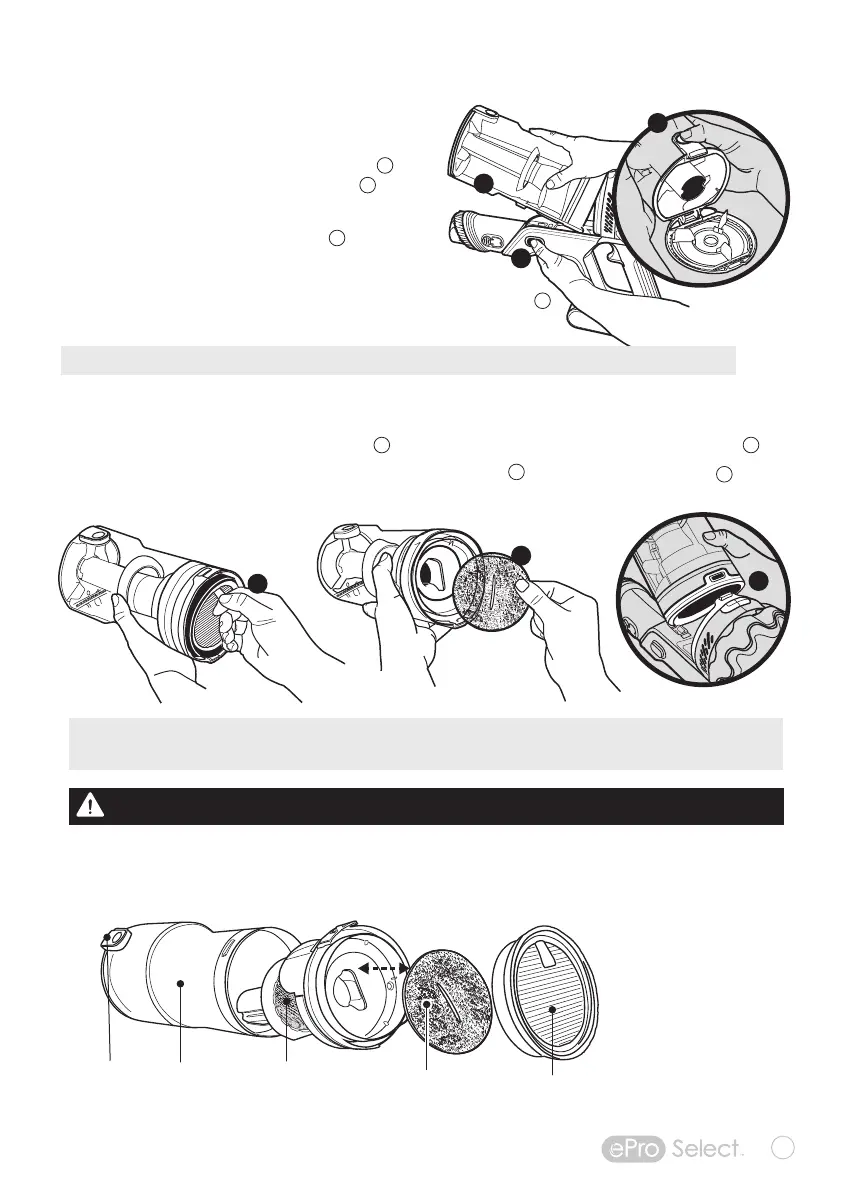
Press DUST BIN ASSEMBLY RELEASE button
and remove Dust Bin from Motor housing .
Hold the hand vacuum over a trash container.
Then, press the BIN RELEASE button to open bin.
Carefully empty contents into a trash container.
(If necessary, clean Multi-Stage Filter Assembly).
To re-install dust bin on motor housing, align Dust Bin ASSEMBLY TAB
and press down towards handle until you hear a “Click” to secure Dust Bin.
CLEANING AND MAINTENANCE
Multi-StageFiltration
The ePro Select Cordless Vacuum comes with a Multi-Stage filtration system that sorts and isolates
larger particles from fine dust, dirt, and sand.
Cleaning the Dust Bin Filter Assembly
Dust Bin
Release
Button
Sealed Dust Bin
traps up to 90%
of dust and debris
Press DUST BIN ASSEMBLY RELEASE button and remove DUST BIN ASSEMBLY from Motor housing .
Remove the HEPA filter from the filter assembly by pulling the TAB . Then remove the foam filter
(Clean the HEPA filter, foam filter and assembly by rinsing with water—no soap or detergent).
High-efficiency MIF Filter absorbs
0.3-micron particles and reduces allergens
Foam
Filter
Metal mesh
filter traps
smaller particles
u
v
w
x
u
v
B
B
A
A
C
F
D
E
D
A
WARNING:
DO NOT OPERATE VACUUM CLEANER WITH DAMP OR WET FILTERS OR WITHOUT FILTER IN PLACE.
NOTE: If suction power seems to diminish, it may be time to empty the dust bin or clean or replace the HEPA lter.
IMPORTANT: Make sure Multi-Stage Filter Assembly has the foam lter in place and HEPA lter is inserted securely before
re-attaching assembly to motor housing.
B
C
E
F


 To Next Page