25
Solomon
short.bk Rev. C
A5 size KAUD.FM
10/30/98 Pass 3
R
Proof Sign-off:
Y.Yano _______
N.Nomoto _______
K.Norum _______
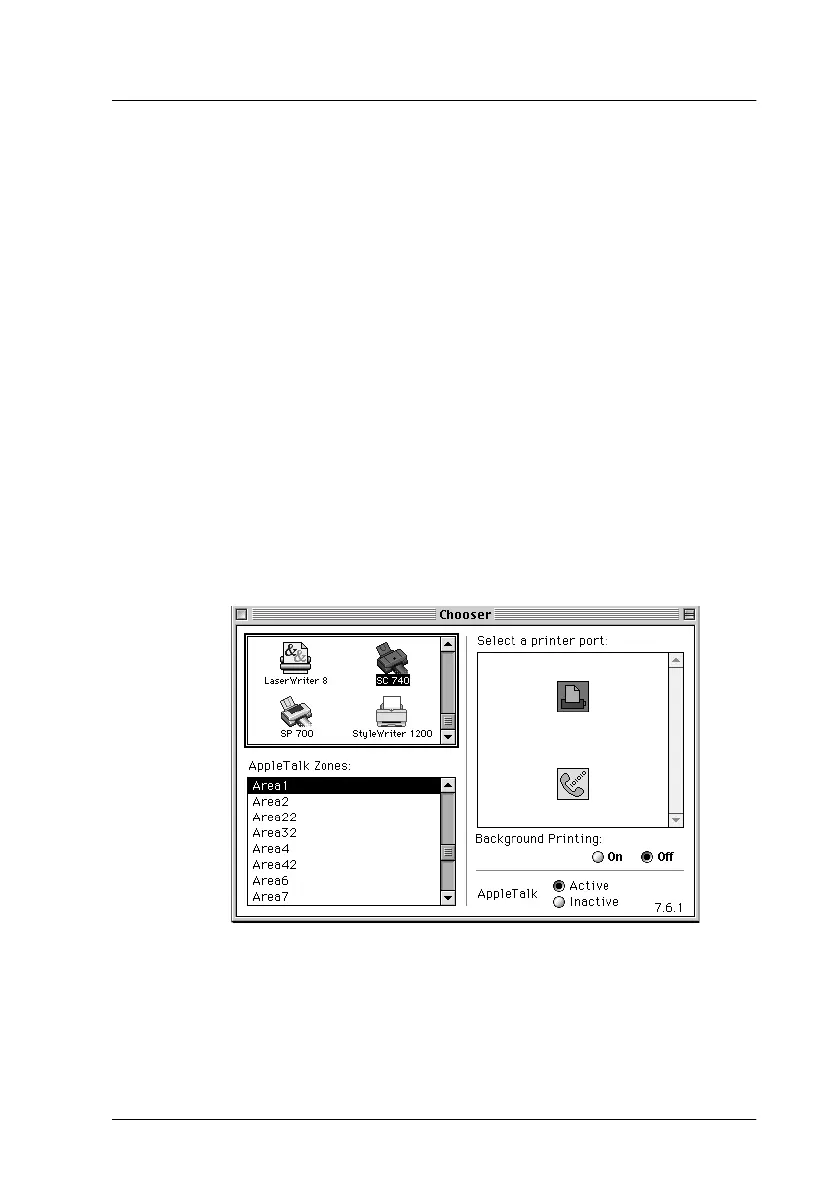
Selecting Your Printer in the Chooser
After you install the printer software, you need to open the
Chooser to select your printer. You have to choose the printer the
first time you use it or whenever you want to switch to another
printer. Your Macintosh will always print using the last printer
selected.
Note:
If you are using a Macintosh Quadra 950 or 900, you need to choose
Compatible
in the Serial Switch dialog box before selecting your
printer from the Chooser. To open the Serial Switch dialog box, choose
Control Panel
from the Apple menu, then choose
Serial Switch
.
1. Make sure the printer is connected to your Macintosh and is
turned on.
2. Choose
Chooser
from the Apple menu. Then click your
printer's icon and the port your printer is connected to.
Note:
If you are using an AppleTalk network, an alert message may appear
when you click the port. In this case, reselect the other port, or make
AppleTalk setting
Inactive
then select the port again.



 To Next Page