37
Solomon
short.bk Rev. C
A5 size KAUS.FM
10/30/98 Pass 3
R
Proof Sign-off:
Y.Yano _______
N.Nomoto _______
K.Norum _______
Maintenance
Checking the Print Head Nozzles
If you find that the printed image is unexpectedly faint or dots in
the printed image are missing, you may be able to solve these
problems by checking the print head nozzles.
You can check the print head nozzles from your computer with
the Nozzle Check utility in the printer software, or from the
printer itself by using the printer’s control panel buttons.
Note:
Do not start the Nozzle Check utility while printing is in progress;
otherwise your printout may be marred.
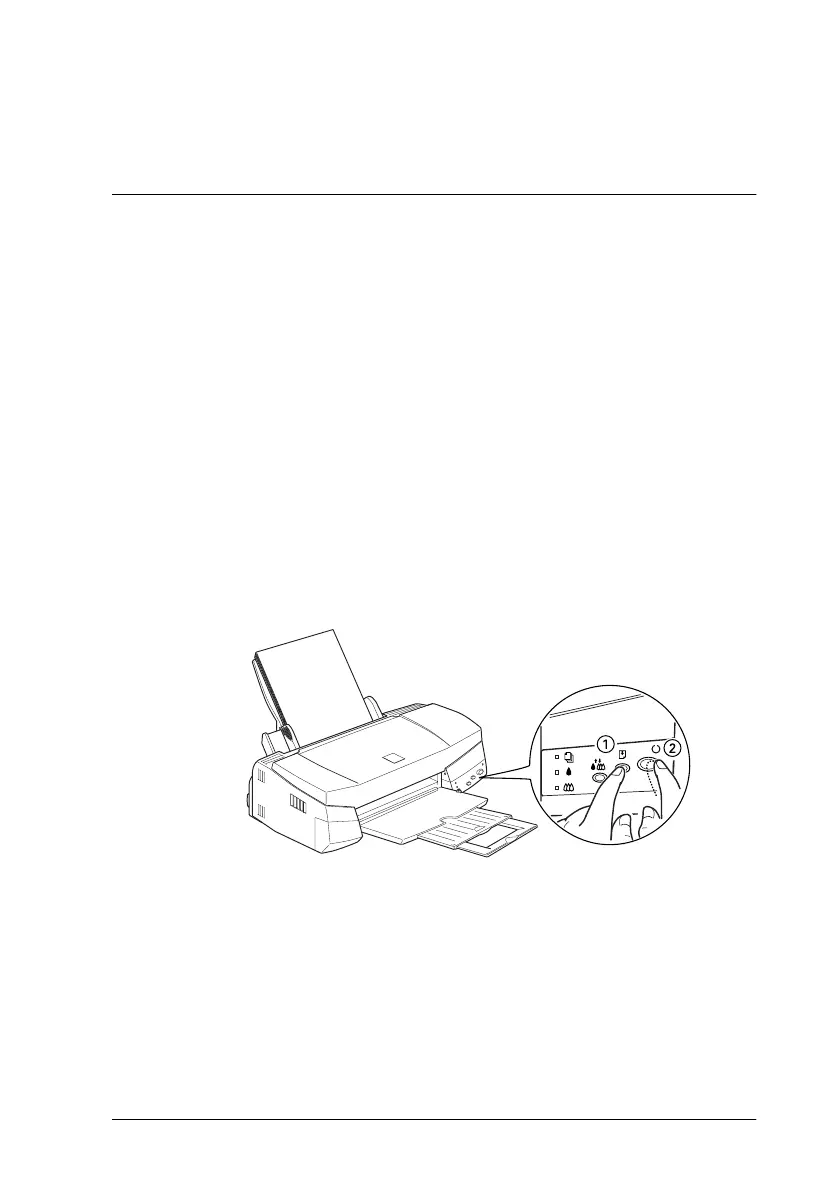
1. Hold down the
E
load/eject button and press the
P
power
button to turn on the printer. Then release both buttons.



 To Next Page